

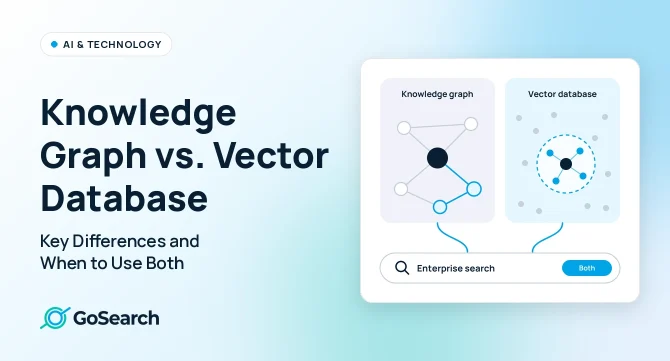

A knowledge graph stores information as entities and the relationships between them, so it answers questions about how things connect. A vector database stores information as embeddings, numeric representations of meaning, so it finds content that is semantically similar to a query. Knowledge graphs favor precision and explainability; vector databases favor flexible matching across unstructured text. Many enterprise search systems combine both in a hybrid retrieval approach.
That difference matters when you evaluate AI enterprise search or build a context layer for AI agents. Your choice of knowledge model decides which questions the system answers well, how much upkeep it needs, and how well it explains its answers. This guide compares both approaches, applies them to real enterprise questions, and helps you choose between graph, vector, and hybrid retrieval.
How a Knowledge Graph Works
A knowledge graph models information as a network of entities (nodes) connected by relationships (edges). An entity can be a person, a project, a customer account, a document, or a product. A relationship describes how two entities connect: “Priya owns Project Atlas,” “Project Atlas depends on the billing API,” “the billing API is documented in this Confluence page.”
Most knowledge graphs also carry a schema or ontology, a defined set of entity types and relationship types. The schema tells the system that a person can own a project but a document cannot report to a manager. That structure is what lets a graph answer precise questions.
How it retrieves results: A knowledge graph finds answers by following connections. It starts at one entity and moves along its relationships to related ones. A question like “Who owns the services that depend on the billing API?” becomes a path: billing API → services that depend on it → owners of those services. Each step follows an explicit, recorded relationship, so the system can show exactly how it reached the answer.
How data gets in: Teams build knowledge graphs from structured sources (HR systems, CRMs, ticketing tools, code repositories) and from entity extraction on unstructured text. Extraction identifies the names, projects, and terms in a document and links them to existing entities. Both steps need ongoing rules and review to keep the graph accurate.
Knowledge Graph vs. Graph Database
The two terms often get used interchangeably, but they describe different layers:
- A graph database is storage and query infrastructure. Neo4j, Amazon Neptune, and similar systems store nodes and edges and run graph queries against them.
- A knowledge graph is the modeled content: the entities, relationships, and schema that represent a specific domain, such as your company’s people, projects, and documents.
You can store a knowledge graph in a graph database, but you can also store one in a relational database or a set of indexed tables. A graph database without a curated model is just an empty structure. When you evaluate a vendor, ask about the knowledge model, not only the storage engine.
How a Vector Database Works
A vector database stores embeddings: lists of numbers that an embedding model generates to represent the meaning of a piece of content. Text with similar meaning produces embeddings that sit close together in that numeric space. “How do I request time off?” and “PTO approval process” share almost no words, but their embeddings land near each other.
How data gets in: The system splits documents into chunks (a paragraph, a section, a slide), runs each chunk through an embedding model, and stores the resulting vector alongside metadata such as source app, author, date, and access permissions.
How it retrieves results: At query time, the system embeds the question with the same model and searches for the stored vectors closest to it. Most vector databases use approximate nearest neighbor (ANN) indexes to run that search quickly across large collections. The result is a ranked list of chunks by semantic similarity, which a search interface displays or a large language model uses as context in retrieval-augmented generation (RAG).
What it does not store: A vector database records that two pieces of content are similar, not why they relate. It has no built-in concept that one chunk describes a person and another describes the project that person owns. Relationships exist only to the extent that the embedding model captured them in the text.
Vector search is a form of semantic search, but not the only one. Keyword search (such as BM25 ranking) still matters for exact terms like ticket IDs, product SKUs, and error codes, which embeddings can blur.
Knowledge Graph vs. Vector Database: Side-by-Side Comparison
Knowledge graphs return precise, traceable answers about how things connect. Vector databases offer flexible matching across unstructured content.
| Dimension | Knowledge Graph | Vector Database |
|---|---|---|
| Data representation | Entities and typed relationships, governed by a schema | Embeddings of content chunks, plus metadata |
| Retrieval method | Traversal and structured queries along relationships | Nearest neighbor search by semantic similarity |
| Strengths | Multi-hop questions, precise facts, clear lineage | Natural language queries, synonyms, paraphrases, unstructured text |
| Limitations | Misses meaning that isn’t modeled; struggles with vague or novel phrasing | Weak at explicit relationships and multi-step reasoning; can return similar but wrong content |
| Relationship queries | Strong: the graph stores each relationship directly, so it can query them | Limited: it stores no links between items, only what the text itself says about them |
| Semantic matching | Limited without added text search or embeddings | Strong: matches by meaning, not exact words |
| Explainability | High: you can see exactly which connections led to each answer | Lower: it shows that a result is close in meaning to the query, but not why it ranked above others |
| Setup effort | High: define the data model, pull people, projects, and terms out of documents, and merge duplicates into one entity | Lower: split documents into passages, convert each to an embedding, and store them |
| Maintenance | Ongoing curation as people, projects, and systems change | Re-embedding when content changes or when you switch embedding models |
| Best for answering | Questions about reporting lines, ownership, system dependencies, and audit trails | Questions about policies, processes, documentation, and other written content |
Knowledge Graph vs. Vector Database in Practice: 5 Enterprise Questions
Enterprise knowledge sits across dozens of apps, including Slack, Google Drive, Confluence, Jira, Salesforce, and your HRIS. These five common questions show which retrieval approach fits each one.
What’s Our Policy on Expensing Client Dinners?
Best fit: vector search. The answer lives in a policy doc or a wiki page, and employees phrase the question in many ways (“meal reimbursement,” “client entertainment limits”). Semantic matching finds the right passage without an exact keyword match.
Who on the Platform Team Has Worked on the Salesforce Integration?
Best fit: knowledge graph. The answer requires linking people to a team, the team to projects, and projects to a system. Those are explicit relationships pulled from the HRIS, Jira, and GitHub. Vector search might surface documents that mention the integration, but it can’t reliably tell you who did the work.
Which Open Jira Tickets Are Blocking the Q1 Launch, and Who Owns Them?
Best fit: both. A graph handles the structure (ticket → blocks → launch, ticket → assignee). If the tickets use inconsistent labels, vector search helps identify which tickets relate to the launch in the first place.
What Did Customers Say About Onboarding in Last Month’s Support Tickets?
Best fit: vector search. The question is about themes across unstructured text, not explicit links. Metadata filters (source: support desk, date: last 30 days) narrow the set before semantic ranking.
What Did We Decide About the Pricing Change, and Which Accounts Does It Affect?
Best fit: both. Vector search finds the meeting notes and Slack threads where the team discussed the decision. A graph connects the pricing plan to the customer accounts on it.
Hybrid Retrieval: Using a Knowledge Graph and Vector Database Together
Hybrid retrieval runs more than one retrieval method and merges the results, so each method covers the other’s blind spots. In enterprise search, “hybrid” usually means one of three combinations:
- Keyword plus vector search: Combines exact term matching with semantic matching, then merges the ranked lists. This is the most common meaning of hybrid search.
- Graph plus vector retrieval: Uses vector search to find relevant content, then uses graph relationships to expand or filter it (often called GraphRAG). It can also run the other way: the graph identifies the right entities, and vector search finds the passages about them.
- Indexed plus real-time retrieval: Searches a pre-built index for speed and queries source apps live for the freshest or most sensitive data.
A typical graph-plus-vector flow for a single question looks like this:
- The system parses the query and identifies any named entities (a person, a project, an account).
- Vector and keyword search retrieve candidate passages by meaning and exact terms.
- The graph expands the candidates through related entities, such as the project’s owner or linked tickets.
- A ranking step merges and reorders the results, filtering out anything the user can’t access.
- A language model generates an answer grounded in the top results, with citations to the sources.
The tradeoff is complexity. Hybrid systems have more components to tune, more pipelines to keep in sync, and more places where permissions must hold. For many organizations, that complexity is the strongest argument for buying hybrid retrieval rather than building it.
Knowledge Graph, Vector Database, or Both? How to Decide
Start with the questions your teams ask, not the technology. These four factors point to the right retrieval approach.
| Decision factor | Lean knowledge graph | Lean vector database | Lean hybrid |
|---|---|---|---|
| Multi-hop questions | Questions follow chains: person → team → project → system | Questions need one relevant passage | Users ask both kinds of question |
| Ambiguous language | Terms are standardized and well defined | Users paraphrase, use synonyms, or don’t know the right term | Precise entities plus loose phrasing in the same query |
| Changing documents | Core entities change slowly (org structure, systems) | Content changes often and needs fast re-indexing | Stable entities with fast-changing content around them |
| Permissions | Access rules map cleanly to entities and relationships | Access is enforced per document or chunk through metadata filters | Both layers need to respect the same source-system permissions |
If most questions are about content and your team has little time to model data, start with vector and keyword search. If most questions center on relationships, plan for a knowledge graph. If you see both, evaluate hybrid retrieval.
What This Means for Enterprise Search Evaluation
Most buyers won’t choose between a knowledge graph and a vector database directly. They’ll choose an enterprise search platform and inherit its retrieval design. So instead of asking a vendor “graph or vector?”, ask how the platform performs on the questions your teams ask, and how it handles three things that matter as much as the retrieval method:
- Multi-source coverage: Does it connect to every app where your knowledge lives, and does it retrieve across them in a single query?
- Freshness: How quickly do edits, new documents, and permission changes show up in results?
- Permission-aware access: Does every result, and every AI-generated answer, respect the permissions in the source system for the person asking?
Run a proof of concept with real questions from each department, including relationship questions and loosely worded ones. Track whether answers are correct, cited, current, and limited to what each tester is allowed to see.
Where GoSearch Fits
GoSearch takes a hybrid approach to retrieval across your company’s apps. It indexes shared company knowledge for fast retrieval and queries personal or sensitive data in real time through live connectors. Real-time connectors run on each user’s own credentials, so results reflect what that person can access in the source app. Shared connectors pick up edits and permission changes on existing content through partial re-indexing every five minutes.
On top of that retrieval layer, GoSearch uses retrieval-augmented generation to turn results into answers. Instead of returning a list of documents, it synthesizes a response from the most relevant sources across connected apps, including intranets, CRMs, and cloud storage. Employees get answers from unstructured content, such as IT troubleshooting steps or HR policies, without searching each platform separately.
The result is an enterprise search and AI agent layer that answers questions across Slack, Google Drive, Confluence, Jira, Salesforce, and more, with citations back to the source. For more on the trade-offs between indexed, federated, and MCP connectors, see our connector field guide.
Choosing the Right Retrieval Approach for Enterprise Search
Knowledge graphs and vector databases solve different retrieval problems. Graphs connect entities and explain how answers were reached. Vector databases match meaning across unstructured content. Enterprise questions often need both, which makes hybrid retrieval worth evaluating for enterprise search and AI agents.
When you evaluate a platform, look past the storage layer to outcomes: accurate answers across every app, up-to-date results, and permissions enforced for every user.
See hybrid retrieval in action. GoSearch searches across the apps your company already uses and returns cited answers that respect each employee’s permissions. Book a demo or start free today.
Search across all your apps for instant AI answers with GoSearch
Schedule a demo
Knowledge Graph vs. Vector Database: Frequently Asked Questions
What Is the Main Difference Between a Knowledge Graph and a Vector Database?
A knowledge graph stores entities and the explicit relationships between them, and retrieves by following those relationships. A vector database stores embeddings of content and retrieves by semantic similarity. Graphs answer “how is this connected?” well; vector databases answer “what content means something like this?” well.
Should You Use a Knowledge Graph, a Vector Database, or Both for RAG?
Vector retrieval is the more common starting point for RAG because it works directly on unstructured documents. Graph-based retrieval, often called GraphRAG, adds value when answers depend on relationships across many entities. Many RAG systems combine the two: vector search finds relevant passages, and the knowledge graph expands, filters, or explains them through related entities.
Is a Knowledge Graph the Same as a Graph Database?
No. A graph database is the storage and query engine. A knowledge graph is the modeled content, the entities, relationships, and schema for a domain, which you can store in a graph database or in other systems.
Which Is Easier to Maintain, and Does It Matter If You’re Buying Enterprise Search?
A vector database usually takes less upfront modeling, but it needs re-embedding as content changes or when you change embedding models. A knowledge graph requires schema design and ongoing curation as people, projects, and systems change. If you’re buying enterprise search rather than building it, maintenance falls to the vendor. Evaluate the platform’s results, coverage, freshness, and permission handling during a proof of concept instead.
Can a Vector Database Enforce Permissions?
Yes, but only as well as its metadata. Most vector databases filter results at query time using permission data stored with each chunk. That works only if the permission data stays in sync with the source apps. Ask how quickly a permission change in Google Drive or Slack shows up in results, and whether AI-generated answers follow the same rules as search results.