

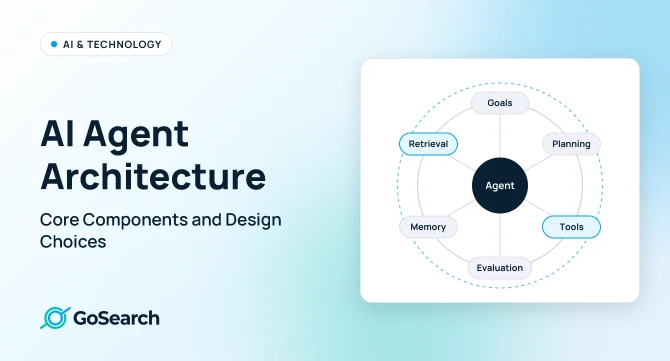

AI agent architecture consists of key components that help an AI system understand a goal, gather the right information, plan steps, take action using different tools, and remain secure throughout. There are eight main components: goals and instructions, inputs, retrieval, memory, planning, tools, orchestration, and evaluation.
Most guides just list these parts. But two teams can build agents with the same components and get very different results. One agent might answer questions reliably. Another might use outdated data, repeat failed steps, or access information it shouldn’t.
The difference comes down to design choices: which approach to use, what the agent is allowed to see and do, and how it handles mistakes safely. This guide explains each part in simple terms, then covers the most important decisions for IT leaders and technical teams.
Key Takeaways
- AI agent architecture has eight core components: goals and instructions, inputs, retrieval, memory, planning, tools, orchestration, and evaluation.
- Security is not a separate step. Identity, access checks, approval gates, and audit logs apply at every layer.
- Retrieval and memory do different jobs: retrieval answers “what is true now”; memory answers “what happened before.”
- Start with the simplest pattern that works: a workflow for stable processes, one agent for judgment, multiple agents only for parallel or specialized work.
- MCP gives agents a standard way to connect to tools, but least-privilege access and safe-to-repeat actions still matter.
- Agents don’t retrain themselves from feedback. People review logs and outcomes, then adjust instructions, tools, and rules.
- When evaluating platforms, prioritize context and permissions: stale data and overbroad access are the biggest risks at company scale.
What is AI Agent Architecture?
AI agent architecture is the blueprint that shows how an AI agent turns a request into completed work. It describes where the agent obtains its instructions and context, how it decides on next steps, which systems it can access, and how its results are reviewed.
The main difference between a chatbot or AI assistant and an agent is that an agent takes action. A chatbot just answers questions. An agent plans and completes steps, such as looking up a policy, filing a ticket, updating a record, or notifying a teammate.
This shift makes mistakes more serious. A wrong answer can be ignored, but a wrong action, such as granting access to the wrong person or changing a customer record, can cause real problems. Good architecture ensures actions are allowed, safe, and reversible if needed.
New to the basics? Start with What Is an AI Agent?
The AI Agent Reference Architecture
Here is how the eight components fit together in one loop. A request comes in, the agent reads its goal, pulls context from retrieval and memory, plans its steps, and acts through tools. Evaluation checks the outcome, and people use those results to improve the system. Orchestration manages the whole run, and security controls apply at every step.
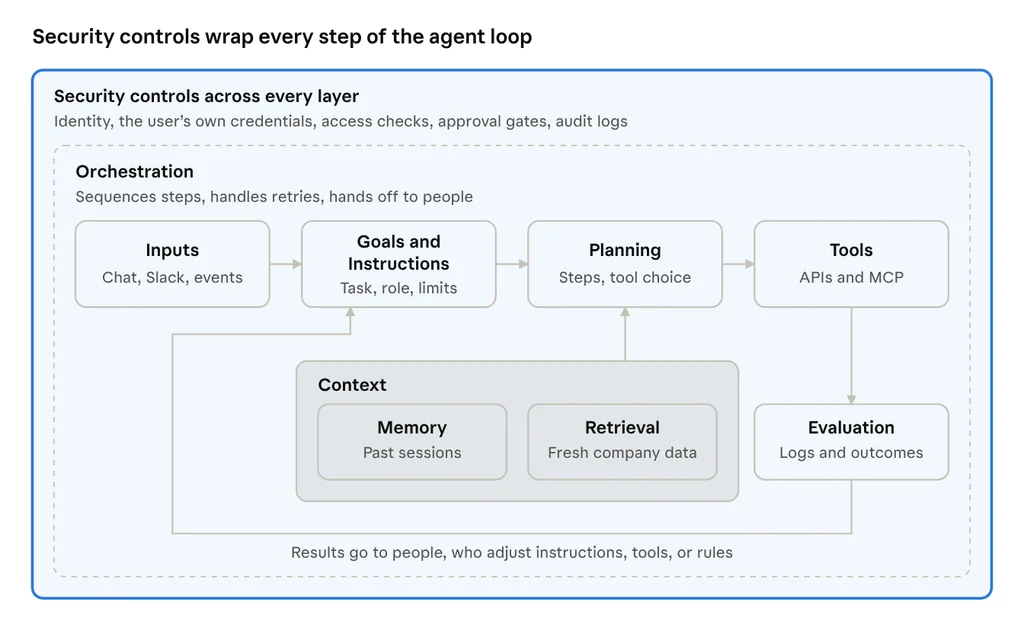
Note: This is just an example design, not GoSearch’s internal architecture.
The Core Components of AI Agent Architecture
Each component below gets a short definition and the one design decision that most affects how the agent behaves in production.
Goals and Instructions
Goals and instructions tell the agent what job it is doing, what role it plays, and what it must never do. They include the task itself, the tone and scope of responses, and the boundaries on data and actions. Every other component works toward the goal defined here.
Design decision: set stop conditions. Define a maximum number of steps, a retry limit for failed actions, and a time cap. Also define when the agent must hand off to a person, such as when confidence is low, or a request falls outside its scope.
Inputs
Inputs are how requests and signals reach the agent. A person might type in a chat window or Slack. A system might fire a trigger, such as a new ticket or a form submission. A schedule might start a weekly report. Each input carries both a request and untrusted content.
Design decision: validate inputs and defend against prompt injection. Prompt injection is when hidden instructions in a document, email, or web page try to hijack the agent. It ranks first in the OWASP Top 10 for LLM Applications 2026. OWASP says prompting and filtering alone cannot reliably stop it, so treat retrieved content as data, never as commands, and enforce authorization outside the model.
Retrieval
Retrieval is how the agent fetches fresh knowledge from company systems for each request: policies, tickets, docs, CRM records, and conversations. It grounds the agent’s reasoning in what is true right now, rather than what the model learned during training. Google Cloud calls grounding the most foundational tool an agent has.
Design decision: prefer current, owned sources and return only what the requester can access. When two sources conflict, rank the newer, officially owned one higher and flag the conflict. Check permissions before content enters the agent’s context, not after. This is where enterprise search does the heavy lifting. For a deeper look, see The Enterprise Context Layer.
Memory
Memory is what the agent keeps between sessions. That can include a user’s preferences, past tasks, prior decisions, and the state of work in progress. Memory lets an agent pick up where it left off instead of starting from zero every time.
Retrieval vs. memory: Retrieved knowledge answers “what is true now.” Persistent memory answers “what happened before.”
Design decision: keep memory scoped and reviewable. Store only what improves future tasks, tie it to the user it belongs to, and let people see and delete it. Never let memory stand in for a fresh lookup of a policy or record that may have changed.
Planning
Planning is how the agent breaks a goal into steps and chooses which tools to use for each one. A simple question may need one lookup. A multi-step task, like onboarding a new hire, may need a dozen ordered actions across several systems.
Design decision: use a fast path for simple requests and step-by-step planning for complex ones. Routing every request through a full planning loop adds cost and latency. Reserve multi-step planning for tasks that require it, and recheck the plan after each step that yields unexpected results.
Tools
Tools let the agent read from and write to other systems, such as creating a ticket, updating a CRM field, or sending a message. Most tools connect through APIs. Increasingly, they connect via the Model Context Protocol (MCP), an open-source standard for integrating AI applications with external systems. Think of MCP as a universal adapter: build one connection, and any compatible agent can use it.
Design decision: grant least-privilege access and make actions safe to repeat. Give each tool only the permissions it needs for its task. Apply stricter checks, such as confirmation or approval, to actions that write or delete data. Design actions so a retry does not create a duplicate ticket or a second payment. For how connector types differ, see Indexed, Federated, or MCP? A Field Guide to Enterprise Search Connectors.
“MCP essentially makes that work reusable across contexts; it creates a consistent way to handle permissions, manage prompts, and orchestrate workflows.”
— Tanvi Motwani, Director of AI, in AI Innovators
Orchestration
Orchestration sequences the steps, handles retries and timeouts, and passes work between agents or people. It is the control layer that decides what runs next, what happens when a step fails, and when a human needs to step in.
Design decision: default to one agent. Add more agents only when a task truly requires parallel or specialized work, such as researching multiple sources simultaneously. Every extra agent adds handoffs, and every handoff is a place where context can be lost or errors can spread.
Evaluation
Evaluation logs each step the agent takes and checks whether the outcome matches the goal. Did it retrieve the right policy? Did the action succeed? Did the user get what they asked for? These records show where an agent is reliable and where it needs work.
Design decision: route results to people who own improvements. Agents do not retrain themselves from feedback. Evaluation results go to the team that adjusts instructions, tools, retrieval sources, or rules. Track outcome metrics, such as task success rate and handoff rate, not just response quality.
“It’s okay for AI to be wrong. The problem is when you can’t determine where it’s wrong.”
— Rohit Chikballapur, Board Member, 2x Founder, in AI Innovators
Security Controls Across Every Layer
Security is not a ninth box at the end of the pipeline. It is a set of controls applied at every layer, because a failure anywhere can expose data or trigger an unwanted action.
- Identity: every agent run is tied to a known user or a named service identity.
- Acting on the user’s own credentials: the agent sees and can do only what that person can see and do.
- Access checks at retrieval and at action: permissions are checked before content enters context and again before any write.
- Approval gates: high-impact or hard-to-reverse actions require a person’s approval.
- Audit logs: every retrieval, decision, and action is recorded for review.
“I’m not asking, ‘Is AI safe?’ I’m asking what authority we’re giving it and what happens when it gets something wrong.”
— Emre Ugurlu, Head of Security GRC at Plaid, in AI Innovators
The stakes are rising. In OWASP’s 2026 list, excessive agency, meaning an agent with more functionality, permissions, or autonomy than its task needs, rose from sixth to third. For information on assigning owners and policies, see “Who Owns That Agent?” Practical AI Agent Governance.
Workflows, Single Agents, or Multiple Agents: How to Choose
The most important architecture decision is not which model to use. It is how much freedom to give the system. There are three common patterns, and each trades control for flexibility.
| How It Works | Fixed steps run in a set order; AI may handle individual steps, such as summarizing or classifying | One agent plans, calls tools, and checks results in a loop until the goal is met or a limit is hit | A supervisor agent splits work among specialized agents and combines their results |
| Control | Highest: every path is defined in advance | Moderate: the agent chooses steps within set tools and limits | Lowest: behavior emerges from several agents interacting |
| Latency | Lowest | Moderate: each planning loop adds model calls | Highest: handoffs and coordination add delay |
| Cost | Lowest | Moderate | Highest: more agents mean more model calls and tokens |
| Failure Recovery | Simple: retry the failed step or route to a person | Retries inside a bounded loop, then hand off | Complex: one failure can cascade, so it needs a supervisor and per-agent limits |
| Best For | Stable, repeatable processes like onboarding or access requests (learn more about agentic workflows) | Flexible tasks within one domain, like answering IT questions or triaging tickets | Parallel or specialized work, like researching many sources at once |
IBM’s overview of agentic architecture reflects the same trade-offs. It describes single-agent systems as easier to design and deploy and less expensive to maintain. It also notes that in multi-agent setups led by one coordinating agent, reliance on that leader can slow progress and create a single point of failure.
“If it’s a workflow with multiple agents, every mistake, even if it only happens 5 or 10% of the time, multiplies across the flow and over time. No company can live with that.”
— Rohit Chikballapur, in AI Innovators
The rule: start with the simplest pattern that does the job. Move to an agent only when the task needs judgment, and add agents only when the work truly needs to run in parallel or across specialties.
Overbuilding is a real risk. Gartner predicts that over 40% of agentic AI projects will be canceled by the end of 2027 due to escalating costs, unclear business value, or inadequate risk controls. Gartner also notes that many use cases labeled agentic do not require an agentic implementation and recommends agents for decisions, automation for routine workflows, and assistants for simple retrieval.
How an AI Agent Handles a Request: An Internal Support Example
Component lists are easier to understand when you watch them work together. Here is an illustrative example: an employee asks in Slack, “Can I get access to the Q4 finance dashboard?” A well-designed agent handles it in six stages and knows what to do when something goes wrong.
- Limits are set before anything runs. The run starts with a step cap, a retry cap, and a time cap. If the agent hits any of them, it stops and hands the request to IT with a summary of what it tried.
- Retrieval finds the right policy. The agent searches for the current access policy for finance dashboards. It finds two versions: the official policy owned by Finance, and an outdated wiki page from two years ago. It uses the current, owned policy and ignores the stale one. It also skips a planning document the employee does not have permission to open, so restricted content never enters the agent’s context.
- The agent proposes an action. It checks the employee’s role and team against the policy, confirms that no duplicate request is already open, and drafts an access request with the reason and the policy it relies on.
- A person approves or denies. Granting access to financial data is high-impact, so the request goes to the dashboard’s data owner. If the owner denies it, the run ends there, and the agent tells the employee why. The agent never retries a denial or looks for another way around it.
- The agent executes, with safe retries. On approval, the agent grants access through the identity system’s API. If the call fails, it retries a few times. Because the action is designed to be safe to repeat, a retry cannot create duplicate permissions. If the retries run out, the agent hands off to IT with the error details.
- The agent verifies and logs. It confirms the employee can now open the dashboard, notifies them in Slack, and records each step, including sources used, the approver, and the outcome, so the IT team can review it later.
Notice what made this safe. The agent never decided on its own to grant access to financial data. Permissions limited what it could see, an approval gate limited what it could do, and stop conditions limited how long it could keep trying.
How to Evaluate an AI Agent Platform’s Architecture
At company scale, two layers decide whether an agent platform succeeds: context and permissions. Your knowledge lives across dozens of apps. Each person has different access rights. And agents do not just read data; they change records. A platform that gets retrieval wrong gives confident answers from stale sources. A platform that gets permissions wrong exposes data to the wrong people.
McKinsey highlights that agents bring new risks, like too much autonomy, fragmented access to systems, limited oversight, and too many agents working separately. It recommends a shared, well-governed architecture built on open standards like MCP, where policies, permissions, and escalation are built in—instead of adding agents onto existing tools without proper structure.
Use these questions when you evaluate vendors:
| Goals and Instructions | How do we set step limits, retry limits, and handoff rules? | Configurable stop conditions and a defined path to a person |
| Inputs | How do you defend against prompt injection from documents, emails, and web pages? | Retrieved content treated as data; authorization enforced outside the model |
| Retrieval | How do you handle stale or conflicting sources, and when are permissions checked? | Freshness and ownership signals; permission checks before content reaches the model |
| Memory | What does the agent remember, for how long, and can users see or delete it? | Scoped, user-visible memory that never replaces a fresh lookup |
| Planning | Do simple requests and complex tasks follow different paths? | A fast path for simple asks; step-by-step plans for complex ones |
| Tools | Which systems can agents write to, and do you support MCP? | Least-privilege scopes, stricter checks on writes and deletes, MCP support |
| Orchestration | What happens when a step fails midway? | Bounded retries, safe-to-repeat actions, and clean handoffs |
| Evaluation | What gets logged, and how do we measure task success? | Step-level logs, outcome metrics, and a review process owned by people |
| Security Controls | Whose credentials does the agent act with, and which actions need approval? | Per-user identity, approval gates for high-impact actions, full audit logs |
If a vendor answers most of these with “the model handles it,” treat that as a red flag. Prompts describe desired behavior; architecture enforces it.
How GoSearch Connects Company Knowledge to Action
GoSearch is built around the two layers that matter most at company scale: grounded context and permissions.
- Grounded context. GoSearch uses hybrid, federated-first retrieval across 100+ apps. It indexes shared company knowledge, like wikis and policies, for fast search. It queries personal or sensitive data, such as email and messages, in real time via live connectors, so agents always work with current information.
- Permissions. Real-time connectors run on each user’s own credentials. An agent sees only what the person using it can access, nothing more.
- Action. GoSearch agents and Workflows read and write across enterprise tools, with MCP powering agent actions. Teams can build Workflows without code or describe them in natural language, using fixed steps where the process is stable and agents where judgment is needed. Learn more in AI Agents vs. Workflows: How GoSearch Uses Both.
- No engineering overhead. GoSearch is built for every employee, not just technical teams, so IT can roll out grounded, permission-aware agents without a long custom build.
See how GoSearch grounds agents in your company’s knowledge. Book a demo.
Search across all your apps for instant AI answers with GoSearch
Schedule a demo
AI Agent Architecture: Frequently Asked Questions
The core components of an AI agent are goals and instructions, inputs, retrieval, memory, planning, tools, orchestration, and evaluation. Goals define the job; inputs bring in requests; retrieval and memory supply context; planning and tools turn the goal into actions; orchestration manages the steps; and evaluation checks results. Security controls apply across every layer.
Retrieval fetches fresh information from company systems for each request, while memory stores what the agent keeps between sessions. Retrieval answers what is true now, such as the current access policy. Memory answers what happened before, such as a user’s preferences or a task in progress. An agent should never use memory in place of a fresh lookup.
Use a workflow when a process is stable, repeatable, and follows clear rules, such as onboarding or routine access requests. Workflows offer more control, lower cost, and lower latency than agents. Use an agent when a task needs judgment, varies from request to request, or requires choosing among several tools to reach a goal.
MCP, the Model Context Protocol, is an open-source standard for connecting AI applications to external systems such as databases, business apps, and tools. In agent architecture, it sits in the tools layer, providing agents with a consistent way to read and act across systems rather than relying on a custom integration for every app.
Well-designed AI agents handle permissions by acting with each user’s own credentials, so they can access only what that person can access. Permissions should be checked twice: before retrieved content enters the agent’s context and again before any action. High-impact actions should also pass an approval gate, with every step recorded in an audit log.
No, AI agents do not automatically retrain themselves from feedback. Most enterprise agents run on fixed models, and memory stores facts and preferences rather than changing how the model reasons. Improvement happens when people review evaluation logs and outcomes, then adjust the agent’s instructions, tools, retrieval sources, or rules based on what they find.