


Quick answer
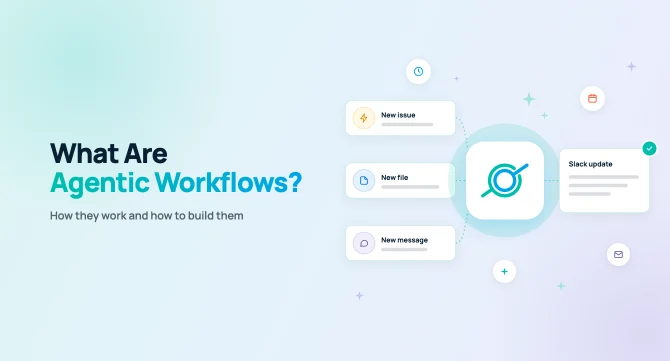
Agentic workflows are multi-step processes in which AI agents decide how to complete a goal, not just follow fixed rules. A trigger, such as a schedule or a new Jira issue, starts the workflow. The agent then gathers context from company apps and the web. It reasons over that context and delivers an output, like a Slack post or email.
Key takeaways
- Agentic workflows combine a trigger, data sources, AI reasoning and an action. The reasoning step is what separates them from rule-based automation.
- Triggers come in two kinds: scheduled (daily, weekly, monthly) and event-based (something happens in an app).
- Building one takes five steps. Pick a task, set the trigger, connect the data, write instructions and choose where results go.
- GoSearch workflows run on a schedule or start from app events. Examples include a new Jira issue, a new Google Drive file or a new Slack message in a channel.
- Business teams build GoSearch workflows in a drag-and-drop, natural-language builder without code, or start from ready-made templates for common tasks.
What are agentic workflows?
An agentic workflow is an automated process where AI or an AI agent works toward a goal on its own. It retrieves information, interprets it, decides what matters and takes action. A person sets the goal and the guardrails; AI handles the steps in between.
Most automation tools run on rules you write ahead of time. When a form comes in, copy it to a spreadsheet. When a deal closes, ping the account team. Rules hold up fine until a task needs someone to read and make a call. Nobody can write a rule for whether a customer sounds ready to churn, or what changed in a 40-page spec.
Agentic workflows fill that gap. The agent reads unstructured content, weighs it against instructions and produces a useful result. It still works when the input looks different every time. See our comparison of top workflow automation tools.
Agentic workflows vs. traditional automation
| Traditional automation | Agentic workflows | |
| Logic | Fixed if/then rules | AI reasoning toward a goal |
| Inputs | Structured fields | Structured and unstructured content (docs, messages, calls, web pages) |
| Handles variation | Breaks when inputs change | Adapts to new or messy inputs |
| Typical output | Moved or copied data | Summaries, analysis, drafts, decisions, alerts |
| Setup | Map every step and field | Describe the goal, connect data, set the trigger |
| Best for | High-volume, predictable tasks | Knowledge work that needs judgment |
Agentic workflows vs. AI agents
People mix these two up a lot. An AI agent is the thing doing the work, and you can chat with one whenever you want. A workflow decides when that agent gets to work, which apps it can look at and where its answer ends up. Once you set it up, it runs without anyone having to ask.
How do agentic workflows work?
Every agentic workflow runs through four stages. A trigger starts it, the agent gathers context, reasons over it and then takes action.
- Trigger. Something tells the workflow to start. A scheduled trigger runs at a set time, like every Friday at 5 PM. An event trigger runs when something happens in an app. Examples include a new email or a Doc added to a specific Drive.
- Context gathering. The agent pulls what it needs from connected sources. These include company apps, knowledge bases, files, web search or a specific web page. With an event trigger, the event itself (the new issue, file or message) becomes part of the input.
- Reasoning. A large language model applies your instructions to that context. It can summarize, compare, classify, extract action items, draft a response or decide whether anything needs attention at all.
- Action. The workflow delivers the result where people already work, such as email or a Slack channel.
Scheduled vs. event-based triggers
The trigger type decides when the work happens, so it shapes what the workflow is good for.
| Runs when | Best for | Example | |
| Scheduled | A set time or interval (once, daily, weekly, monthly) | Recurring reports, digests, monitoring | A Monday-morning summary of last week’s sales calls |
| Event-based (app trigger) | Something happens in a connected app | Fast responses, triage, keeping teams in the loop | Summarize and route each new Jira bug the moment someone files it |
A schedule is the right fit for anything you’d otherwise set a recurring calendar reminder for. If a bug needs an owner today, a Friday digest won’t cut it, so go with an app trigger.
Agentic workflow examples by team
The best agentic workflows replace knowledge work that is repetitive but still needs judgment. Here are common examples, with the trigger that fits each.
| Workflow | Trigger | |
| Sales | Summarize the week’s Gong calls into trends, objections and deal risks | Scheduled: every Friday |
| Engineering | Summarize a new Jira bug, find related issues and docs, and alert the owning team in Slack | Event: new Jira issue |
| Product | Digest new customer feedback posted in a Slack channel into themes | Event: new message in a Slack channel |
| Knowledge management | Summarize a new doc added to a shared Drive folder and announce it to the team | Event: new file in Google Drive |
| Customer success | Draft a briefing with account history before each customer meeting | Event: Google Calendar event |
| Support / Ops | Triage incoming requests to a shared inbox and flag urgent ones | Event: new Gmail message |
| Marketing | Track competitor launches and pricing changes on the web | Scheduled: weekly |
| Leadership | Combine updates from several systems into an executive briefing | Scheduled: Monday mornings |
How to build an agentic workflow in 5 steps
You can build an agentic workflow by picking one repeatable task, then defining its trigger, data, instructions and output. These steps apply in any platform.
- Pick a task worth automating. Look for work that happens often, follows a pattern and needs reading or judgment. Weekly reports, ticket triage and meeting prep are good starting points. Many platforms, including GoSearch, offer templates for these common tasks.
- Choose the trigger. Use a schedule if the work happens on a cadence. Use an app event if work should start the moment something happens, like a new issue or message.
- Connect the right data. Give the agent access to the apps, documents and web sources it needs, and nothing it doesn’t. Narrow sources produce more accurate results.
- Write clear instructions. Tell the agent what to look for, what format to use and what to ignore. Treat it like a brief for a new teammate: specific goals, an example of good output and limits on length.
- Choose where results go. Send the output to the place people already check, such as a Slack channel or an inbox. Then run the workflow, review the first few results and refine the instructions.
How agentic workflows work in GoSearch
GoSearch Workflows lets teams build agentic workflows in a drag-and-drop builder, grounded in company knowledge from connected apps. Workflows can run on a schedule or start automatically when something happens in a connected app.
1. Choose a trigger
GoSearch supports two kinds of triggers.
- Scheduled triggers run once or on a recurring schedule, such as daily, weekly or monthly.
- App triggers start a workflow when an event happens in a connected app. For example, a workflow can start when someone creates a Jira issue or adds a doc to a Google Drive folder. It can also start when a message lands in a specific Slack channel. New Gmail emails and Google Calendar events can trigger workflows too.
With an app trigger, the event’s content feeds straight into the workflow. The agent reads the new Jira issue or Slack message and acts on it right away. No one needs to spot it first.
2. Select data sources and actions
Next, choose what the workflow can use:
- GoAI for generation and reasoning
- Custom AI agents built for a specific role or task
- Web search and web page analysis
- Uploaded files
- Workspace connectors such as Box, Confluence, GitHub, Gong, Google Drive and Highspot
3. Define the output
Finally, choose where results go. Workflows can send an email, post a message in Slack, and more, automatically.
Start from a workflow template
You don’t have to build every workflow from scratch. GoSearch includes ready-made workflow templates for common use cases, such as:
- Unread emails
- Today’s meetings
- Open Jira tickets
- Stale deals
The template library covers many more tasks and keeps growing. Pick a template, then adjust the trigger, data sources or output to fit your team.
A Friday recap of Gong calls
Say your sales leader wants a read on this week’s calls without sitting through every recording. She sets a workflow to run every Friday at 5 PM. It goes through the week’s Gong calls and emails her the objections and trends that kept coming up.
Jira bug triage
A workflow triggered on a Jira project runs each time someone opens a new issue there. It reads the ticket and checks Confluence and GitHub for anything related. That might be an earlier fix or a pull request that touched the same code. The workflow posts what it found in the team’s Slack channel.
Posting new Drive docs to Slack
If your team keeps specs in a shared Google Drive folder, new files there are easy to miss. You can point a workflow at that folder with an app trigger. When a new doc shows up, it posts a few lines in Slack about what’s in it, plus the link.
Best practices for agentic workflows
The most reliable agentic workflows have a narrow scope, clear instructions and early human review.
- Start with one workflow and one team. Prove value on a single task before scaling across departments. A template can get you there faster.
- Keep event triggers narrow. A trigger on one Slack channel or one Jira project gives you a handful of useful posts a day. Point it at every channel and people will start muting it.
- Only connect the sources the task needs. A workflow that summarizes sales calls doesn’t need your engineering wiki. Extra sources tend to pull in results that have nothing to do with the task.
- Tell it what the output should look like. “Five bullets, under 100 words” gets you a better result than “summarize this.” Most people read these in Slack on their phone, so write the instructions with that in mind.
- Keep people in the loop for high-stakes actions. Let workflows summarize, flag and draft; let people approve decisions.
- Review and refine. Check the first few runs, then adjust instructions based on what was missing or noisy.
Build your first agentic workflow
Agentic workflows turn company knowledge into work that happens on its own. They run on a schedule or the moment something changes in your apps. GoSearch brings enterprise search, AI agents and workflow automation together in one place, so teams can build workflows without code.
Sign up for free to build your first workflow or start from a template. You can also book a demo to see GoSearch Workflows in action.
Search across all your apps for instant AI answers with GoSearch
Schedule a demo
FAQs
An agentic workflow is an automated process where an AI agent completes a multi-step task on its own. A trigger starts it. The agent gathers information from apps or the web and reasons over it using your instructions. Then it delivers a result, such as a summary, alert or draft. People set the goal, and the agent does the steps.
Traditional automation follows fixed if/then rules and works best with structured, predictable data. Agentic workflows use AI reasoning instead. They can read documents, messages and call transcripts, adapt when inputs change and produce analysis or decisions. Traditional automation moves data. Agentic workflows interpret data and act on it.
Agentic workflows start from either a schedule or an event. Scheduled triggers run at set times, such as daily or weekly. Event triggers run when something happens in a connected app. Examples include a new Jira issue, Google Drive file, Gmail message or Slack channel message.
Start with a task your team handles regularly that requires some judgment. Set a schedule or choose an app event to trigger the workflow, then connect the sources it needs. From there, write instructions for the agent, specify what the result should look like, and decide where it should go. Run it a few times and adjust the instructions based on what you see. GoSearch has a no-code builder and templates to help you get started.
No, you don’t need to code if you use a no-code platform. GoSearch Workflows uses a drag-and-drop builder. Business users choose a trigger, data sources and an output through a guided interface. Developers can use frameworks for custom agent systems. But most knowledge work, like reports, triage and summaries, needs no engineering help.
GoSearch Workflows supports app triggers across connected tools, including events in Jira, Google Drive, Slack, Gmail and Google Calendar. Examples include a new Jira issue, a new doc in a Drive folder or a new Slack channel message. GoSearch adds new app triggers regularly. Workflows can also run on a schedule.
Teams use agentic workflows to summarize Gong calls each week, sort incoming Jira bugs, and pull together customer feedback from Slack. Other workflows can prepare meeting briefings, track competitor updates, or compile executive reports. The workflow handles the ongoing collection and review, then sends the results where the team needs them.