
GoSearch gives teams two types of automated AI: agents and workflows. Both run on the same foundation, your company’s connected knowledge, 100+ app integrations, and a no-code builder, but they’re designed for different jobs. Agents respond when someone needs help right now. Workflows run automatically in the background, without anyone having to ask. Knowing whether AI agents vs. workflows fits a given task means getting the most from your enterprise AI.
This guide breaks down what agents and workflows each do inside GoSearch, with real examples, so you can decide which one to build for a given task.
Quick answer: In GoSearch, an agent is an AI assistant a person talks to directly, in Slack, Teams, or browser, to get an answer, a draft, a recommendation, or a completed action on demand. Through MCP connectors, agents can go beyond answering and actually complete the task, like creating a ticket or updating a record, in the connected app itself. A workflow is an automated, multi-step process that runs on its own based on a trigger, like a form submission, a status change, or a schedule, and often uses one or more agents to handle the reasoning and action steps inside it. Agents are user-driven. Workflows are system-driven. Build an agent when a person needs to ask for something or get something done. Build a workflow when the work should happen automatically, on a schedule or trigger.
What is the difference between an AI agent and a workflow?
An agent is an AI assistant that a person interacts with directly to complete a task on demand. A workflow is an automated, multi-step process that runs on its own based on a trigger like a form submission, a status change, or a schedule.
| Agents | Workflows | |
|---|---|---|
| Scope | One AI assistant focused on a specific task orarea of expertise. | A multi-step process that coordinates agentsand connected apps. |
| How it starts | A user interacts through chat to ask a questionor give a task. | An event, schedule, or manual trigger starts theprocess automatically. |
| How it works | Uses company knowledge, connected apps, orthe web to understand requests, provideanswers, and take action. | Coordinates one or more agents, triggers, andconnected knowledge sources to completework automatically. |
| Best for | • Research and Q&A • Writing and summarization • Data analysis • One-off tasks | • Request routing • Notifications and approvals • Scheduled reports • Multi-step automations |
The simplest way to decide: if a person needs to ask for it, build an agent in GoSearch. If it should just happen, build a workflow.
What agents do in GoSearch (with examples)
GoSearch agents are AI assistants that help people complete tasks on demand. They live natively inside the tools people already use, like Slack, Microsoft Teams, and the browser, and respond whenever someone needs help. A person asks a question or requests a task, the agent pulls context from connected systems, reasons over it, and returns a structured answer, drafts content, or takes the action directly through a connected app. Agents aren’t limited to answering questions. Through MCP connectors, they can execute the task itself, like creating a ticket, updating a record, or sending a message, without the person leaving the conversation.
Information retrieval and research
Query docs, search knowledge bases, and surface the right answer instantly. No more digging through tabs. Just ask and get context-rich results from the sources that matter.
For example, an employee asks in Slack: “Summarize recent customer feedback about the onboarding flow.” The agent searches Slack, Jira, and connected docs, then returns a structured summary of the recurring themes, so the employee doesn’t have to check each tool manually.
Content creation
Generate drafts, summarize threads, and turn raw notes into polished output. Agents that write with you, not just for you.
For example, a sales rep asks an agent to draft a follow-up email referencing a specific customer’s last three support tickets. The agent pulls the ticket history from the connected help desk and drafts the email in the same conversation, ready to review and send.
Data analysis and reporting
Aggregate data, spot trends, and deliver summaries on demand. Turn scattered inputs into clear, actionable reports without the manual work.
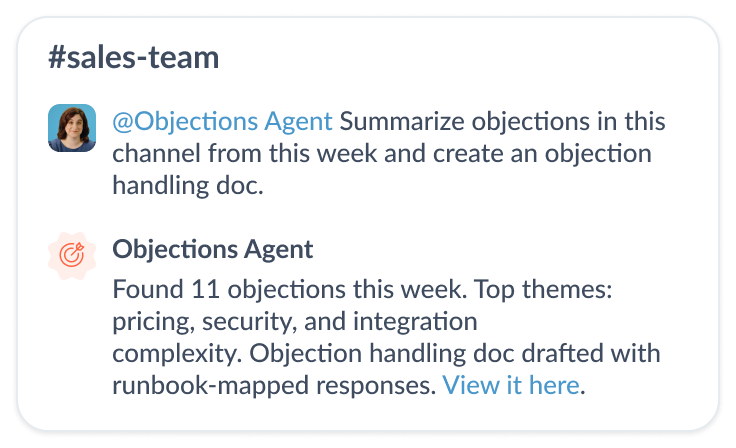
For example, a product manager asks: “What are the main differences between our product and Competitor X based on recent internal discussions and docs?” The agent pulls from meeting notes, sales call summaries, and product docs to produce a concise competitive brief in seconds instead of the hour it would take to track that information down manually.
Decision support
Triage requests, recommend next steps, and keep workflows unblocked. Give your team the context they need to act fast and act right.
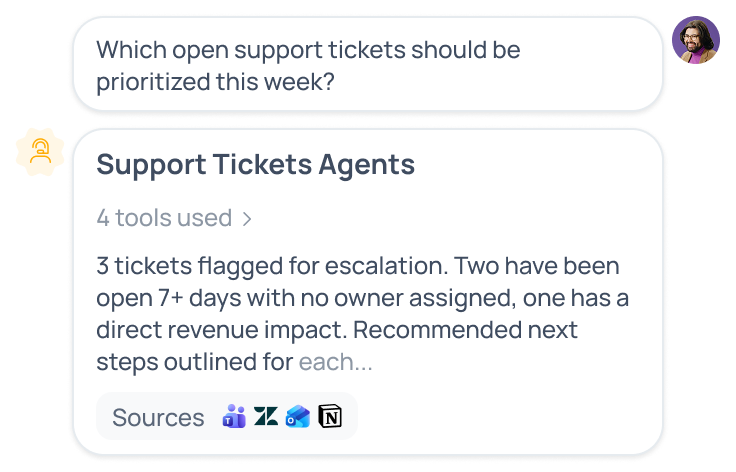
For example, a support lead asks an agent which open tickets should be escalated this week. The agent reviews ticket volume, customer tier, and SLA status across the connected help desk, then returns a prioritized list with the reasoning behind each recommendation.
Task completion and action-taking via MCP
Go beyond answers. Through MCP connectors, GoSearch agents can complete the task itself in the tools your team already uses, like creating a Jira ticket, updating a CRM record, or sending a Slack message, all from a single conversational request.
For example, an employee asks an agent to “create a Jira ticket for this bug and assign it to the platform team.” Instead of just drafting a summary the employee has to copy elsewhere, the agent uses the connected Jira MCP server to create the ticket, set the assignee, and confirm it’s done, all inside the same Slack thread.
The key idea: agents are user-driven. They run when someone asks, and they don’t stop at giving an answer. They can carry a task through to completion inside the apps your team already relies on.
What workflows do in GoSearch (with examples)
GoSearch workflows are built for repeatable processes that should run automatically, without someone re-triggering each step by hand. Instead of starting with a question, a workflow starts with an event, like a form submission, a status change, or a schedule, and it often uses one or more agents to handle the reasoning steps in between.
Feature request routing
When a new feature request comes in through a form:
- The request is captured automatically.
- An agent categorizes and summarizes the request.
- A Jira ticket is created with that summary attached.
- The product team is notified in Slack.
No one has to manually triage the request. The workflow handles the full path from submission to notification, based on the form submission trigger.
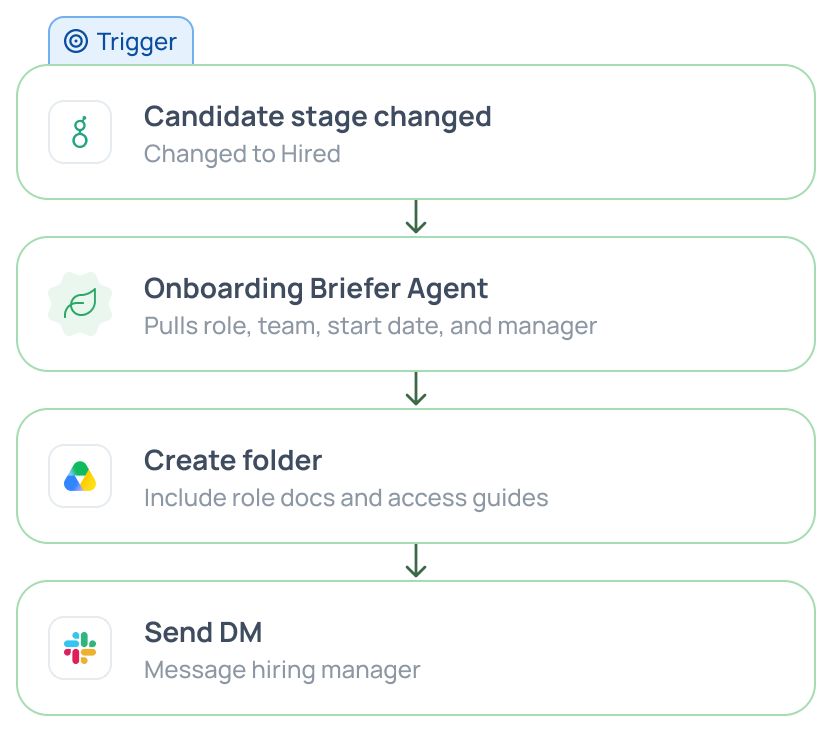
Employee onboarding
When a candidate’s status changes to “hired” in the HR system:
- An agent generates an onboarding brief based on the role and team.
- A shared folder is created with the relevant documents.
- A Slack message goes to the hiring manager with next steps.
Scheduled leadership reporting
Every Monday morning:
- The workflow pulls internal conversations and updates from connected apps.
- An agent summarizes the key developments from the past week.
- A report is sent automatically to leadership before the week’s first meeting.
Common workflow use cases include:
- Request routing and approvals
- Notifications and alerts triggered by system events
- Scheduled reporting on a recurring cadence
- Multi-step operational processes that span several apps
The key idea: workflows are system-driven. They run on their own, every time, without someone starting them manually.
How do agents and workflows work together?
Agents and workflows aren’t competing approaches. In most real deployments, workflows use agents to handle the steps that require reasoning, summarization, or judgment, while agents can trigger workflows when a task needs to continue across systems.
Two common patterns:
- A workflow routes an incoming request, an agent classifies it, and the workflow continues based on that classification.
- An agent identifies an action a person needs taken, then triggers a workflow to execute it across multiple connected apps.
This is how GoSearch moves from answering isolated questions to running end-to-end processes without constant manual input. Because agents and workflows are built on the same foundation of company knowledge, 100+ app connectors, and a no-code builder, an agent can handle a question in Slack one moment and a workflow can route a full approval process the next, without switching platforms or duplicating setup work.
How to decide: AI agents vs. workflows
Ask two questions:
- Does a person need to interact with this in the moment? If yes, build an agent.
- Should this run on its own, the same way, every time? If yes, build a workflow.
If the answer to both is yes at different points in the same process, that’s a sign you need a workflow that calls an agent for the reasoning step, not one or the other alone.
Agents + workflows: Better together
Agents and workflows solve two different problems, and GoSearch is built so you don’t have to choose one platform for one and a different tool for the other. Reach for an agent when a person needs an answer, a draft, a recommendation, or a task completed right now, including actions taken directly in connected apps via MCP. Reach for a workflow when the same process needs to run the same way every time, without anyone remembering to kick it off. Most teams end up building both, with workflows calling on agents to handle the steps that need judgment or action. Starting from the question “does a person need to ask for this, or should it just happen” will point you to the right one almost every time. It’s not about AI agents vs. workflows — it’s about both, solving separate use cases or working together.
Search across all your apps for instant AI answers with GoSearch
Schedule a demo
FAQ
A GoSearch agent is an AI assistant that responds to a person’s request in real time, inside Slack, Teams, or search. It draws on your company’s connected knowledge and apps to answer questions, draft content, summarize information, or complete a task on demand. Through MCP connectors, agents can also take action directly in connected apps, like creating a ticket or updating a record, instead of only returning information for a person to act on manually.
A GoSearch workflow is an automated, multi-step process that runs on a trigger, such as a form submission, a status change, or a schedule, instead of a direct request from a person. Workflows can chain together multiple apps and steps, and they often call on one or more agents to handle specific steps, like categorizing a request or summarizing content, before continuing to the next one.
The core difference is who or what starts the work. An agent starts when a person asks a question or requests a task, and it responds in that moment. A workflow starts on its own, triggered by an event like a form submission or a schedule, and runs the same sequence of steps every time without a person prompting it.
GoSearch agents can do both. Through MCP connectors, an agent can go beyond returning an answer and actually complete the task in the connected app itself, like creating a Jira ticket, updating a CRM record, or sending a Slack message. This means a person can ask for something and have it done in the same conversation, instead of getting a summary they then have to act on manually.
Neither is better. They solve different problems. Agents handle unpredictable, in-the-moment requests that need a person’s input and judgment, like researching a topic, drafting an email, or taking a one-off action through a connected app. Workflows handle predictable, repeatable processes that should run the same way every time without manual triggering, like routing a request or sending a scheduled report. Most teams need both.
Yes. This is one of the most common patterns in GoSearch. A workflow triggers automatically on an event, then hands a specific step, like categorizing a request, summarizing content, or drafting a message, to an agent. The agent completes that step and the workflow continues to the next one, combining automation with AI reasoning where it’s actually needed.
Build an agent for one-off, unpredictable requests that need a person’s input to start and don’t follow the same steps every time, like asking for a competitive brief, summarizing recent customer feedback, or drafting a follow-up email. If the task changes shape depending on who’s asking and what they need, it belongs with an agent.
Build a workflow for processes that should happen the same way every time without someone prompting it, like routing a new feature request to Jira, generating an onboarding brief when a candidate is hired, or sending a weekly summary report to leadership. If the trigger and the steps are the same every time, it belongs in a workflow.
Yes. GoSearch agents and workflows run on the same foundation of connected company knowledge, 100+ app integrations, and a no-code builder. That means you can build an agent for Slack-based Q&A and a workflow for automated request routing without switching tools, duplicating your connector setup, or maintaining two separate systems.