
Sales teams have access to more data than ever—but that data is often trapped inside disconnected systems.
A ZoomInfo MCP server gives AI agents secure access to ZoomInfo’s sales intelligence, allowing teams to search companies, contacts, buying signals, technologies, and account insights using natural language.
With the Model Context Protocol (MCP), AI assistants like ChatGPT, Claude, and enterprise AI agents can securely connect to business applications without requiring custom integrations.
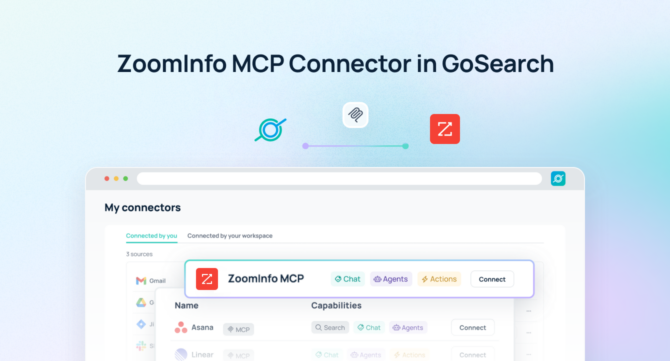
GoSearch’s ZoomInfo MCP server brings ZoomInfo intelligence into your broader enterprise context layer—connecting sales intelligence with CRM data, Slack conversations, internal documentation, customer systems, and more than 100 enterprise applications.
Instead of manually researching accounts across multiple platforms, teams can ask AI questions and get answers grounded in the complete context of their business.
At a Glance: ZoomInfo MCP Server
| What it does | Connects AI agents to ZoomInfo sales intelligence |
| Data available | Companies, contacts, buying signals, intent data, technographics, firmographics |
| Works with | ChatGPT, Claude, AI agents, enterprise assistants |
| Primary use cases | Account research, prospecting, CRM enrichment, sales workflows |
| Enterprise advantage | Connect ZoomInfo with 100+ business applications through GoSearch |
What Is a ZoomInfo MCP Server?
A ZoomInfo MCP server is a Model Context Protocol connection that allows AI agents to securely access ZoomInfo data.
MCP acts as a bridge between AI models and business applications. Instead of building custom API integrations for every AI workflow, organizations can expose trusted business data through standardized MCP connections.
For ZoomInfo, this means AI agents can retrieve sales intelligence when needed, including:
- Company profiles
- Contact information
- Decision makers and buying committees
- Intent signals
- Technology insights
- Firmographic data
- Account intelligence
For example, instead of searching manually:
“Find technology companies with more than 1,000 employees that are actively researching enterprise AI solutions.”
An AI agent connected to ZoomInfo can instantly identify relevant accounts and combine those insights with information from other business systems.
ZoomInfo MCP Server vs. ZoomInfo API
While both provide access to ZoomInfo data, they serve different purposes.
| ZoomInfo API | ZoomInfo MCP Server |
| Designed for developers | Designed for AI agents |
| Requires custom development | Connects AI tools directly to business data |
| Returns structured data | Enables contextual AI responses |
| Typically supports one application | Can power workflows across many applications |
| Requires engineering resources | Enables business users to interact through AI |
APIs are valuable for building applications. MCP servers make enterprise data available to AI agents that can reason, answer questions, and automate work.
What Can You Do With a ZoomInfo MCP Server?
1. Accelerate Account Research
Before a sales call, teams can ask:
“Create an account brief for Acme Corp.”
The AI agent can combine:
ZoomInfo
- Company size
- Industry
- Leadership contacts
- Technologies used
- Intent signals
Plus internal systems
- Salesforce opportunities
- Previous conversations
- Slack discussions
- Customer history
- Product documentation
The result is a complete account overview without switching between applications.
2. Find High-Intent Prospects
Sales teams can ask:
“Which accounts in our ICP are showing buying signals for enterprise AI solutions?”
AI agents can analyze ZoomInfo intent data alongside:
- CRM pipeline
- Existing relationships
- Previous engagement
- Marketing activity
to prioritize the accounts most likely to convert.
3. Enrich CRM Records Automatically
Instead of manually researching prospects, AI agents can help:
- Fill missing company information
- Identify new decision makers
- Update account profiles
- Detect organizational changes
- Improve CRM data quality
4. Build Better Sales Territory Plans
Sales leaders can ask:
“Create a territory strategy for my assigned accounts.”
AI can combine ZoomInfo intelligence with internal sales data to identify:
- Best-fit accounts
- Expansion opportunities
- Executive contacts
- Market trends
- Competitive insights
5. Improve SDR Prospecting
SDRs spend hours researching accounts before outreach.
With ZoomInfo MCP, they can ask:
“Find 20 companies similar to our best customers with active buying intent.”
AI agents can surface:
- Matching companies
- Relevant contacts
- Recent signals
- Outreach recommendations
in seconds.
6. Support Marketing Campaigns
Marketing teams can use ZoomInfo MCP to identify:
- Target account lists
- ICP matches
- Industry segments
- Buying trends
- Expansion opportunities
AI can help transform sales intelligence into more personalized campaigns.
Example ZoomInfo MCP Prompts
Here are examples teams can ask AI agents:
Account Research
“Summarize everything we know about Acme Corp before my meeting.”
Prospecting
“Find healthcare companies with 5,000+ employees showing intent around AI infrastructure.”
Sales Intelligence
“Which accounts in Salesforce have open opportunities and increasing buying intent?”
Competitive Research
“Find companies using competitor products that match our ICP.”
Territory Planning
“Recommend the top 25 accounts I should prioritize this quarter.”
How GoSearch Enhances ZoomInfo MCP
ZoomInfo provides powerful sales intelligence.
GoSearch connects that intelligence to the rest of your organization.
With GoSearch, teams can combine ZoomInfo with:
- Salesforce
- HubSpot
- Slack
- Microsoft Teams
- Google Drive
- Confluence
- Jira
- Customer support platforms
- Internal knowledge bases
This creates a complete enterprise context layer for AI.
Instead of asking:
“What does ZoomInfo know about this account?”
teams can ask:
“What does our company know about this account?”
Why Use GoSearch for ZoomInfo MCP?
GoSearch helps organizations move beyond disconnected AI experiments by providing:
Enterprise-wide context
Connect ZoomInfo with more than 100 applications so AI has access to the information needed to deliver accurate answers.
Secure AI access
Maintain existing permissions and security controls while enabling AI-powered workflows.
No-code AI agents
Create agents that can research accounts, generate reports, automate workflows, and take action across systems.
Automated workflows
Turn sales intelligence into action by triggering updates, notifications, documents, and processes across your business.
How to Connect ZoomInfo MCP Server with GoSearch
Connecting ZoomInfo with GoSearch takes only a few steps.
Step 1: Open GoSearch Settings
Navigate to your GoSearch workspace settings.
Step 2: Select MCP Connectors
Choose ZoomInfo from available MCP connections.
Step 3: Authenticate ZoomInfo
Connect your authorized ZoomInfo account.
Step 4: Configure Access
Set permissions based on your organization’s security requirements.
Step 5: Start Using AI
Ask questions, build agents, and automate workflows using ZoomInfo data.
No custom development required.
Turn ZoomInfo Intelligence Into AI-Powered Action
A ZoomInfo MCP server gives AI agents access to critical sales intelligence. But the real value comes from combining that intelligence with the rest of your business.
GoSearch connects ZoomInfo with your enterprise systems so AI agents can answer questions, automate workflows, and help teams make better decisions using complete business context.
Connect ZoomInfo to your AI stack with GoSearch.
Search across all your apps for instant AI answers with GoSearch
Schedule a demo
Frequently Asked Questions
A ZoomInfo MCP server connects AI agents to ZoomInfo sales intelligence through the Model Context Protocol, allowing AI systems to access company, contact, intent, and account data securely.
Yes. MCP enables AI assistants like ChatGPT and other AI agents to access connected business applications such as ZoomInfo when configured through an MCP-compatible platform.
Yes. MCP is designed to allow compatible AI assistants, including Claude, to connect with external business applications.
Depending on permissions, AI agents can access company information, contacts, buying signals, intent data, technographics, and other available ZoomInfo intelligence.
Yes. GoSearch connects ZoomInfo with 100+ enterprise applications, allowing AI agents to combine sales intelligence with business knowledge across your organization.