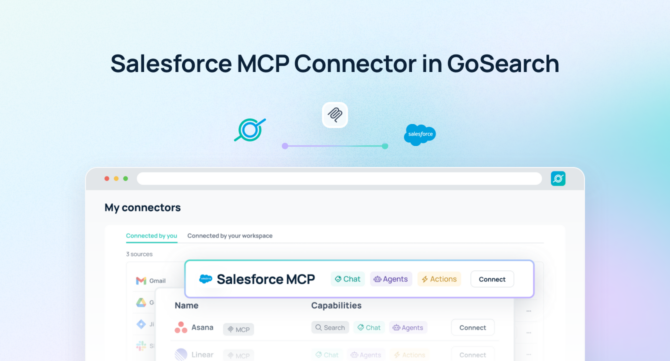

A Salesforce MCP server allows AI agents to securely access, query, and act on live CRM data in real time — without manual exports, tab-switching, or custom-built integrations.
Quick Answer: A Salesforce MCP server is a Model Context Protocol endpoint that gives AI agents real-time, permission-aware access to Salesforce objects, records, reports, and flows — enabling them to retrieve and update CRM data, trigger automations, and coordinate workflows without leaving the conversation.
With GoSearch, teams can use a Salesforce MCP server to query accounts, opportunities, and contacts using natural language, automate pipeline updates and reporting, and coordinate workflows across tools — all without copying data, building custom pipelines, or maintaining fragile integrations. AI agents interact directly with Salesforce as a structured, permission-aware system, enabling both intelligence and execution at enterprise scale.
As organizations scale AI across revenue, operations, and go-to-market teams, the CRM where customer data lives becomes an actionable system — not just a record store — that drives real-time decision-making and coordinated workflows across applications.
TL;DR
- A Salesforce MCP server is a Model Context Protocol endpoint that gives AI agents structured, permission-aware access to live Salesforce records, reports, flows, and metadata.
- GoSearch’s Salesforce MCP server goes beyond read access — letting AI agents take actions in Salesforce and orchestrate workflows across 100+ connected enterprise tools in a single workflow.
- GoSearch inherits Salesforce’s existing permissions automatically.
- Key use cases include automated pipeline reporting, deal summarization, cross-system opportunity coordination, and real-time account research — across tools like Slack, Jira, and your knowledge base.
- GoSearch’s Salesforce MCP server differs from Salesforce’s native hosted MCP server, which focuses on individual agent connections within the Salesforce platform. GoSearch adds enterprise orchestration, cross-system write actions, and a unified governance layer across your entire tool stack.
What Is a Salesforce MCP Server?
A Salesforce MCP server is a Model Context Protocol (MCP) endpoint that gives AI models and agents structured, permission-aware access to Salesforce CRM data — including accounts, contacts, opportunities, cases, reports, and flows — in real time, without requiring data exports, scheduled syncs, or custom API pipelines. Unlike traditional Salesforce integrations, a Salesforce MCP server exposes CRM objects as callable tools that AI agents can invoke dynamically during query execution.
MCP is an open standard for connecting AI systems to external tools. Instead of building bespoke connectors for every application, MCP gives AI agents a standardized way to call tools, retrieve data, and take actions across systems. Originally developed by Anthropic and now under Linux Foundation governance, MCP has seen broad adoption across Claude, Cursor, VS Code, Salesforce’s own Agentforce platform, and dozens of enterprise systems.
Unlike traditional integrations that rely on static exports or data pipelines, a Salesforce MCP server enables AI to perform actions directly in real time. Teams can use it to:
- Query accounts, opportunities, and contacts using plain-language questions
- Update opportunity stages, log activities, and create records from conversation
- Generate pipeline summaries, deal briefs, and forecast reports on demand
- Trigger cross-system workflows in Slack, Jira, your knowledge base, or other tools
- Automate handoff tasks, renewal reminders, and status updates across the revenue stack
Because the Salesforce MCP server enforces existing object-level and field-level permissions, AI agents act only within authorized boundaries — ensuring CRM governance while accelerating operational efficiency.
GoSearch Salesforce MCP Server vs. Salesforce’s Native MCP Server
Salesforce now offers its own hosted MCP server, giving AI clients like Claude and Cursor direct access to Salesforce objects and flows through the Model Context Protocol. It is a solid foundation for teams that want to connect an AI assistant to their Salesforce org.
The GoSearch Salesforce MCP server is built for a different scope: enterprise orchestration across multiple systems simultaneously.
| Salesforce Native MCP | GoSearch Salesforce MCP | |
|---|---|---|
| Query accounts, contacts & opportunities | ✅ | ✅ |
| Read and write CRM records | ✅ | ✅ |
| Real-time, permission-aware access | ✅ | ✅ |
| Trigger Salesforce flows and automations | ✅ | ✅ |
| Cross-system orchestration | ❌ | ✅ (100+ connectors) |
| Unified governance layer | ❌ | ✅ |
| Connect to Slack, Jira, knowledge base, etc. | ❌ | ✅ |
| Multi-agent routing | ❌ | ✅ |
If your team needs to do more than work inside Salesforce — triggering follow-up tasks in Jira, pulling context from your knowledge base, updating stakeholders in Slack, or enabling agents to reason across your full enterprise stack — GoSearch is the right platform.
How It Works
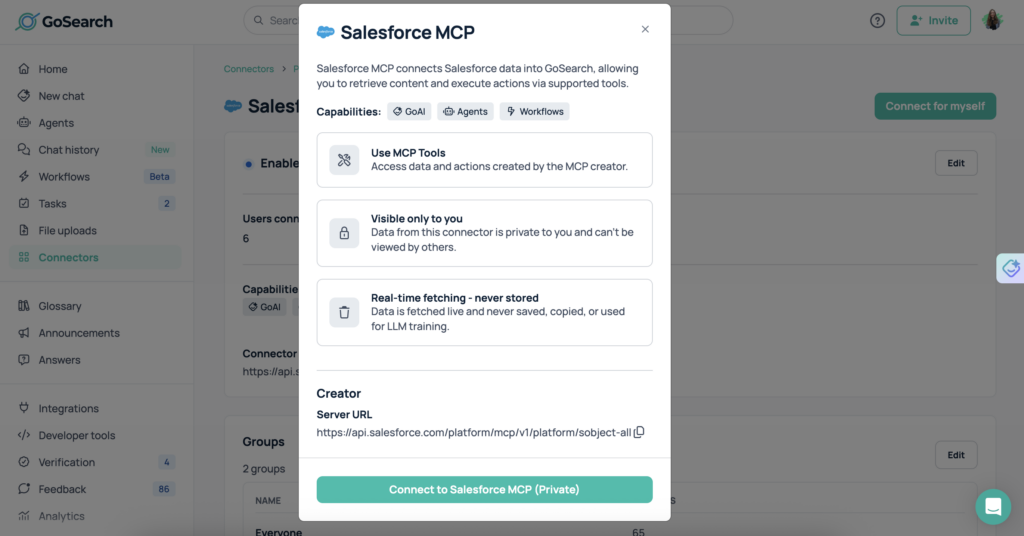
The GoSearch Salesforce MCP server connects AI agents directly to live CRM records, reports, and flows — and orchestrates actions across the enterprise.
When a user submits a query, GoSearch interprets the request and dynamically calls the Salesforce MCP server as a tool. The agent retrieves the relevant accounts, opportunities, or reports; synthesizes the content into a clear answer or structured output; and can write updates directly back into Salesforce. It can combine Salesforce data with information from other systems — like Slack conversations, internal documentation, or project trackers — and perform actions in Salesforce or connected apps in the same workflow.
This architecture allows organizations to move beyond basic CRM search into real-time orchestration, where AI reasons and executes in context.
What You Can Do With a Salesforce MCP Server
With Salesforce connected via MCP, teams can unlock a wide range of high-impact use cases that go beyond simple data access.
Sales teams can query live pipeline data using plain language — asking questions like “what deals are at risk this quarter” and receiving structured answers grounded in current opportunity data, without pulling a report manually. Deal summaries, account histories, and stakeholder maps can be generated on demand and shared directly into Slack or meeting notes.
Rough call notes don’t have to stay rough. Revenue teams can transform bullet points or transcript fragments into polished follow-up emails, deal briefs, or account plans — written directly back into Salesforce or sent through connected tools, structured around what actually happened in the conversation.
Data buried in reports and dashboards becomes immediately accessible. Teams can ask questions about their own CRM and receive structured insights grounded in actual pipeline data — with patterns surfaced, forecasts aggregated, and supporting evidence referenced automatically.
AI agents can also assist with operational tasks: updating opportunity stages, logging call activities, routing renewal tasks, and coordinating across connected systems. Because all data is live, every action reflects the most current state of the CRM.
Example Queries
One of the biggest advantages of a Salesforce MCP server is the ability to ask complex, multi-source questions and execute actions across applications automatically.
- “Summarize the five largest open opportunities this quarter and flag any that haven’t had activity in 14 days.”
- “Update the stage on the Acme Corp deal to Negotiation and log a note about today’s call.”
- “Pull the account history for TechCo and draft a renewal prep brief with key risks and upsell opportunities.”
- “Find all deals closing this month where forecast category is Commit and notify the AE in Slack.”
- “Create a new contact record for the person I just met and attach them to the right account.”
- “Analyze win/loss reasons across Q1 deals and surface the top three patterns with supporting examples.”
- “Update all deals in the Proposal stage where last activity was over 30 days ago and create follow-up tasks for each owner.”
These examples highlight how MCP servers enable multi-step, cross-system workflows — not just CRM data retrieval.
Salesforce MCP Server vs. Traditional Integrations
Traditional approaches to connecting Salesforce with AI systems often introduce complexity or limitations. Here’s how they compare:
| Salesforce MCP Server | Traditional API Integration | Data Sync / Pipeline | |
|---|---|---|---|
| Data freshness | Real-time | Near real-time | Stale (batch) |
| Setup complexity | Low | High (custom dev) | High (ongoing maintenance) |
| Permission enforcement | Inherited from Salesforce | Must be rebuilt | Often bypassed |
| Cross-system orchestration | Yes (via GoSearch) | No | No |
| Infrastructure overhead | Minimal | High | High |
| Time to first query | Minutes | Weeks | Weeks |
A Salesforce MCP server provides real-time, structured, permission-aware access to your CRM without duplicating data. This ensures that AI outputs are always grounded in the latest records and pipeline data, while also reducing infrastructure overhead. Teams move faster and can trust that the customer data they are acting on reflects reality.
Learn why MCP is replacing custom integrations across enterprise AI →
Who Should Use a Salesforce MCP Server?
A Salesforce MCP server is valuable across multiple teams that rely on Salesforce as their system of record for customer relationships.
Sales teams can generate deal briefs, pipeline summaries, and account plans directly from conversations — without manual report-pulling — and keep stakeholders aligned with up-to-date summaries written into shared tools.
Revenue operations teams can automate pipeline hygiene tasks, surface stale deals and overdue activities, and trigger notifications in connected tools like Slack or Jira without switching contexts.
Customer success teams can pull complete account histories, flag at-risk renewals, and generate structured handoff documents automatically — with AI surfacing signals from across connected systems.
Executive and leadership teams gain fast visibility into pipeline health, forecast accuracy, and deal velocity — asking questions directly and receiving structured answers grounded in live CRM data.
IT and RevOps teams maintain full control over permissions, governance, and auditability across all AI workflows. GoSearch enforces Salesforce’s existing access controls at every step, including object-level and field-level security.
Why Use GoSearch for MCP Servers?
GoSearch provides a unified platform for deploying and managing MCP servers across the enterprise. By connecting Salesforce with over 100 enterprise systems, GoSearch enables AI agents to reason, act, and coordinate workflows across tools while maintaining a single layer of governance and control.
Teams can route queries, workflows, and agents to the systems that contain the most relevant data — ensuring better outputs and more effective execution. Because GoSearch treats Salesforce as a live system of record rather than a static data source, the customer intelligence in your CRM flows directly into decision-making processes and operational workflows instead of remaining siloed behind a reporting layer.
In Summary
A Salesforce MCP server gives AI agents real-time, permission-aware access to your CRM data — without the overhead of traditional API integrations or data pipelines. Teams stop manually pulling reports and start acting on live customer data directly.
GoSearch’s Salesforce MCP server extends that foundation with enterprise-grade orchestration: AI agents can take actions in Salesforce, combine data from 100+ connected systems, and operate under a unified governance layer. Sales teams close faster with on-demand deal intelligence. RevOps teams keep pipelines clean automatically. Leadership gets instant answers grounded in live CRM data.
GoSearch automatically inherits Salesforce’s existing permissions, and teams start running live queries in the same session. For organizations that want AI to do more than surface CRM information, GoSearch is the platform that makes it possible.
Get Started With the Salesforce MCP Server
The GoSearch Salesforce MCP server enables organizations to operationalize their CRM data across apps and workflows. AI agents can retrieve, analyze, and act on real-time Salesforce data — updating records, generating summaries, triggering notifications, and coordinating tasks automatically — with no manual data gathering and full security and compliance across the enterprise.
Get a demo to see how GoSearch connects Salesforce and other MCP servers to power enterprise-wide AI workflows that both inform and act.
Search across all your apps for instant AI answers with GoSearch
Schedule a demo
Frequently Asked Questions
A Salesforce MCP server is a Model Context Protocol endpoint that gives AI agents real-time access to Salesforce CRM data — including accounts, contacts, opportunities, cases, and flows — without data exports or custom development. It provides a standardized, permission-aware way for AI models to query and act on CRM records directly, using live Salesforce APIs instead of synced copies.
Unlike the Salesforce REST or SOQL API, a Salesforce MCP server requires no custom code — any MCP-compatible AI agent can connect to it immediately using the standardized protocol. The Salesforce API requires bespoke development and ongoing maintenance for each integration, while an MCP server exposes Salesforce objects as callable tools that AI agents can invoke dynamically. It also enables AI agents to combine CRM data with other systems in a single workflow, something the API alone cannot orchestrate.
No — they serve different purposes. Salesforce’s hosted MCP server connects individual AI clients like Claude or Cursor directly to your Salesforce org for reading and writing within Salesforce. GoSearch’s Salesforce MCP server is built for enterprise orchestration: AI agents can combine CRM data with 100+ connected systems, operate under a unified governance layer, and trigger cross-tool workflows in a single step.
The GoSearch Salesforce MCP server uses OAuth authentication and inherits Salesforce’s existing object-level and field-level permissions automatically. AI agents cannot access records or fields beyond what the authenticated user’s profile allows, ensuring CRM governance is enforced at every step. No separate permission sets or custom access rules are required at the GoSearch level.
GoSearch’s Salesforce MCP server supports both read and write operations — AI agents can retrieve records and take actions in the same workflow. This includes creating and updating accounts, contacts, and opportunities; logging activities; updating opportunity stages; and triggering cross-system workflows. Salesforce’s native MCP server also supports write operations, but GoSearch extends this with cross-system orchestration across your full enterprise stack.
Any MCP-compatible AI client can connect to an MCP server, including Claude, Cursor, VS Code with Copilot, Agentforce, and enterprise platforms like GoSearch. MCP is an open standard with broad and growing adoption across major AI and enterprise platforms. GoSearch extends this further by managing MCP servers at the enterprise level, with centralized governance across all connected tools.

![Selecting the Best Enterprise Search Software [Features + Vendors]](https://images.gosearch.ai/blog/content/uploads/2023/10/17234328/Blog-Header-3-370x184.png)