
ChatGPT Dots is not publicly available, so its final features, pricing, security model, and release timeline remain unconfirmed. Based on the early conversation around the product, Dots appears to represent a broader shift toward persistent AI workspaces that can organize context, connect information, and help people move from prompts to completed work.
GoSearch already delivers that experience for enterprise teams. It connects company knowledge across more than 100 workplace applications, gives employees permission-aware answers, supports custom AI agents, generates structured outputs, and automates recurring work through visual workflows. The difference is that GoSearch is built around the company’s knowledge layer, not just an individual AI conversation.
What is ChatGPT Dots?
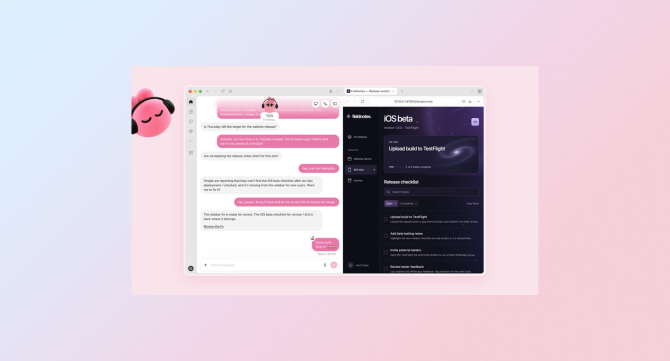
ChatGPT Dots appears to be an unreleased or private OpenAI product concept. Because it is not publicly available, any descriptions of its interface or capabilities should be treated as provisional rather than confirmed product facts.
The interest around Dots reflects a clear market direction:
- AI that retains useful context over time
- Workspaces organized around projects, tasks, and goals
- Better ways to combine files, conversations, and instructions
- AI that produces usable work products instead of only chat responses
- More continuity between research, creation, and execution
This is a natural evolution beyond the basic chatbot. People do not want to start every task with a blank prompt, manually find relevant files, and then move the result into another application. They want an AI system that understands the work they are doing and helps advance it.
That is also the central problem GoSearch solves for organizations.
The value of ChatGPT Dots is persistent context
The most important potential value of ChatGPT Dots is not the name or interface. It is the idea of persistent context.
A conventional AI interaction often looks like this:
- Open a chat.
- Explain the project.
- Upload or paste supporting information.
- Ask for an answer.
- Repeat the setup later.
A persistent AI workspace could reduce that repetition by keeping relevant context connected to the work itself. Instead of treating every prompt as an isolated event, the AI could help maintain continuity across research, decisions, drafts, and follow-up tasks.
For individual users, that could make AI more useful for:
- Research projects
- Content development
- Planning
- Writing and editing
- Data analysis
- Personal task management
- Ongoing creative work
For businesses, however, persistent context creates a larger requirement: the AI must understand not only what one person has shared, but also what the organization already knows.
That information is spread across Slack, Google Drive, Salesforce, Jira, GitHub, Confluence, HubSpot, Notion, email, support tools, and other systems. A project workspace that cannot securely reach that information still leaves employees responsible for assembling the context manually.
GoSearch makes company context available to AI
GoSearch connects AI to the knowledge employees already use at work. Its enterprise search platform brings together information from more than 100 workplace and personal data connectors, including tools such as Google Drive, Slack, Jira, Confluence, Salesforce, GitHub, HubSpot, Zendesk, Teams, and Notion.
Employees can ask questions in natural language and receive answers based on connected company information. GoSearch combines semantic search, indexed content, and real-time retrieval so users can find both historical knowledge and current information.
That enables questions such as:
- “What did we decide about the enterprise pricing model?”
- “Summarize the latest customer feedback about the onboarding flow.”
- “Which Jira issues are blocking the launch?”
- “Find the most recent version of the security questionnaire.”
- “What did the account team discuss with this customer last quarter?”
- “Which employees have experience with this integration?”
The goal is not simply to return a list of documents. GoSearch uses GoAI to synthesize information into answers, summaries, and recommendations while linking back to the underlying sources.
ChatGPT Dots and GoSearch address different context problems
The comparison is not necessarily ChatGPT Dots versus GoSearch. These products appear designed to address different layers of the AI experience.
| Capability | ChatGPT Dots | GoSearch |
|---|---|---|
| Public availability | Not publicly available as of October 1, 2026. Announced on September 29th, 2026. | Available as an enterprise AI platform |
| Primary focus | Reportedly persistent AI workspaces and project context | Enterprise search, company knowledge, agents, and workflows |
| Knowledge scope | Not released; will update once confirmed | More than 100 workplace and personal connectors |
| Company knowledge | Not released; will update once confirmed | Search across connected workplace applications |
| Permissions | Not released; will update once confirmed | Access-aware retrieval based on connected source permissions |
| Custom assistants | Not released; will update once confirmed | No-code custom AI agents |
| Structured outputs | Not released; will update once confirmed | GoAI artifacts, including documents, spreadsheets, PDFs, and code |
| Workflow automation | Not released; will update once confirmed | Visual, scheduled workflows across enterprise systems |
| Model choice | Not released; will update once confirmed | Supports leading models from multiple providers |
| Deployment and governance | Not released; will update once confirmed | Enterprise controls, BYOC options, LLM API key support, and zero-data-retention agreements |
The key distinction is scope. Dots may help an individual organize AI work around a project. GoSearch helps an organization make its distributed knowledge searchable, understandable, and actionable.
GoSearch already supports AI workspaces for teams
GoSearch gives teams many of the capabilities organizations are beginning to expect from persistent AI workspaces.
Custom AI agents
Teams can build no-code AI agents for specific business needs, such as:
- HR policy assistance
- IT support
- Sales enablement
- Customer support
- Engineering documentation
- Product research
- Marketing analysis
A team can define an agent’s instructions, select relevant data sources, establish an expected response style, and control who can access it. This creates a repeatable AI experience for a department instead of requiring every employee to recreate the same prompt.
For example, an IT team could build an internal support agent that searches approved runbooks, ticket history, and documentation. An HR team could create an employee policy assistant that answers questions using current benefits and workplace policies.
GoSearch’s existing custom-agent functionality provides the structure expected from a persistent AI workspace, but adds enterprise permissions and shared deployment.
GoAI artifacts
A chat answer is useful, but many business tasks require a deliverable.
GoAI artifacts turn research and analysis into structured outputs, including:
- Spreadsheets
- Documents
- PDFs
- Code files
- Reports
- Tables and other formatted assets
Artifacts can be reviewed in an output panel, where users can inspect the generated result and verify the supporting sources before using it. This shortens the distance between asking a question and producing something useful.
A marketing team could ask GoSearch to analyze campaign performance across connected systems and generate a report. An engineering team could turn issue and documentation data into a release summary. A sales team could create an account brief from CRM records, call notes, and internal documents.
The value is practical: AI does not stop at explanation. It creates a work product.
GoSearch Workflows
GoSearch Workflows extend persistent context into recurring automation. Teams can choose a trigger, connect data sources and AI actions, and define how the output should be delivered.
Workflows can:
- Run once or on a recurring schedule.
- Pull information from workplace applications, uploaded files, web search, or AI agents.
- Analyze and summarize that information.
- Send the result by email or post it in Slack.
This supports use cases such as:
- Weekly summaries of sales calls from Gong
- Recurring competitive intelligence reports
- Engineering release updates from GitHub
- Customer feedback analysis
- Executive briefings
- Knowledge-base review and update processes
A persistent AI workspace helps a person continue work over time. A GoSearch Workflow helps an organization keep work moving even when nobody is actively asking a question.
GoSearch connects AI to the full organization
A major limitation of personal AI workspaces is that important company context often lives outside the workspace.
A project plan may be in Google Drive. The latest decision may be in Slack. The customer history may be in Salesforce. The implementation details may be in Jira or GitHub. The relevant meeting transcript may be in Gong. The most current policy may be in Confluence or Notion.
GoSearch is designed to search across those systems together.
For sales teams
Sales representatives can use GoSearch to retrieve:
- Account history
- Deal context
- Customer objections
- Product documentation
- Pricing guidance
- Relevant case studies
- Past call summaries
- Internal subject-matter experts
Instead of searching several systems before a customer call, a sales representative can ask for a synthesized account brief and follow the cited sources.
For engineering teams
Engineering teams can use GoSearch to connect:
- Code repositories
- Architecture documentation
- Incident history
- Runbooks
- Jira issues
- Slack discussions
- Product requirements
- Technical decisions
This gives engineers access to organizational memory while debugging, onboarding, or evaluating a new implementation.
For HR teams
HR teams can create a searchable layer across:
- Benefits documentation
- Employee policies
- Onboarding materials
- Internal FAQs
- Compliance resources
- People data
Employees can get answers without sending repetitive questions to the HR team, while HR retains control over which sources and permissions apply.
For customer support teams
Support teams can search across:
- Help desk tickets
- Product documentation
- Internal knowledge bases
- Customer conversations
- Bug reports
- Engineering updates
This helps representatives find more complete context before responding and helps product teams identify recurring issues.
Enterprise AI needs permissions, not just memory
Persistent context is useful only when it is safe.
GoSearch is designed around permission-aware retrieval. Its connected sources can determine which information is available to each user, and personal connectors can retrieve private files, emails, or messages without indexing them for the broader organization.
GoSearch also supports enterprise controls such as:
- Source-level permissions
- Group-based access controls
- Granular indexing settings
- Personal non-indexing connectors
- Bring Your Own Cloud options
- Bring Your Own LLM API key options
- Zero-data-retention agreements with LLM providers
- SOC 2 Type II compliance
- Sensitive-data detection and review controls
These controls matter because an AI assistant should not make information easier to access than the underlying system permits.
A personal AI workspace may remember information that a user intentionally provides. Enterprise AI must also understand what that user is allowed to access.
GoSearch is model-agnostic
Another important enterprise requirement is model flexibility.
Different models perform better for different tasks. One may be more effective for coding, another for long-context analysis, another for multimodal reasoning, and another for cost-sensitive high-volume work.
GoSearch supports models from multiple providers, including OpenAI, Anthropic, and Google. Organizations can select the model that best matches the task while preserving the same search, permissions, agents, and workflow layer.
This prevents a company’s knowledge infrastructure from becoming permanently tied to one model provider.
The model can change. The company’s connected knowledge and governance remain in place.
Why the ChatGPT Dots conversation matters
Even though ChatGPT Dots is not publicly available, the interest around it highlights a broader shift in how people expect to use AI.
The market is moving from:
- One-off prompts to persistent context
- Generic answers to grounded answers
- Chat responses to structured deliverables
- Individual productivity to shared workflows
- Information retrieval to task execution
- Model loyalty to model choice
GoSearch was built around this direction from the beginning. Its purpose is not simply to provide another chatbot. It is to make company knowledge available wherever employees work and give teams the tools to search, summarize, create, and automate.
The broader lesson is straightforward: AI becomes more valuable when it has the right context, and enterprise context is distributed across the organization’s systems.
GoSearch is the company’s AI context layer
ChatGPT Dots may eventually offer a compelling way for people to organize personal AI work. Its final capabilities will become clearer if and when OpenAI releases it publicly.
For businesses, the more fundamental question is where the AI gets its context.
GoSearch provides that enterprise context layer by connecting company apps, enforcing existing permissions, supporting multiple AI models, enabling custom agents, generating structured artifacts, and automating recurring workflows.
That gives organizations a path from AI experimentation to practical adoption:
- Connect the systems where company knowledge lives.
- Let employees search and ask questions in natural language.
- Ground answers in current, permission-aware information.
- Build custom agents for repeatable department workflows.
- Generate verified work products.
- Automate recurring research, reporting, and analysis.
ChatGPT Dots may be a sign of where personal AI workspaces are heading. GoSearch is built for where enterprise AI needs to go next: from finding knowledge to using it.
Get GoSearch Free or schedule a demo.
Search across all your apps for instant AI answers with GoSearch
Schedule a demo
Frequently Asked Questions
Is ChatGPT Dots publicly available?
No. As of October 1, 2026, ChatGPT Dots is not publicly available, so its final features, pricing, security controls, and release timeline have not been confirmed.
What is ChatGPT Dots expected to do?
Public information is limited because the product has not been released. The discussion around Dots suggests a focus on persistent AI workspaces, project context, and a more continuous relationship between AI conversations and ongoing work.
How is GoSearch similar to ChatGPT Dots?
GoSearch provides persistent, context-rich AI assistance through connected company knowledge, custom AI agents, structured artifacts, and recurring workflows. It is designed for shared enterprise use rather than only individual project organization.
How is GoSearch different from ChatGPT Dots?
GoSearch focuses on enterprise search and execution. It connects to more than 100 workplace applications, respects source permissions, supports multiple LLM providers, and lets teams create agents and workflows across business systems.
Can GoSearch create custom AI assistants?
Yes. GoSearch includes a no-code AI agent builder that lets teams create specialized assistants for functions such as HR, IT, sales, customer support, engineering, product, and marketing.
Can GoSearch automate recurring work?
Yes. GoSearch Workflows let users schedule AI-powered processes that pull information from connected applications, analyze it, and deliver results through channels such as email or Slack.
Does GoSearch support more than one AI model?
Yes. GoSearch is model-agnostic and supports leading models from multiple providers, including OpenAI, Anthropic, and Google. Teams can choose models based on performance, cost, reasoning, multimodal capabilities, or governance requirements.
Is GoSearch secure for enterprise use?
GoSearch is designed for enterprise security and permission-aware access. It supports source-level permissions, non-indexing personal connectors, granular indexing controls, BYOC and BYOK options, zero-data-retention agreements with LLM providers, and SOC 2 Type II compliance.