
Sales teams have never had more technology at their disposal. CRMs, conversation intelligence, sales enablement, project management, collaboration tools, knowledge bases, and AI assistants each promise to help sellers work faster.
Individually, most of them deliver. The problem is what happens when you have all of them: the answer a rep needs is in one of twelve places.
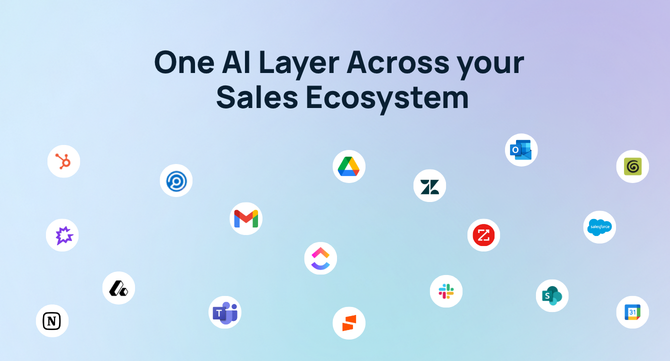
Customer history lives in Salesforce. Call recordings sit in Gong. Collateral lives in Highspot, product updates in Jira, conversations in Slack. Proposals, contracts, and documentation live across Google Drive, SharePoint, Notion, and Confluence.
Every new application becomes one more place to check before a seller can walk into a customer conversation with confidence.
Why Sales Teams Struggle With Fragmented Knowledge
Revenue teams rarely struggle because they lack information. They struggle because the information they need is fragmented.
Preparing for a customer call requires searching multiple systems to understand recent conversations, open support issues, product requests, previous proposals, competitive discussions, and internal notes. The process is time-consuming, and even then it’s easy to miss an important detail.
The cost compounds. McKinsey Global Institute research puts the average knowledge worker at nearly 20 percent of the workweek — roughly a day and a half a month — spent searching for information or tracking down colleagues. For a seller, that is time not spent in front of customers.
Multiply that across dozens of customer conversations each week and the impact becomes clear: time spent searching replaces time spent selling.
What Can AI Agents Do for Sales Teams?
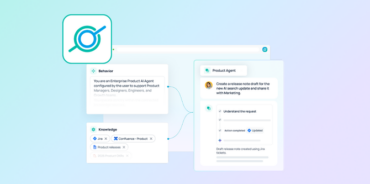
AI agents for sales teams retrieve context from across a company’s connected applications — CRM, call recordings, documents, support tickets, and chat — and then act on it. Finding information is only part of the equation. The next step is putting that knowledge to work.
Because these agents reach connected business knowledge, they can handle work a rule-based workflow can’t. Seven use cases cover most of what revenue teams build.
Retrieval: finding what already exists
1. Competitive intelligence. When a prospect mentions a competitor, an agent surfaces battle cards, recent win stories, pricing guidance, objection-handling resources, and previous deals involving that competitor — during the call, not after it.
2. Proposal and content discovery. Rather than searching folders or messaging coworkers, sellers locate the most relevant case studies, presentations, security documentation, or proposal templates based on the customer’s industry, size, or use case.
3. Internal knowledge assistance. Sellers frequently need answers from product, engineering, legal, or customer success. Agents search documentation, Slack conversations, and knowledge bases to answer common questions immediately — reducing interruptions for subject matter experts and keeping deals moving.
Workflows: acting on what they find
4. Pre-meeting briefs. Before a customer call, an agent compiles account history, recent emails, CRM activity, call summaries, open support cases, and relevant product updates into a single briefing. Instead of spending 20 minutes gathering information, sellers head into every meeting already prepared.
5. Post-call follow-up. After a meeting, a workflow summarizes the conversation, identifies action items, drafts a follow-up email, updates CRM fields, and notifies internal stakeholders in Slack — all from one recording or transcript.
6. Deal inspection and forecasting. Agents review open opportunities, identify missing information, flag stalled deals, highlight risks, and remind account teams to complete next steps before forecast reviews.
7. Customer health and expansion. By combining CRM data, support tickets, product documentation, and customer communications, agents identify expansion opportunities, surface renewal risks, and recommend proactive outreach before problems reach the relationship.
The quality of these automations depends entirely on the quality of the data behind them. Connected systems give agents the context to deliver trustworthy results; disconnected ones produce confident answers built on partial information.
Why AI Agents Need Connected Context
The effectiveness of any AI agent depends on the breadth of information it can reach.
When an agent only sees a CRM record or a meeting transcript, its recommendations are naturally limited. Connecting knowledge across the broader sales ecosystem gives it the context to produce accurate summaries, answer detailed questions, generate account briefs, and recommend next steps from a complete picture rather than a fragment.
No single platform contains the full story of a customer relationship:
- A CRM captures account activity and opportunities
- Conversation intelligence reveals what customers are actually saying
- Collaboration tools hold internal discussions and decisions
- Documentation platforms explain implementation details
- Project management systems track feature requests and delivery timelines
Each application contributes another piece. The challenge is assembling those pieces in the moments that matter — before a customer meeting, during a discovery call, while handling an objection, or when building a renewal strategy.
This is the same architectural problem AI agents for enterprise search solve across the rest of the organization. Revenue teams just feel it first — their deadlines belong to the customer.
Why the Modern Sales Workflow Is Cross-Functional
Closing a deal takes more than the sales team.
Product managers answer roadmap questions. Customer success shares adoption insights. Marketing provides relevant content. Solutions engineers contribute technical guidance, while legal and finance review contracts and pricing.
Information moves constantly between these teams, creating a network of knowledge that extends well beyond the CRM. A connected stack lets revenue teams tap that knowledge without manually tracking down documents, messages, or subject matter experts — which is why sales AI that stops at the CRM boundary tends to underdeliver in practice.
How to Evaluate AI Agents for Sales Teams
Five criteria separate agents that get adopted from those that get abandoned:
- Connector coverage — does it natively reach Salesforce, Gong, Slack, Highspot, Drive, Jira, and the tools your team actually uses, or only a subset?
- Permission enforcement — do agents respect source-system access controls, so a seller never sees data they shouldn’t?
- Citation and grounding — do answers link to source documents, so a rep can verify before repeating something to a customer?
- Build effort — can a sales ops manager configure an agent, or does every workflow require engineering?
- Time to value — is the team running useful agents in days, or is this a quarter-long implementation?
The fifth is where most sales AI projects stall. If building a workflow takes a sprint, most revenue teams never build one.
Building a More Connected Revenue Organization
Technology investments keep growing, but adding software doesn’t automatically improve productivity. The larger opportunity is connecting the systems already in place so information flows freely across the organization.
When sellers can search across Salesforce, Gong, Slack, Highspot, Google Drive, Jira, Confluence, Notion, Outlook, and HubSpot from one place, they spend less time hunting for answers and more time engaging customers. The result is faster onboarding, better call preparation, stronger cross-team collaboration, and more informed decisions throughout the sales cycle.
Connect Your Sales Ecosystem With GoSearch
GoSearch connects more than 100 workplace applications — including Salesforce, HubSpot, Gong, Highspot, Slack, Google Drive, Outlook, Gmail, Notion, Confluence, Jira, Box, and SharePoint — into a single AI-powered knowledge layer.
Without leaving that layer, revenue teams can search their entire sales ecosystem, generate account summaries, prepare for customer meetings, and pull competitive insights.
Beyond search, GoSearch lets teams build AI agents and no-code workflows that automate repetitive work across the sales cycle — pre-meeting briefs, call summaries, follow-up drafts, request routing, CRM updates, and multi-step sales processes — while staying grounded in the knowledge and permissions of connected systems.
As organizations keep investing in AI, the biggest opportunity isn’t adding more tools. It’s connecting the ones they already use. See how the enterprise search platform works, or book a demo to see agents running against your stack.
Search across all your apps for instant AI answers with GoSearch
Schedule a demo
AI Agents for Sales Teams: FAQs
AI agents for sales teams are systems that retrieve information across connected business applications — CRM, conversation intelligence, documents, support tickets, and chat — and then take action on it. Rather than answering questions inside one tool, they assemble context from the full revenue stack to draft briefs, summarize calls, update records, and surface competitive intelligence.
CRM-native AI sees CRM data. It can score leads, summarize opportunity records, and draft emails from what’s already stored in the CRM. Sales AI agents built on a connected knowledge layer also reach call recordings, support tickets, product documentation, internal Slack discussions, and proposal libraries — which is where most of the context behind a deal actually lives.
They should, and this is worth verifying in evaluation. Well-built agents enforce the access controls of each source system, so a seller only sees what they were already authorized to see. Platforms that flatten permissions at the index layer create exposure — particularly once AI summarization is involved, since a summary can surface restricted content without linking to the restricted document.
It depends far more on connector setup and permission validation than on the agents themselves. Platforms with native connectors to your existing stack can be running useful workflows in days. Those requiring custom integration work or engineering-built agents typically take weeks to months — which is the point where most sales AI initiatives lose momentum.