
GoSearch recently launched a suite of powerful product releases. These updates transform enterprise search into a proactive execution engine. Specifically, they enable enterprise AI workflow automation by connecting fragmented data with actionable insights. By introducing GoAI artifacts and a visual builder, GoSearch allows teams to operationalize knowledge without writing code. These releases help organizations move beyond simple search. Instead, teams can now deploy AI that actively moves work forward.
As the landscape of workplace productivity shifts from simple information retrieval to autonomous task execution, these new GoSearch capabilities provide the necessary infrastructure to deploy AI that actively moves work forward. Whether it is selecting a specialized reasoning model for a complex audit or building a workflow that syncs data across siloed CRM and engineering tools, these updates ensure that GoSearch acts as a central nervous system for your enterprise operations.
Key Takeaways
- GoSearch has launched a visual, no-code builder for agentic workflows that allows teams to orchestrate multi-step business processes across their tech stack without technical setup.
- Organizations can choose between the latest flagship AI models from Google, Anthropic, and OpenAI to power their GoSearch agents based on specific reasoning needs.
- The new GoAI artifacts feature enables GoSearch to generate structured, functional files like spreadsheets and code that users can preview and verify via an output panel.
- GoSearch expanded its connectivity with six new MCP connectors, allowing AI agents to securely pull data and execute actions within tools like HubSpot, Miro, Asana, and Notion.
- Every new automation and search feature in GoSearch inherits existing enterprise security protocols to ensure that AI agents only interact with authorized data.
Scaling Enterprise AI Automation with Workflows
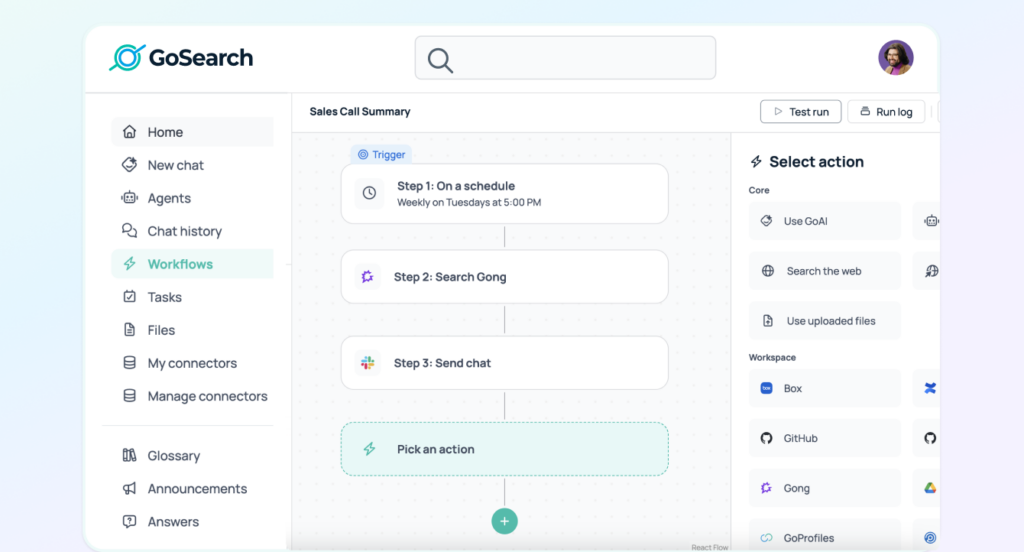
GoSearch Workflows provide a visual, self-serve way to build AI-powered automation across enterprise systems, allowing teams to schedule tasks and deliver results through email or Slack.
In the past, enterprise automation required complex technical configuration or structured schema design. GoSearch Workflows solves this problem through a visual, drag-and-drop builder. This tool is designed specifically for business users. Because of this, your team can easily deploy enterprise AI workflow automation. This shift allows teams to move beyond simple information retrieval. To achieve this, users can create automated outcomes that run on a consistent schedule.
Whether it is tracking competitive intelligence via recurring web searches or generating weekly engineering summaries from GitHub, GoSearch Workflows ensures that enterprise knowledge is delivered directly where it is needed most.
The Three-Step Process for Building GoSearch Workflows
The power of GoSearch Workflows lies in its accessibility. Any team member can configure a complex automation in minutes by following a guided three-step interface:
- Choose a Trigger: Define when the workflow executes. Users can select one-time runs or recurring schedules, such as daily, weekly, or monthly intervals.
- Select Data Sources and Actions: Choose the information the workflow uses. This includes GoAI reasoning, custom AI agents, web search, uploaded files, or workspace connectors like Box, Google Drive, and Gong.
- Define the Output: Specify how the results are delivered. GoSearch Workflows can automatically send emails or post messages in Slack to ensure insights reach the right stakeholders without manual effort.
Powering Automated AI Reasoning with New Models
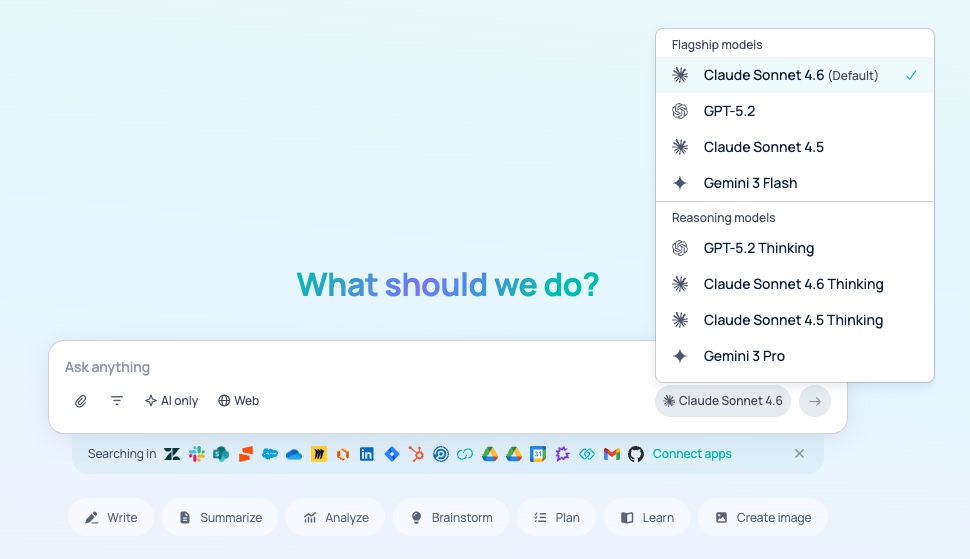
GoSearch supports the latest flagship models from Google, Anthropic, and OpenAI, allowing organizations to toggle between Gemini 3.1 Pro, Claude Sonnet 4.6, and GPT-5.2.
Choosing the right model is critical for balancing performance and cost. These models serve as the reasoning engine for your enterprise AI workflow automation. For instance, Gemini 3.1 Pro is the preferred choice for multimodal reasoning. It excels at interpreting complex diagrams or video data. In contrast, Claude Sonnet 4.6 offers industry-leading performance for long-context windows. GPT-5.2 remains the powerhouse for logic-heavy tasks, such as building intricate software development workflows.
| Model | Provider | Primary Strength | Ideal Enterprise Use Case |
| Gemini 3.1 Pro | Multimodal Analysis | Analyzing video transcripts and visual charts | |
| Claude Sonnet 4.6 | Anthropic | Contextual Accuracy | Extracting data from long-form legal contracts |
| GPT-5.2 | OpenAI | Logic & Code | Building complex API integrations and technical tasks |
Generating Verified Deliverables with GoAI Artifacts
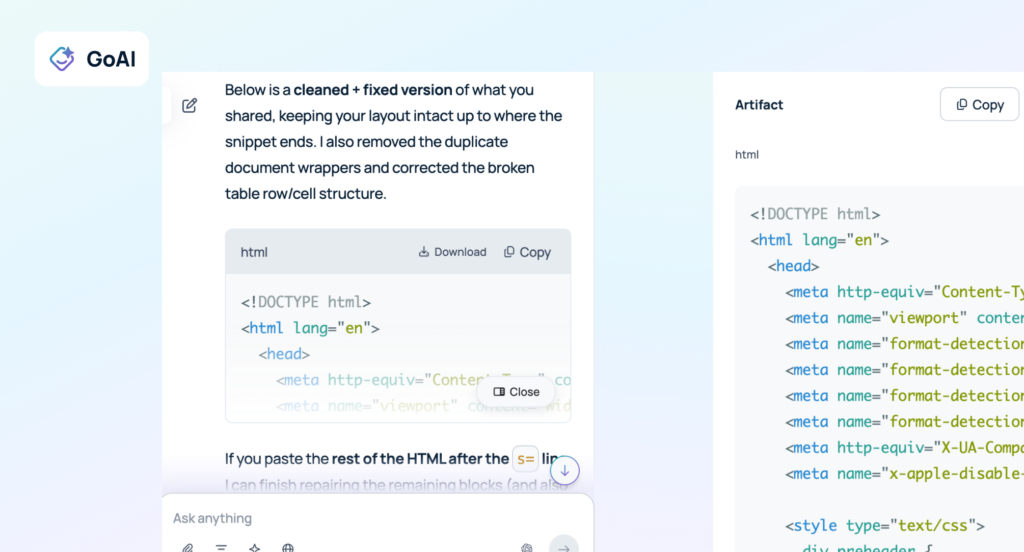
GoAI artifacts are structured, high-value files—such as spreadsheets, PDFs, or code scripts—generated by GoSearch to help teams move from research to immediate execution.
Standard chat responses often remain confined to a message thread. However, GoAI artifacts are functional assets. These assets are a critical output of enterprise AI workflow automation. These appear in a dedicated side panel next to your search results. When a user requests a complex deliverable, GoSearch builds the file in the background. This allows users to verify accuracy and inspect citations before downloading the file for use in other professional applications.
Streamlining Conversations with the GoAI Output Panel
The GoAI Output Panel acts as an interactive bridge between raw data and a final business asset. It provides total visibility into the evidence used to generate an artifact. Specifically, it connects every claim to a verified source document via built-in citations. Therefore, teams can use this side-by-side view to validate AI output against compliance standards. By transforming unstructured search results into native file formats like Excel (XLSX) or Word, GoSearch eliminates the need for manual reformatting and data entry.
Connecting Your Stack for Enterprise AI Workflow Automation with MCP Connectors
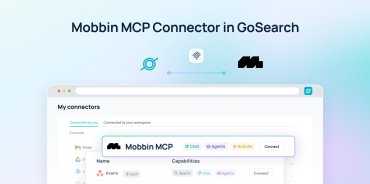
GoSearch MCP connectors are standardized integration points that enable AI agents to securely “read” and “act” within the specific external applications used by your team.
GoSearch HubSpot MCP Connector
The HubSpot connector allows GoSearch AI agents to interface directly with your CRM data. This enables sales and marketing teams to automate lead research and summarize deal history. Moreover, you can update contact records without ever leaving the GoSearch interface. By bridging the gap between customer data and AI reasoning, teams can generate highly personalized outreach or internal account summaries in seconds.
GoSearch Miro MCP Connector
With the Miro connector, GoSearch agents can analyze visual collaboration data across your organization. This is particularly useful for summarizing sticky notes from brainstorming sessions, extracting action items from complex project boards, or finding specific design references buried in extensive canvases. It turns visual data into searchable, actionable text.
GoSearch Asana MCP Connector
The Asana connector integrates project management directly into the GoSearch agentic ecosystem. AI agents can query task statuses, identify project blockers, and update project timelines based on information gathered from other connected tools. This reduces manual status updates and ensures that project tracking remains accurate and up-to-date.
GoSearch Linear MCP Connector
For engineering-heavy organizations, the Linear connector allows GoSearch agents to manage development workflows. Agents can summarize recent issue tickets, identify trends in bug reports, and bridge the gap between technical documentation and active development tasks. This ensures that engineers have the context they need without toggling between multiple platforms.
GoSearch Box MCP Connector
The Box connector ensures that your organization’s cloud-stored files are fully accessible to AI. GoSearch agents can perform deep-content analysis on archived files in Box, retrieving specific data points or summarizing long-form assets. This integration is vital for compliance and legal teams who need to surface information from large repositories of legacy data.
GoSearch Notion MCP Connector
The Notion connector turns your internal wiki and knowledge management system into an active data source. GoSearch agents can query wiki data in Notion to provide context-aware support, ensuring that internal policies and project notes are always at the agent’s fingertips. This streamlines the onboarding process and improves internal knowledge sharing.
Frequently Asked Questions
What are the biggest updates in the latest GoSearch release?
The latest GoSearch releases focus on transitioning from search to action via agentic workflows, the addition of flagship models like Gemini 3.1 Pro and Claude 4.6, and the introduction of GoAI artifacts. These features work together to help teams automate recurring tasks and manage AI-generated work more effectively across their entire software ecosystem.
How do GoSearch Workflows improve productivity?
GoSearch Workflows improve productivity by replacing manual reporting and research with automated, scheduled processes that run in the background. Instead of manually checking multiple tools for updates, a user can build a workflow that pulls data from Jira, summarizes it using an AI model, and emails the results directly to stakeholders.
What is a GoAI artifact?
A GoAI artifact is a discrete, functional file—such as a spreadsheet, document, or code script—generated by the GoSearch platform. Unlike plain text chat, artifacts are structured deliverables that users can preview, verify via the citation panel, and download for use in professional applications.
How do MCP connectors extend the utility of GoSearch AI agents?
GoSearch MCP connectors allow AI agents to securely interact with the specific data and actions available in third-party applications like HubSpot, Miro, and Asana. By bridging these silos, GoSearch enables agents to retrieve real-time context and perform write-actions, effectively turning a search tool into a comprehensive operational assistant.
How do these updates maintain enterprise-grade security?
Every new feature, including agentic workflows and MCP connectors, operates within the existing permission framework of the connected applications to ensure data privacy. GoSearch inherits the security protocols and access controls already defined in your tech stack, meaning AI agents only interact with information that the specific user is authorized to access.
Search across all your apps for instant AI answers with GoSearch
Schedule a demo