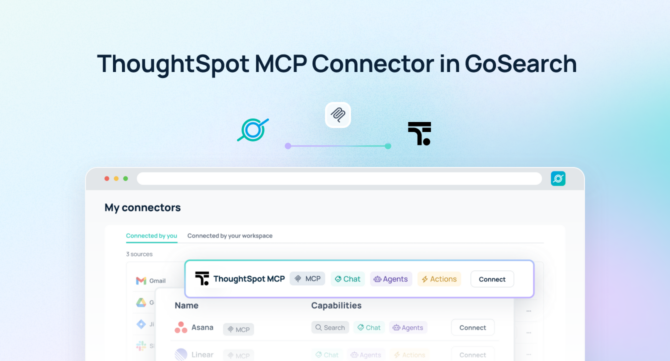

A ThoughtSpot MCP server is a Model Context Protocol endpoint that connects AI agents to ThoughtSpot’s analytics engine — including natural language search, governed metrics, and Liveboard insights — enabling both intelligent querying and automated action without duplicating data outside ThoughtSpot.
Quick Answer: A ThoughtSpot MCP server gives AI agents direct, permission-aware access to live business analytics, governed metrics, and Liveboard data in real time — no data exports or custom integrations required.
With GoSearch, teams can deploy a ThoughtSpot MCP server to interrogate business data using natural language, trigger analytics-informed workflows, and connect ThoughtSpot insights to the broader enterprise stack. Instead of logging into dashboards or exporting reports, AI agents work directly inside ThoughtSpot’s semantic layer with full permission enforcement — and then act on what they find across every connected system.
As organizations mature their AI strategies, the gap between surfacing an insight and doing something about it becomes the critical bottleneck. A ThoughtSpot MCP server, combined with GoSearch’s orchestration layer, closes that gap.
TL;DR
- A ThoughtSpot MCP server is a Model Context Protocol endpoint that gives AI agents structured, permission-aware access to live ThoughtSpot analytics, governed metrics, Liveboards, and natural language search results.
- GoSearch’s ThoughtSpot MCP server goes beyond analytics access — AI agents can act on insights and coordinate workflows across 100+ connected enterprise tools in a single execution.
- Setup takes under 5 minutes. GoSearch inherits ThoughtSpot’s existing permissions automatically, so teams are querying live business data without any additional indexing or syncing infrastructure.
- Key use cases include on-demand metric retrieval, anomaly-triggered workflows, cross-system business reviews, automated reporting, and analytics-informed decision routing.
- GoSearch’s ThoughtSpot MCP server differs from ThoughtSpot’s native Agentic MCP Server, which delivers analytics intelligence within individual AI clients. GoSearch adds enterprise orchestration, write actions across connected systems, and a unified governance layer spanning your entire tool stack.
What Is a ThoughtSpot MCP Server?
A ThoughtSpot MCP server is a Model Context Protocol (MCP) endpoint that provides AI models and agents with structured, permission-aware access to ThoughtSpot’s analytics platform — including its natural language search engine, semantic layer, governed metrics, and Liveboard visualizations — in real time, without requiring dashboard exports, manual queries, or bespoke integration development.
MCP is an open standard for connecting AI systems to external tools. Rather than maintaining custom connectors for every application, MCP gives AI agents a standardized way to retrieve data, call tools, and take actions across systems. Anthropic, which developed the standard, has seen broad adoption across Claude, Cursor, VS Code, and enterprise platforms globally.
Unlike BI integrations that depend on scheduled exports or dashboard screenshots, a ThoughtSpot MCP server lets AI agents query the live analytics engine directly. Teams can use it to:
- Ask complex business questions and receive governed, semantically accurate answers in real time
- Surface Liveboard insights alongside project, CRM, or operational context from other systems
- Trigger downstream workflows based on metric thresholds, anomalies, or analytical findings
- Route data-informed decisions to the right stakeholders across Slack, email, or connected tools
- Automate recurring business reviews, performance summaries, and exception reports
Because the ThoughtSpot MCP server enforces existing row-level and object-level security, AI agents operate only within the data each user is authorized to access — maintaining analytical governance while eliminating the manual overhead of generating and distributing reports.
GoSearch ThoughtSpot MCP Server vs. ThoughtSpot’s Native Agentic MCP Server
ThoughtSpot’s own Agentic MCP Server is a capable offering that brings ThoughtSpot’s natural language analytics directly into individual AI clients like Claude, Gemini, and ChatGPT. It is a strong starting point for teams that want to query ThoughtSpot data from within their AI assistant of choice.
The GoSearch ThoughtSpot MCP server is built for a broader scope: enterprise orchestration that connects ThoughtSpot analytics to action across your entire tool stack.
| ThoughtSpot Native Agentic MCP | GoSearch ThoughtSpot MCP | |
|---|---|---|
| Natural language analytics queries | ✅ | ✅ |
| Real-time, permission-aware access | ✅ | ✅ |
| Liveboard and metric retrieval | ✅ | ✅ |
| Take actions across connected systems | ❌ | ✅ |
| Cross-system orchestration | ❌ | ✅ (100+ connectors) |
| Unified governance layer | ❌ | ✅ |
| Connect to CRM, Slack, ERP, HRIS | ❌ | ✅ |
| Multi-agent routing | ❌ | ✅ |
If your team needs ThoughtSpot to do more than answer questions — triggering business workflows, connecting analytics findings to operational systems, or enabling agents to reason and act across your full enterprise stack — GoSearch is the right platform.
How the GoSearch ThoughtSpot MCP Server Works
The GoSearch ThoughtSpot MCP server connects AI agents directly to live business analytics and coordinates downstream action across the enterprise.
When a user submits a query or a workflow is triggered, GoSearch interprets the request and dynamically invokes the ThoughtSpot MCP server as a callable tool. The agent queries ThoughtSpot’s semantic layer, retrieves the relevant metrics or Liveboard data, and synthesizes findings into a clear answer or action plan. When needed, it combines ThoughtSpot insights with data from other connected systems — CRM, ERP, HRIS, project management tools — and executes coordinated actions in the same workflow.
This architecture allows organizations to move beyond passive analytics consumption into active, insight-driven execution — where AI not only finds the answer but follows through on what it means.
What You Can Do With a ThoughtSpot MCP Server
Connecting ThoughtSpot via MCP unlocks a range of high-impact use cases that extend well beyond querying a dashboard.
Business and revenue teams can access governed metrics on demand without opening ThoughtSpot directly. An account executive can ask about pipeline coverage, a sales leader can pull regional performance, and a CFO can retrieve margin trends — all through natural language, with results grounded in ThoughtSpot’s semantic layer rather than an AI model’s approximation.
Operations and finance teams can set up analytics-triggered workflows that act on what the data reveals. When revenue drops below a threshold, when churn risk rises, or when a cost center exceeds budget, AI agents can detect the signal in ThoughtSpot and route notifications, escalations, or tasks to the right people across Slack, email, or ticketing systems — automatically.
Data and analytics teams benefit from reduced report distribution overhead. Recurring business reviews, weekly performance summaries, and exception reports can be generated and distributed through GoSearch workflows rather than manual dashboard screenshots and email chains.
Example Queries
A ThoughtSpot MCP server makes it possible to combine analytical depth with cross-system action in ways no standalone BI tool can match.
- “Pull last week’s revenue by region, flag any region that missed target by more than 10%, and notify the relevant sales lead via Slack.”
- “Show me customer churn rate by segment for the past two quarters and identify which cohort has deteriorated the most.”
- “Retrieve the top 10 accounts by ARR that haven’t had a logged activity in Salesforce in the past 30 days.”
- “Generate a performance summary for the EMEA business unit and post it to the #emea-leadership channel.”
- “Find any product lines where gross margin has declined for three consecutive months and create a review task in Asana.”
- “Compare Q1 and Q2 support ticket volume by product area and surface this alongside the related Jira backlog.”
- “Alert the finance team when any department’s monthly spend forecast exceeds the approved budget by more than 5%.”
These examples show how a GoSearch ThoughtSpot MCP server turns analytical findings into coordinated enterprise action — not just a number on a screen.
ThoughtSpot MCP Server vs. Traditional Approaches
Conventional approaches to connecting ThoughtSpot with broader enterprise workflows rely on scheduled exports, manual report distribution, or point-in-time dashboard screenshots. Here’s how they compare:
| ThoughtSpot MCP Server | Traditional BI Integration | Manual Export / Report | |
|---|---|---|---|
| Data freshness | Real-time | Near real-time | Stale |
| Setup complexity | Low | High (custom dev) | N/A |
| Permission enforcement | Inherited from ThoughtSpot | Must be rebuilt | Often bypassed |
| Cross-system orchestration | Yes (via GoSearch) | No | No |
| Infrastructure overhead | Minimal | High | High |
| Time to first query | Minutes | Weeks | N/A |
A ThoughtSpot MCP server gives AI agents live, semantically governed access to business data without reproducing it outside the analytics platform. Every AI output reflects what ThoughtSpot actually knows — grounded in your organization’s defined metrics, business logic, and row-level security — rather than a cached export or a model’s best guess.
Learn why MCP is replacing custom integrations across enterprise AI →
How to Connect ThoughtSpot to an MCP Server in GoSearch
Connecting ThoughtSpot to GoSearch via MCP is fast and requires no engineering resources. Most teams are querying live analytics within the same session they begin setup.
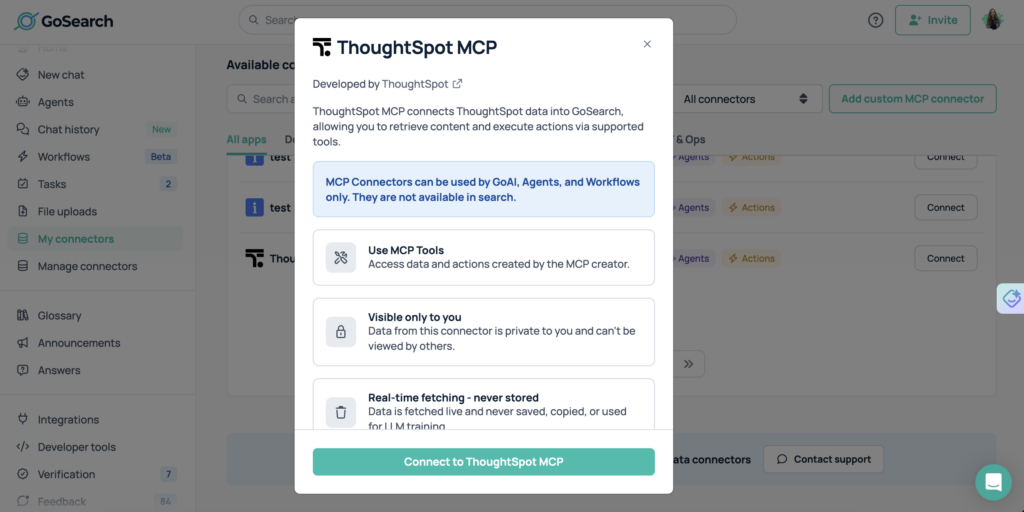
- Enable the Intercom ThoughtSpot server in GoSearch.
Navigate to GoSearch’s connector library and activate the ThoughtSpot MCP server from the integrations panel.
- Authenticate using ThoughtSpot’s existing access controls.
Connect via OAuth or a ThoughtSpot access token. GoSearch inherits ThoughtSpot’s existing permission scopes — including row-level and object-level security — automatically. No need to rebuild data access rules or recreate governance configurations. Required scopes include access to ThoughtSpot’s search, Liveboards, and semantic data models.
- ThoughtSpot becomes a live tool for any AI agent or workflow in GoSearch.
No indexing, syncing, or data duplication is required. All access happens in real time through secure APIs. ThoughtSpot’s analytics engine is immediately callable by any AI agent or automated workflow you deploy through GoSearch.
- Start querying immediately.
Use natural language to retrieve metrics, surface Liveboard insights, or trigger cross-system workflows. Test with a simple query like: “What was our total revenue last quarter, broken down by product line?”
Who Should Use a ThoughtSpot MCP Server?
A ThoughtSpot MCP server creates value across every team that relies on data to make decisions or drive action.
Business and revenue leaders can retrieve governed metrics and performance summaries on demand — without waiting on analyst queues or navigating dashboards — and immediately route findings into operational decisions.
Sales and go-to-market teams gain real-time visibility into pipeline, account health, and regional performance through natural language queries that combine ThoughtSpot’s analytical depth with CRM and activity data from connected tools.
Finance and operations teams can automate the detection and escalation of budget variances, cost anomalies, and forecast deviations — converting what used to be a manual reporting cycle into a continuous, automated workflow.
Data and analytics teams spend less time generating and distributing reports. GoSearch handles recurring analytics delivery, leaving data teams free to focus on modeling, governance, and more complex analytical work.
IT and security teams maintain full control over data access, permission enforcement, and auditability across all AI-powered analytics workflows. GoSearch inherits and enforces ThoughtSpot’s access controls at every step — no AI agent ever sees data it isn’t authorized to access.
Why Use GoSearch for MCP Servers?
GoSearch provides a unified platform for deploying and managing MCP servers across the enterprise. By connecting ThoughtSpot with more than 100 enterprise systems, GoSearch enables AI agents to reason over analytics data and coordinate action across tools — sales, finance, operations, product, and more — under a single governance layer.
Teams can route analytical findings directly into operational workflows, ensuring that insights don’t stop at a dashboard but flow through to the people and systems that need to act on them. Because GoSearch treats ThoughtSpot as a live analytical engine rather than a static report source, business intelligence becomes a continuous input to enterprise decision-making rather than a periodic deliverable.
Get Started With the ThoughtSpot MCP Server
The GoSearch ThoughtSpot MCP server enables organizations to turn business analytics into enterprise-wide action. AI agents can retrieve, analyze, and act on live ThoughtSpot data — triggering notifications, routing decisions, and coordinating cross-system workflows automatically — with no manual report generation and full security and compliance across the enterprise.
Get a demo to see how GoSearch connects ThoughtSpot and other MCP servers to power AI workflows that don’t just surface insights, but follow through on them.
Search across all your apps for instant AI answers with GoSearch
Schedule a demo
ThoughtSpot MCP Server: Frequently Asked Questions
A ThoughtSpot MCP server is a Model Context Protocol endpoint that allows AI agents to access ThoughtSpot’s analytics platform — including natural language search, governed metrics, and Liveboard data — in real time. It gives AI models a standardized, permission-aware way to query and act on business intelligence without requiring dashboard exports, manual queries, or custom integration development.
The ThoughtSpot API requires custom development and ongoing maintenance for each integration. An MCP server exposes ThoughtSpot as a standardized, callable tool that any MCP-compatible AI agent can use immediately — no custom code required. It also enables AI agents to combine ThoughtSpot analytics with data from other enterprise systems in a single coordinated workflow.
No. ThoughtSpot’s native Agentic MCP Server delivers analytics intelligence within individual AI clients like Claude, Gemini, and ChatGPT — a strong option for teams that want to query ThoughtSpot from their AI assistant. GoSearch’s ThoughtSpot MCP server is built for enterprise orchestration, enabling AI agents to act on analytical findings across 100+ connected systems and operate under a unified governance layer.
The GoSearch ThoughtSpot MCP server requires access to ThoughtSpot’s search, Liveboards, and semantic data models. When connecting via OAuth or access token, the relevant ThoughtSpot permission scopes — including row-level and object-level security — are inherited automatically. AI agents cannot access data beyond what the authenticated user is authorized to view.
GoSearch’s ThoughtSpot MCP server supports both retrieval and action. AI agents can query ThoughtSpot’s analytics engine and also trigger downstream actions — sending notifications, creating tasks, updating records, and coordinating multi-system workflows — based on what the data reveals.
MCP is an open standard with broad adoption. Compatible tools include Claude (Anthropic), Cursor, VS Code with Copilot, and enterprise platforms like GoSearch that manage MCP servers at scale. Any MCP-compatible client can connect to an MCP server using the standardized protocol.
Most teams complete setup in under 5 minutes. Authentication uses ThoughtSpot’s existing OAuth flow, permissions are inherited automatically, and no data indexing is required. Teams are typically querying live ThoughtSpot analytics within the same session they begin setup.