
GoSearch is expanding how AI can work with your company knowledge.
The latest updates give teams more ways to turn company context into useful work, from reusable AI Skills and proactive daily intelligence to bringing GoSearch knowledge directly into Claude. We’re also continuing to expand the connectors available for search, agents, and workflows.
Here’s what’s new in GoSearch.
Key takeaways
- AI Skills make repeatable work reusable. Save instructions for recurring tasks so GoSearch can apply the right process, format, and context without starting from scratch.
- Proactive Intelligence surfaces what needs your attention. GoSearch can review your connected work and surface priorities, upcoming meetings, open requests, and commitments before you ask.
- GoSearch is now available in Claude. Connect GoSearch to Claude through MCP to bring company knowledge into coding, prototyping, research, and artifact creation.
- More connectors are continually being added. New federated and MCP connectors expand the systems GoSearch can access in real time and the actions agents and workflows can take.
- The same company knowledge can power more AI workflows. Search, AI conversations, agents, workflows, Skills, proactive intelligence, and Claude can all work with the business context available through GoSearch.
Turn repeatable work into AI Skills
Most teams have tasks they do over and over that require more than a simple prompt.
A marketer might need every product announcement to follow the same voice and structure. A sales team might review call notes against a consistent qualification framework. An operations team might summarize support issues using a specific format and set of criteria.
With GoSearch AI Skills, you can save those instructions once and reuse them whenever the task comes up.
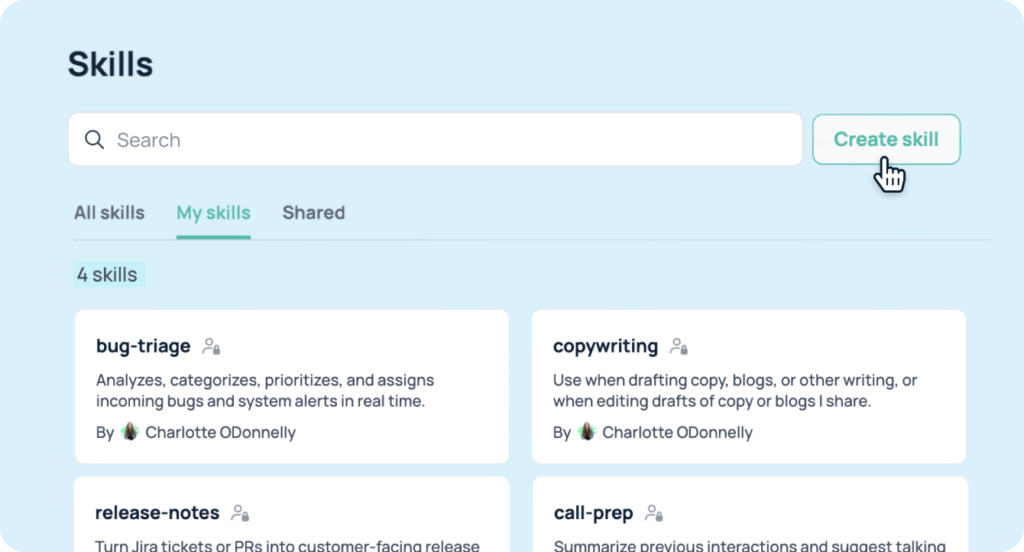
A Skill is a reusable set of instructions that tells AI how to handle a specific task, including the format, tone, process, and constraints to follow. You create a Skill by writing the instructions directly in GoSearch or uploading a Skill file, then give it a name and description so GoSearch knows when it applies.
Once created, Skills can work across GoSearch AI conversations, agents, and workflows. They can also be shared with specific people or teams, so recurring processes don’t have to live in someone’s personal prompt library.
What can you use an AI Skill for?
Skills are particularly useful when a task is repeatable and the output needs to follow a consistent process.
For example, you could create Skills for:
- Writing copy according to your company’s brand guidelines
- Reviewing content against a specific checklist
- Summarizing customer feedback using a standard format
- Preparing a weekly sales update
- Analyzing NPS feedback
- Reviewing code against internal engineering standards
The important distinction is that a Skill provides the instructions. It doesn’t replace an agent or workflow that takes action. Instead, it gives those agents and workflows a consistent playbook to follow.
That makes Skills useful for turning the way experienced employees work into reusable instructions that AI can apply across the organization.
Start your day with Proactive Intelligence
Most AI tools wait for you to ask a question. GoSearch Proactive Intelligence works from the other direction.
Instead of starting your day with a blank prompt, GoSearch can look across the work context available through your connected applications and surface what deserves your attention.
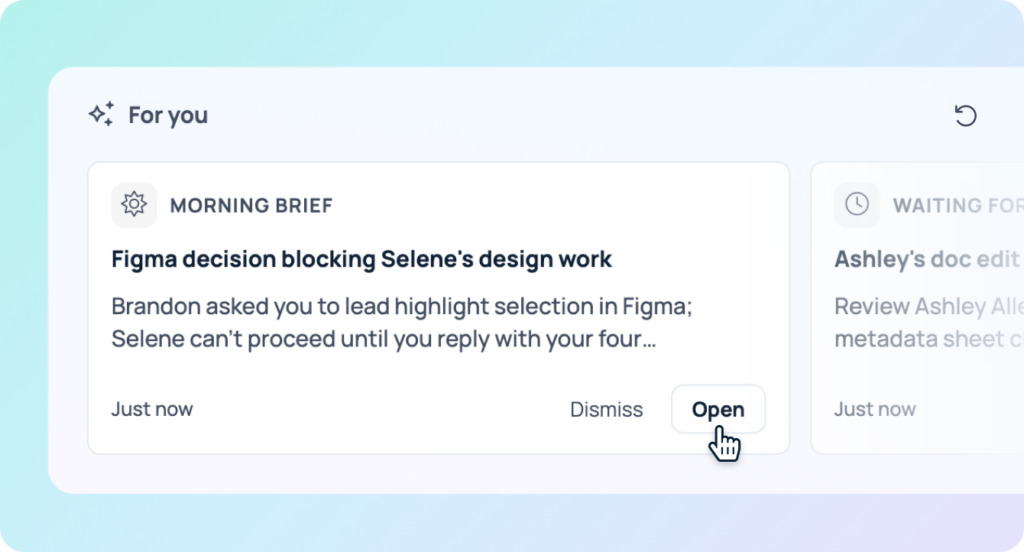
Daily AI Pulse Cards appear on your GoSearch homepage, each focused on a different part of your workday:
Morning Brief gives you a starting point by surfacing important updates, decisions, and work that may affect your priorities.
Waiting for Me identifies requests, approvals, reviews, assignments, and other work that needs your action.
Meeting Prep gathers relevant context for upcoming meetings, including related messages, documents, and previous notes.
Slipping Through the Cracks surfaces commitments and follow-ups you may have promised but haven’t finished.
Together, these cards give you a view of what is happening across your work before you have to go looking for it.
Plan ahead or catch up
Proactive Intelligence isn’t limited to what’s happening today. You can adjust the time window for each Pulse Card, looking forward up to one week or back up to two weeks.
That makes it useful for different points in your workweek. At the start of the week, you can look ahead for upcoming work. After time away, you can look back for requests and commitments you may have missed. Before the weekend, you can review unfinished follow-ups.
Because the cards use information from your connected tools, they can pull together context that would otherwise require checking multiple applications individually. GoSearch’s federated retrieval also respects the permissions of the underlying source tools.
Proactive Intelligence doesn’t make decisions for you. It gathers and organizes the relevant context so you can decide what to act on first.
Bring GoSearch knowledge into Claude
GoSearch is now available in the Claude app directory through an MCP connection.
The GoSearch MCP connection lets Claude access the enterprise knowledge available through your GoSearch account. That includes information from the business applications connected to GoSearch, giving you a way to bring company context into Claude workflows.

This is particularly useful when the work starts in Claude but depends on information that lives inside your company.
For example, a developer can ask Claude to review internal API documentation and existing implementation patterns before building a new integration. A product manager can bring customer feedback and product history into a prototype. A marketer can combine internal positioning and customer research with a broader research workflow.
The goal is to extend company knowledge into Claude rather than requiring teams to choose between their internal information and the AI environment where they want to work.
What can you do with GoSearch in Claude?
The GoSearch MCP connection can support workflows such as:
- Build code using internal technical knowledge: Give Claude access to API documentation, architecture decisions, engineering guidelines, and existing implementations.
- Create prototypes grounded in company context: Use internal processes and documentation when building dashboards, tools, and other Claude artifacts.
- Create new content and artifacts: Bring previous launch plans, customer feedback, or internal documentation into presentations, specifications, guides, and other outputs.
- Combine company knowledge with external research: Use internal product, customer, or business information alongside broader research.
- Review work against internal standards: Check drafts, designs, or technical work against your company’s existing policies and documentation.
GoSearch remains a complete AI platform for searching, understanding, and acting on company knowledge. The Claude connection gives teams another environment where they can use that knowledge.
More connectors for more company knowledge
AI is only as useful as the context it can access. That’s why we’re continuing to expand GoSearch’s connector ecosystem.
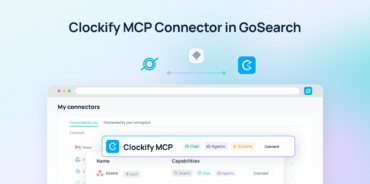
GoSearch supports hundreds of app integrations, with multiple ways to connect those systems depending on how the data needs to be accessed. Indexed connectors can provide a searchable copy of shared data, while federated connectors retrieve information directly from the source in real time. MCP connectors provide a way for AI agents to access tools and take actions in connected systems.
We’re continuing to add new connectors so teams can bring more of their existing tools into GoSearch.
Federated connectors are useful when you need fresh information directly from the source without copying it into a search index. MCP connectors extend that connection into AI agents and workflows, allowing them to work with external systems and take supported actions.
This also means connector support isn’t limited to a static list of apps. As teams add new systems to their stack, GoSearch continues to expand the ways those systems can participate in search, AI conversations, agents, and workflows.
One knowledge layer, more ways to use it
These updates connect to a broader shift in how teams use GoSearch.
Search is still an important starting point. But once company knowledge is connected, AI can do more with it.
Skills give AI reusable instructions for recurring work.
Proactive Intelligence brings relevant information to you before you have to ask.
Claude integration brings company knowledge into another AI environment where teams are already coding, researching, and creating.
New connectors expand the systems that GoSearch can access and the workflows it can support.
Together, these capabilities give teams more ways to use the same company knowledge across the workday. Instead of treating search, AI conversations, agents, and automation as separate experiences, GoSearch connects them through the knowledge and systems your organization already uses.
Get a personalized demo of GoSearch to see these new features and the full platform in action.
Search across all your apps for instant AI answers with GoSearch
Schedule a demo
Frequently asked questions
AI Skills are reusable sets of instructions that tell GoSearch how to handle a specific task. A Skill can define a process, tone, format, or set of constraints so you don’t have to repeat the same instructions every time. Skills can be used across GoAI conversations, agents, and workflows and can be shared with specific people or teams.
A prompt is typically written for a specific interaction, while a Skill is designed to be reused. If you find yourself repeatedly giving AI the same instructions for how to format, review, summarize, or complete a task, those instructions can become a Skill. GoSearch can then apply the Skill when it’s relevant instead of requiring someone to recreate the prompt each time.
GoSearch Proactive Intelligence uses your connected work context to surface information you may need before you ask for it. It provides daily AI Pulse Cards including Morning Brief, Waiting for Me, Meeting Prep, and Slipping Through the Cracks. The cards help surface priorities, requests, meeting context, and unfinished commitments across connected applications.
Yes. GoSearch is available in the Claude app directory through an MCP connection. It lets Claude access company knowledge available through your GoSearch account, including information from the business applications connected to GoSearch. This can be used for coding, prototyping, research, artifact creation, and other Claude workflows that benefit from internal company context.
You can use GoSearch in Claude to bring internal company knowledge into tasks such as writing code, building prototypes, creating artifacts, researching topics, and reviewing work against internal standards. For example, Claude can use internal API documentation and engineering patterns when building an integration, or use product history and customer feedback when creating a prototype.
Skills provide reusable instructions, agents are configured AI systems that can take actions, and workflows automate multi-step processes based on triggers or schedules. A Skill can give an agent or workflow a consistent playbook to follow, while the agent or workflow handles the actions. This lets teams separate the instructions for how a task should be done from the automation that carries it out.