
Most AI tools wait for you to ask, which works well when you already know what to ask. At 8:45 a.m., with a full calendar and a busy inbox, that is rarely the case. What you need is a view of what deserves your attention first.
Work keeps getting louder. Microsoft reported that the most-pinged fifth of Microsoft 365 users received 275 meeting, email, and chat pings a day. A good AI tool absorbs that load instead of adding to it.
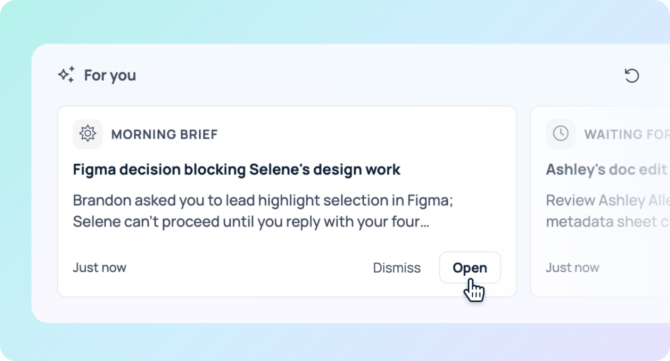
Quick answer: You can use AI to plan your day by letting it gather your schedule, open requests, and commitments before you start work. GoSearch proactive intelligence does this with daily AI pulse cards on your GoSearch homepage. The four cards are Morning Brief, Waiting for Me, Meeting Prep, and Slipping Through the Cracks. You can regenerate any card and adjust its time window to look forward up to one week or back up to two weeks.
What does it mean to plan your day with proactive AI?
Proactive AI acts before you prompt it. Reactive AI waits for a question, while proactive AI reads your work context and surfaces what matters on a schedule.
Daily briefs began in consumer tools, and OpenAI launched ChatGPT Pulse in September 2025 for Pro users on mobile. A work day reaches further than one inbox and one calendar, though. It spans chat threads, tickets, documents, CRM records, and wikis. GoSearch builds its pulse cards on that wider context, with every one of its 100+ connectors feeding in.
What are GoSearch AI pulse cards?
GoSearch places four cards on your homepage each day, and each one answers a different planning question. Together they cover your morning, your meetings, your requests, and your loose ends.
What does the Morning Brief card do?
The Morning Brief gives you one starting point for the day. It surfaces items that need your decision or reply, along with work that blocks or changes what you are doing. It also shows decisions made on projects you are part of and significant work that shipped. Routine status updates and threads where you are only copied stay out, so the brief stays focused. You read one summary and choose your first move.
What does the Waiting for Me card show?
Once you know the shape of your day, the Waiting for Me card shows what still needs your action. It covers open requests and @mentions, approvals and reviews only you can give, and tasks or tickets assigned to you. Updates on tickets you watch and deliverables someone is waiting on appear here too. You see these items early, so colleagues get faster answers and you avoid blocking anyone by accident.
How does the Meeting Prep card help?
The Meeting Prep card turns your calendar into a prep list. It lists your upcoming meetings with the organizer and attendees, then adds related emails, messages, docs, and prior notes from your connected tools. You spend less time hunting for the last thread, the latest document, or last month’s decision.
What does Slipping Through the Cracks catch?
The Slipping Through the Cracks card covers the commitments you made along the way. It surfaces things you promised to send, review, approve, follow up on, deliver, decide, or schedule and have not finished. It also checks for signs you already finished the work, such as a closed ticket, a later message delivering it, or a thank-you from the recipient, and leaves those items out.
How do time windows change your daily plan?
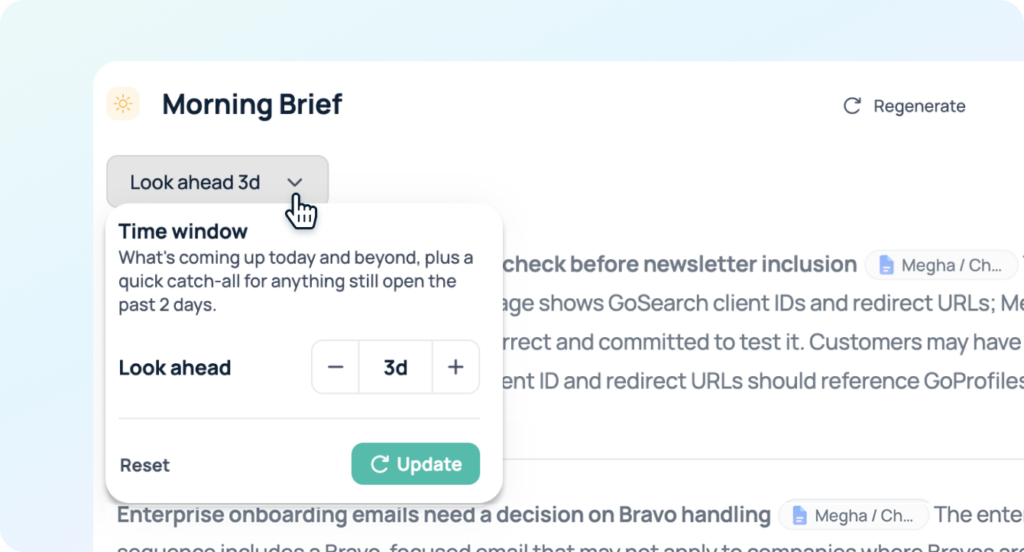
Each card has its own time window, and you can adjust it and refresh the card whenever your planning needs change. Look forward up to one week to plan ahead, or look back up to two weeks to catch up. A few common uses show how the windows work:
- Monday planning: Look forward one week to see what is coming and prepare early.
- Return from time off: Look back two weeks to find requests and commitments you missed.
- Friday wrap-up: Look back across the week to check for loose ends before the weekend.
How do you build a daily planning routine with pulse cards?
A simple routine follows the natural order of your day.
- Open your GoSearch homepage and read the Morning Brief to set your priorities.
- Clear the Waiting for Me items that unblock other people.
- Check Meeting Prep before each meeting block.
- Regenerate a card when your day changes, such as after a new request or a rescheduled meeting.
- Scan Slipping Through the Cracks before you close out the day.
Why does planning with work data beat starting from a blank prompt?
A general chat tool knows only what you paste into it, so you have to remember the context, gather it, and ask the right question. GoSearch already connects to your tools, which means the cards arrive with that context included.
Permissions stay intact, too. Pulse cards respect the permissions of your source tools, so you see only what you can already access there. GoSearch retrieves information in real time through federated retrieval. It works with OpenAI, Anthropic, Google Gemini, and xAI models, and it holds SOC 2 Type II, GDPR, HIPAA, and CCPA compliance.
The benefits show up differently by team:
- Sales: Prepare for customer calls with account context and catch follow-ups you promised.
- Customer success: See open customer requests and upcoming check-ins in one place.
- Engineering and product: Spot review requests, watched tickets, and open threads across tools.
- Marketing: Track approvals and deadlines across campaigns and content.
Where does AI day planning fall short?
Proactive AI gathers and organizes, and you still make the decisions. Review each card before you act on it. Cards reflect the work your team records in connected tools, so fuller records produce a fuller plan. When something changes, regenerate the card.
How do you get started?
Open your GoSearch homepage and read your pulse cards, starting with the Morning Brief. Once you see how your week flows, adjust each card’s time window. To see Proactive Intelligence with your own tools, book a GoSearch demo.
Search across all your apps for instant AI answers with GoSearch
Schedule a demo
Frequently Asked Questions
Yes. Proactive AI gathers your schedule, messages, and open tasks on its own and presents a plan before you start work. GoSearch Proactive Intelligence does this with daily AI pulse cards, and each card covers one part of your day, such as meetings or follow-ups. You review the cards, decide what matters, and get started. Your first minutes go toward acting on priorities instead of searching for them.
Yes. You can adjust each card’s time window to look forward up to one week or look back up to two weeks. A forward window helps you plan a busy week, while a backward window helps you catch up after vacation or a long project sprint. Choose the window that fits the planning job in front of you. A shorter window keeps your daily view focused on what is closest.
Yes. GoSearch pulse cards respect the permissions of your source tools, so you only see items you can already access there. GoSearch also holds SOC 2 Type II, GDPR, HIPAA, and CCPA compliance. It supports Zero Data Retention with its LLM providers and offers a bring-your-own-cloud deployment option. Because proactive AI reaches across your tools, review your requirements with your IT team before you connect them.
No. A daily planner app shows what you enter yourself, while AI pulse cards surface what your connected work tools already contain. You skip the copying and the remembering, and every GoSearch connector feeds the cards, so the view covers your whole stack. Planner apps still help with time blocking, so the two work well together. Pulse cards handle the gathering, and your planner handles the scheduling.
Yes. Cards appear on your GoSearch homepage each day, and you can regenerate any card when your day changes. You can also adjust and refresh the time window on a single card without touching the others. A new meeting, an urgent request, or a long stretch of calls are all good moments to refresh. Pick the card that changed and refresh only that one, and your plan stays current as work moves.