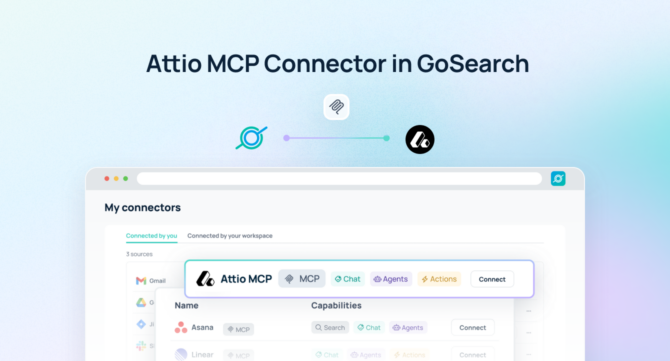

An Attio MCP server connects AI agents to Attio data — including contacts, companies, deals, lists, and relationship intelligence — enabling intelligent querying and coordinated action without duplicating CRM data outside Attio.
Quick Answer: An Attio MCP server is a Model Context Protocol endpoint that gives AI agents real-time, permission-aware access to CRM records, relationships and pipelines — no data exports or custom integrations required.
With GoSearch, teams can deploy an Attio MCP server to interrogate customer and pipeline data using natural language, automate CRM-linked workflows, and connect Attio to the broader enterprise stack. Instead of manually searching records or switching between Attio and the tools where work gets done, AI agents work directly inside Attio’s data model with full permission enforcement — and act on what they find across every connected system.
As modern go-to-market teams move away from legacy CRMs toward more flexible, data-rich platforms like Attio, the ability to reason over live relationship data and trigger coordinated action from those findings becomes a core competitive advantage.
TL;DR
- An Attio MCP server is a Model Context Protocol endpoint that gives AI agents structured, permission-aware access to live Attio contacts, companies, deals, lists, and relationship data.
- GoSearch’s Attio MCP server goes beyond read access — AI agents can take actions in Attio and orchestrate workflows across 100+ connected enterprise tools in a single execution.
- Setup takes under 5 minutes. GoSearch inherits Attio’s existing permissions automatically, so teams are querying live CRM data without any additional indexing or syncing infrastructure.
- Key use cases include pipeline analysis, account research, relationship context retrieval, automated outreach coordination, and cross-system revenue workflow orchestration.
- GoSearch’s Attio MCP server differs from Attio’s native MCP server, which provides record access for individual AI clients. GoSearch adds enterprise orchestration, write actions across connected systems, and a unified governance layer spanning your entire tool stack.
What Is an Attio MCP Server?
An Attio MCP server is a Model Context Protocol (MCP) endpoint that provides AI models and agents with structured, permission-aware access to Attio’s CRM platform — including contact and company records, deal pipelines, lists, notes, tasks, and relationship graph data — in real time, without requiring data exports, manual record searches, or custom integration development.
MCP is an open standard for connecting AI systems to external tools. Rather than building and maintaining separate connectors for each application, MCP gives AI agents a consistent, standardized way to retrieve data, call tools, and execute actions across systems. Anthropic, which developed the standard, has seen broad adoption across Claude, Cursor, VS Code, and enterprise platforms globally.
Unlike integrations that depend on scheduled syncs or static CRM snapshots, an Attio MCP server lets AI operate on live relationship data. Teams can use it to:
- Retrieve contact and company records, deal status, and relationship history by natural language description
- Surface account context and pipeline intelligence alongside meeting notes, emails, or support history
- Create, update, or enrich records as part of a broader automated workflow
- Trigger cross-system actions in Slack, email platforms, billing tools, or connected revenue systems
- Automate pipeline reviews, account briefings, and follow-up coordination across the go-to-market stack
Because the Attio MCP server enforces existing workspace and record-level permissions, AI agents access only the data each user is authorized to view — maintaining CRM governance while removing the friction of manually pulling and distributing relationship intelligence.
GoSearch Attio MCP Server vs. Attio’s Native MCP Server
Attio’s native MCP server provides contact, company, and deal record access for individual AI clients — a strong starting point for revenue teams that want to query their CRM from within an AI assistant or productivity tool.
The GoSearch Attio MCP server is designed for a broader scope: enterprise orchestration that extends Attio’s relationship intelligence beyond the CRM and into coordinated action across the full go-to-market and revenue stack.
| Attio Native MCP | GoSearch Attio MCP | |
|---|---|---|
| Access contacts, companies & deals | ✅ | ✅ |
| Real-time, permission-aware access | ✅ | ✅ |
| Pipeline and list retrieval | ✅ | ✅ |
| Take actions across connected systems | ❌ | ✅ |
| Cross-system orchestration | ❌ | ✅ (100+ connectors) |
| Unified governance layer | ❌ | ✅ |
| Connect to Slack, billing, support, finance | ❌ | ✅ |
| Multi-agent routing | ❌ | ✅ |
If your team needs Attio to do more than answer questions about records and pipeline — triggering revenue workflows, connecting CRM data to operational systems, or enabling agents to reason and act across your full enterprise stack — GoSearch is the right platform.
How the GoSearch Attio MCP Server Works
The GoSearch Attio MCP server connects AI agents directly to live CRM and relationship data and coordinates downstream action across the enterprise.
When a user submits a query or a workflow is triggered, GoSearch interprets the request and dynamically invokes the Attio MCP server as a callable tool. The agent retrieves the relevant contacts, companies, deals, or list data, synthesizes that content into a clear answer or action plan, and — when needed — combines Attio’s relationship intelligence with data from other connected systems like billing platforms, support tools, communication channels, or internal documentation.
This architecture transforms Attio from a record-keeping system into an active input for AI-powered revenue coordination — where agents don’t just read CRM data but follow through on what it means for the business.
What You Can Do With an Attio MCP Server
Connecting Attio via MCP unlocks a range of high-impact use cases that go well beyond looking up a contact or checking deal stage.
Sales and revenue teams can surface complete account context — deal history, relationship timeline, associated contacts, and recent activity — directly within the tools where conversations happen, without switching into Attio manually. When a rep prepares for a call or a leader reviews pipeline, the relevant CRM intelligence is retrieved and synthesized on demand.
Customer success and post-sale teams gain a live view of account health, renewal timelines, and relationship depth across their entire book of business. AI agents can flag accounts that haven’t had recent activity, surface expansion opportunities, and trigger proactive outreach workflows — all grounded in what Attio actually knows rather than a manually maintained spreadsheet.
Operations and RevOps teams can automate the coordination that typically requires multiple people and multiple tools — routing new deals to the right owners, syncing pipeline changes to finance systems, and ensuring that the data in Attio stays aligned with the systems that depend on it, without manual reconciliation.
Example Queries
A GoSearch Attio MCP server makes it possible to combine CRM depth with cross-system action in ways no standalone relationship tool can deliver.
- “Show me all deals in the negotiation stage that haven’t had activity in the past 10 days and notify the account owner via Slack.”
- “Pull a full relationship summary for Acme Corp including all contacts, recent interactions, and open deals.”
- “Find all enterprise accounts with renewals due in the next 60 days and create follow-up tasks for the customer success team.”
- “Identify contacts added to Attio in the past 30 days who haven’t been reached out to yet and draft an outreach sequence.”
- “Retrieve all deals that moved to closed-lost this quarter and summarize the most common reasons from the associated notes.”
- “Find all companies tagged as a priority account that don’t have an active deal in the pipeline and flag them for the sales lead.”
- “Generate a pipeline review summary for the enterprise segment and post it to the #revenue-leadership Slack channel.”
These examples show how a GoSearch Attio MCP server turns relationship intelligence into coordinated revenue action — not just a CRM lookup.
Attio MCP Server vs. Traditional Approaches
Conventional approaches to connecting Attio data with broader revenue and operational workflows depend on manual record reviews, CSV exports, or point integrations that degrade as data models evolve. Here’s how they compare:
| Attio MCP Server | Traditional CRM Integration | Manual Export / Review | |
|---|---|---|---|
| Data freshness | Real-time | Near real-time | Stale |
| Setup complexity | Low | High (custom dev) | N/A |
| Permission enforcement | Inherited from Attio | Must be rebuilt | Often bypassed |
| Cross-system orchestration | Yes (via GoSearch) | No | No |
| Infrastructure overhead | Minimal | High | High |
| Time to first query | Minutes | Weeks | N/A |
An Attio MCP server gives AI agents live, structured, permission-aware access to relationship and pipeline data without reproducing it outside the CRM. Every AI output reflects the current state of Attio — the most recent interaction, the latest deal stage, the actual composition of a list — rather than a data extract from last week’s sync.
Learn why MCP is replacing custom integrations across enterprise AI →
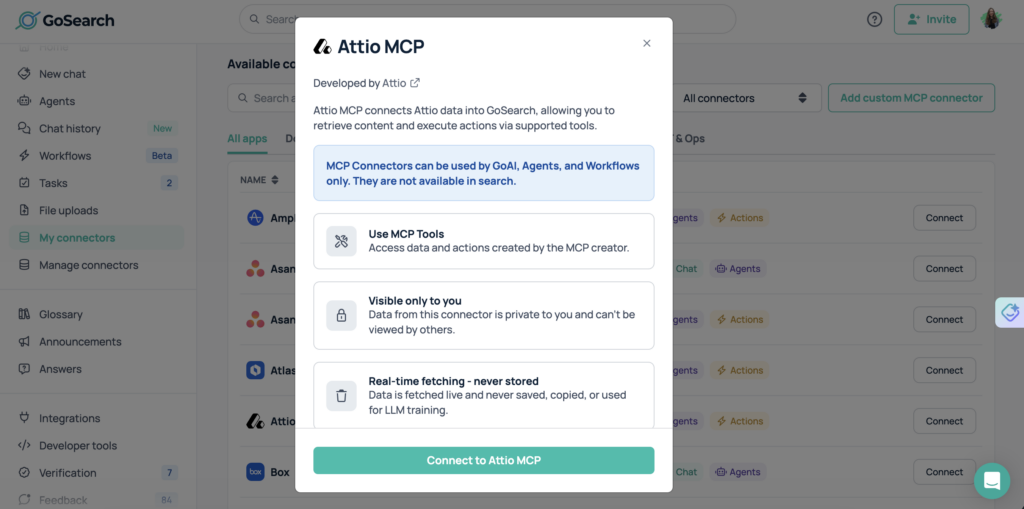
How to Connect Attio to an MCP Server in GoSearch
Connecting Attio to GoSearch via MCP is fast and requires no dedicated technical resources. Most teams are querying live CRM data within the same session they begin setup.
- Enable the Attio MCP server in GoSearch.
Navigate to GoSearch’s connector library and activate the Attio MCP server from the integrations panel.
- Authenticate using Attio’s existing access controls.
Connect via OAuth using your Attio credentials. GoSearch inherits Attio’s existing workspace and record-level permissions automatically — no need to recreate access rules or rebuild data sharing configurations. Required scopes include read access to contacts, companies, deals, lists, and notes.
- Attio becomes a live tool for any AI agent or workflow in GoSearch.
No indexing, syncing, or data duplication is required. All access happens in real time through secure APIs. Attio is immediately callable by any AI agent or automated workflow you deploy through GoSearch.
- Start querying immediately.
Use natural language to retrieve CRM data, surface relationship intelligence, or trigger cross-system revenue workflows. Test with a simple query like: “Show me all open deals in the enterprise pipeline along with their last activity date.”
Who Should Use an Attio MCP Server?
An Attio MCP server delivers value across every team that depends on relationship data to drive revenue and customer outcomes.
Sales teams can surface complete account and deal context on demand — relationship history, associated contacts, pipeline stage, and recent activity — directly within the tools they use for outreach and call preparation, without switching into Attio manually.
Customer success teams gain real-time visibility into account health, renewal timelines, and engagement patterns across their full book of business. AI agents can proactively flag at-risk accounts, surface expansion signals, and trigger coordinated outreach before problems escalate.
RevOps and revenue leadership can run pipeline reviews, analyze deal velocity, and generate segment summaries through natural language queries — replacing hours of manual CRM navigation and spreadsheet consolidation with on-demand intelligence.
Marketing and demand generation teams can query Attio lists, segment contacts by attribute, and coordinate campaign targeting directly against live CRM data — ensuring outreach is always grounded in the current state of the relationship rather than a static export.
IT and security teams maintain full control over CRM data access, permission enforcement, and auditability across all AI-powered revenue workflows. GoSearch inherits and enforces Attio’s access controls at every step — no AI agent ever accesses a record it isn’t authorized to view.
Why Use GoSearch for MCP Servers?
GoSearch provides a unified platform for deploying and managing MCP servers across the enterprise. By connecting Attio with more than 100 enterprise systems, GoSearch enables AI agents to reason over relationship and pipeline data and coordinate action across tools — sales, customer success, marketing, finance, support, and more — under a single governance layer.
Teams can route CRM intelligence directly into the operational systems where revenue outcomes are made, ensuring that a stalled deal, a renewal risk, or a new expansion opportunity triggers the right response in the right tool automatically. Because GoSearch treats Attio as a live system of record rather than a contact database, relationship intelligence becomes a continuous driver of go-to-market execution rather than a reference tool people consult occasionally.
Get Started With the Attio MCP Server
The GoSearch Attio MCP server enables organizations to operationalize CRM and relationship data across tools and workflows. AI agents can retrieve, analyze, and act on live Attio data — routing follow-ups, generating pipeline reports, triggering notifications, and coordinating cross-system revenue workflows automatically — with no manual record hunting and full security and compliance across the enterprise.
Get a demo to see how GoSearch connects Attio and other MCP servers to power AI workflows that turn relationship intelligence into revenue action.
Search across all your apps for instant AI answers with GoSearch
Schedule a demo
Attio MCP Server: Frequently Asked Questions
An Attio MCP server is a Model Context Protocol endpoint that allows AI agents to access live Attio data — including contacts, companies, deals, lists, and relationship history — in real time. It gives AI models a standardized, permission-aware way to query and act on CRM data without requiring exports, manual searches, or custom API development.
The Attio API requires custom development and ongoing maintenance for each integration. An MCP server exposes Attio as a standardized, callable tool that any MCP-compatible AI agent can use immediately — no custom code required. It also allows AI agents to combine Attio CRM data with information from other enterprise systems in a single coordinated workflow.
No. Attio’s native MCP server provides contact, company, and deal record access for individual AI clients — a solid starting point for revenue teams querying their CRM from within an AI assistant. GoSearch’s Attio MCP server is built for enterprise orchestration, enabling AI agents to take actions across 100+ connected systems, coordinate cross-functional revenue workflows, and operate under a unified governance layer.
The GoSearch Attio MCP server requires read access to contacts, companies, deals, lists, and notes. When connecting via OAuth, Attio’s existing workspace and record-level permissions are inherited automatically. AI agents cannot access records beyond what the authenticated user is authorized to view.
GoSearch’s Attio MCP server supports both retrieval and action. AI agents can query Attio’s CRM data and also trigger downstream actions — updating records, creating tasks, sending notifications in connected tools, and coordinating multi-system revenue workflows based on what the data reveals.
MCP is an open standard with broad adoption. Compatible tools include Claude (Anthropic), Cursor, VS Code with Copilot, and enterprise platforms like GoSearch that manage MCP servers at scale. Any MCP-compatible client can connect to an MCP server using the standardized protocol.
Most teams complete setup in under 5 minutes. Authentication uses Attio’s existing OAuth flow, permissions are inherited automatically, and no data indexing is required. Teams are typically querying live Attio data within the same session they begin setup.