
If you’ve ever typed a question into GoSearch and felt like the answer wasn’t quite what you needed, you’re not alone. Getting more useful responses from AI enterprise search almost always comes down to one thing: how you ask.
GoSearch works in two ways, and both are useful. You can run a quick keyword search the way you’d use Google, and GoSearch will surface the most relevant results from across your company’s tools. Or you can ask it something in plain language, and it will find information, synthesize it, and give you a real answer. This guide focuses on that second mode: how to write AI enterprise search prompts that get you more specific, useful responses. No technical background required.
Quick Answer: How Do You Write Better AI Prompts for Enterprise Search?
Every effective enterprise search prompt has three parts: a clear task that tells AI what to do, context that points it to the right information, and an output format that describes what the response should look like. A prompt like “Summarize where we stand against our Q2 budget plan, using data from our most recent budget review. Create a prioritized list of areas that need discussion” will consistently outperform a vague ask like “summarize the budget review.” The more complete your prompt, the more useful the response.
Start Here: Your First GoSearch Prompt
If you’re new to GoSearch, copy this into the chat and replace the brackets:
Tell me how I can use GoSearch to make my life easier. I’m a [description of you or your job]. Give me 5 things I can do right now, and a prompt for each one.
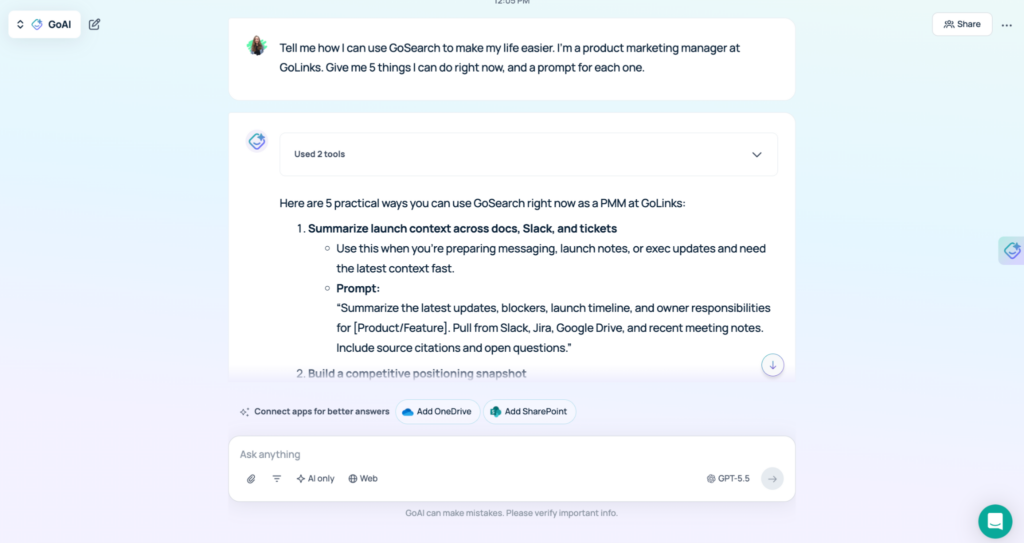
GoSearch already knows your company, your role, and your connected tools, so the suggestions it returns will be specific to your actual environment. It’s one of the fastest ways to discover what AI enterprise search can do for your situation.
The Three Parts of Every Effective Enterprise Search Prompt
The best prompts for enterprise search aren’t complicated. They’re just complete. Think of it like asking a well-informed colleague for help: the more clearly you describe what you need, the better the answer.
Every strong AI enterprise search prompt has three components.
Task. Be clear about what you want GoSearch to do and why it matters. “Analyze recurring customer issues and feedback from the past month” gives it a specific job to do.
Context. Add any background that will help GoSearch find the right information. You don’t need to specify which app your data lives in. GoSearch knows your connected tools and will find it. Just describe what you’re looking for: “Use data from our help desk logs.”
Output. Tell GoSearch what shape the response should take: a summary, a prioritized list, an email draft, a document or file download. Even a short instruction here makes a real difference. “Group into themes” is enough.
Put together, that’s one natural sentence: Analyze recurring customer issues and feedback from the past month, using data from our help desk logs. Group into themes.
GoSearch handles the rest.
Good Prompt vs. Great Prompt: Real AI Enterprise Search Examples by Role
A good enterprise search prompt will get you something. A great one gets you exactly what you need. The difference is usually a bit more specificity, not more complexity. Each great prompt below is broken into its task, context, and output components.
Engineering: Investigating a Bug Report
Good:
What do we know about the checkout timeout issue?
Great:
Summarize what we know about the checkout timeout issue reported this week, including who’s working on it and whether there is a root cause identified yet. Give me an update I can share on Slack and flag if it’s blocking the current sprint.
Why it’s better: The great prompt tells GoSearch what to extract and what shape to put the answer in.
Sales: Preparing for a Prospect Call
Good:
Give me background on Meridian Logistics.
Great:
Brief me on Meridian Logistics before my first call with them tomorrow. What do we know about them and any prior contact history? Draft a check-in email I can send to confirm the call agenda.
Why it’s better: GoSearch pulls from your CRM, internal notes, and prior conversations, and generates an email draft for you to send.
Product: Catching Up on a Project
Good:
What’s the status of the onboarding redesign?
Great:
Brief me on the onboarding redesign project. I’m being looped in and need to get up to speed quickly. List the top 3 priorities I should propose as next steps.
Why it’s better: Instead of tracking down teammates for a catch-up, GoSearch synthesizes the current state from tickets, docs, and meeting notes in one query.
Finance: Preparing for a Budget Review
Good:
Summarize our Q2 budget plan.
Great:
Summarize where we stand against our Q2 budget plan. I’m leading the review next week and need to understand how we’re tracking by category. Create an Excel sheet with breakdowns by department and category.
Why it’s better: The great prompt asks GoSearch to do the analytical work and generate a file rather than just retrieve data for you to interpret manually.
HR: Responding to a Policy Question
Good:
What’s our policy on home office equipment reimbursement?
Great:
Help me respond to an employee question about reimbursing a standing desk, including what our policy covers, the approval process, and any edge cases. Write a friendly email I can send to the employee.
Why it’s better: Instead of returning a policy document, GoSearch gives you a ready-to-send response, including nuance from recent discussions that might not be in the formal policy.
How to Refine AI Enterprise Search Prompts and Get Better Answers
The first response is a starting point, not a final answer. The most productive users of AI enterprise search treat the first response as a draft and build on it. GoSearch holds the context of your conversation throughout, so you can ask it to adjust the format, pull in something it missed, or take the answer in a different direction without starting over.
A few ways to keep refining:
- “Make this shorter and more direct.”
- “Can you pull in anything from the last two weeks on this?”
- “Reformat this as bullet points for a team meeting.”
Conversational follow-ups don’t require a full three-part prompt. They just involve asking natural language questions that build on or specify your previous instructions.
Enterprise Search Prompt Templates You Can Use Today
Copy any of these and fill in the brackets. Each follows the task, context, output structure. GoSearch will find the right information from your connected tools and generate an output in your specified format.
Sales — Territory snapshot
Give me a summary of my open opportunities. Group them by stage and flag any that haven’t had activity in the last two weeks. Create a prioritized sheet of the ones most at risk of slipping this quarter.
Engineering — Getting up to speed
Brief me on the [project name] project. I’m joining the team and need to understand where things stand and what the open questions are. Draft a meeting agenda prioritized to address current blockers.
Marketing — Campaign performance check
Summarize how our active campaigns are performing against targets, pulling from our recent email marketing data. Flag anything underperforming and give me 3 recommendations for where we should shift focus.
Design — Preparing for a review
Summarize the current feedback on the [project name] design. I have a review tomorrow and need to understand what’s open and what’s already been addressed. Give me an executive brief with any unresolved decisions clearly flagged.
Operations — Initiative status
Give me a status update on the [initiative name] initiative. Pull from the latest sprint activity and recent team discussions. Write a message I can share on Slack organized by what’s on track, what’s blocked, and what decisions need to be made this week.
People Ops — Onboarding prep
Pull together a first-week plan for [name], who is starting as a [role] next week. Base it on our onboarding process and the posted job description. Write it as a structured day-by-day plan I can share as a Word Doc with them before they start.
Legal/Compliance — Contract review
Summarize our current agreements with [vendor name]. Pull from any contracts on file. Give me an overview of key terms, renewal dates, and obligations, with renewals in the next 90 days flagged at the top.
Start Writing Better Enterprise Search Prompts Today
Effective prompting for enterprise search doesn’t require technical skill. It requires clarity. Every strong AI enterprise search prompt gives GoSearch a clear task, enough context to find the right information, and a specific output format so the response is ready to use. Start simple, then refine from there. The prompts that work best aren’t the most elaborate ones. They’re the ones that most clearly describe what you’re actually trying to do.
Begin with the starter prompt at the top of this guide, then use the templates as a foundation for your most common tasks.
Search across all your apps for instant AI answers with GoSearch
Schedule a demo
Frequently Asked Questions About AI Prompts for Enterprise Search
Enterprise search is a Google-like search experience built for your company’s internal tools and data. It surfaces information from the apps your team uses every day, like your CRM, project tracker, document library, and communication tools, all from one place. GoSearch is an AI enterprise search platform that combines traditional keyword and semantic search with conversational AI, so you can search simply or prompt deeply depending on what you need.
Search is fast and direct: type a keyword or phrase and GoSearch returns the most relevant results from across your connected tools, the same way Google surfaces web pages. Prompting goes further: you describe what you need in natural language, and GoSearch finds the information, synthesizes it, and gives you a structured answer rather than a list of results. Both are useful. Search works well when you know exactly what you’re looking for. Prompting works better when you need GoSearch to do the thinking, not just the finding.
General AI tools like ChatGPT work from public information, chat history, and a limited number of enterprise integrations. GoSearch is connected to your company’s actual data across more than 100 apps, so it can answer questions about your specific deals, projects, policies, and team activity without you needing to upload anything. Prompting for enterprise search is faster and more direct because GoSearch already knows your context.
The most effective AI prompts for work are specific about three things: what you want done (task), what information to use (context), and what the response should look like (output). Vague prompts get vague answers. Prompts that describe the actual situation, name the relevant information, and specify a format consistently produce more useful, ready-to-use responses.