


Coveo is an established enterprise search platform known for AI-powered relevance. Teams that look elsewhere rarely do so because of search quality. They want different pricing, faster setup, or search that can take action through agents and workflows.
This guide explains why organizations evaluate Coveo alternatives, compares features and implementation, and shows which platforms suit different use cases.
Throughout, we draw on customer reviews from G2 and buyer data from Vendr to show where Coveo’s strengths and trade-offs come up in practice, from setup time to contract costs.
Why Companies Look for Coveo Alternatives: Pricing, Setup, and Workflows
Coveo’s G2 rating sits at 4.3 out of 5 as of September 2026. Reviews commonly highlight the platform’s search relevance and breadth of functionality, while some users also mention complexity, pricing, and implementation effort.
The platform delivers strong search relevance when properly configured. Three concerns come up repeatedly in customer feedback.
Pricing Is Hard to Forecast
Coveo sells its plans through custom quotes, and the price depends on the product, usage, data sources, and contract terms. Some G2 reviewers say usage-based pricing makes costs hard to forecast at larger scales, and total cost also depends on connectors, permissions setup, relevance tuning, and the internal team needed to run it. Buyers should request a proposal that separates licensing, usage, implementation, support, and renewal costs.
Setup Requires Specialized Expertise
G2 reviewers report an average of four months to implement Coveo. Some customer reviews describe Coveo as requiring substantial technical involvement, as connector configuration, permissions mapping, relevance tuning, analytics, and ongoing administration may require developers or specialized implementation support. Your deployment scope and in-house technical team determine how much outside expertise you may need.
Coveo Centers on Search, Not Action
Coveo is primarily positioned around search, relevance, recommendations, and knowledge experiences. Organizations that want search to initiate actions, such as updating records, creating tickets, or notifying stakeholders, should evaluate which workflow and automation capabilities are included and which require additional tools or configuration.
Together, these factors mean the subscription is only part of the cost. Weigh implementation, administration, integrations, support, and workflow needs before you compare quotes.
Coveo vs. GoSearch: Search Relevance vs. AI Agents and Workflows
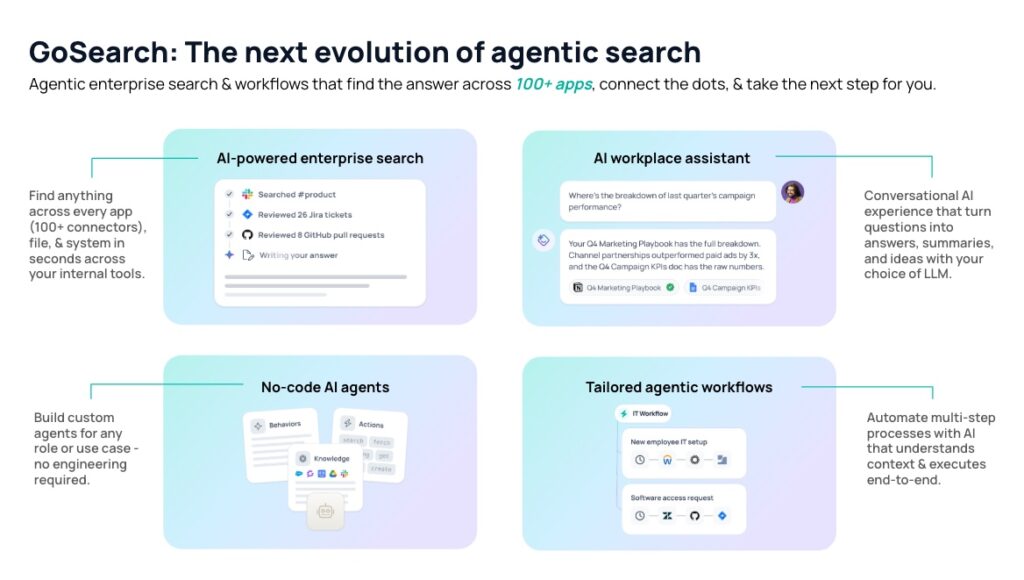
Coveo and GoSearch both search across enterprise content, but they differ in what happens after the answer. Coveo focuses on relevance, recommendations, and generative answers across customer-facing and internal search. GoSearch pairs hybrid workplace search with no-code AI agents and workflows that can update records, create tickets, and notify teams based on the results.
| Comparison | Coveo | GoSearch |
|---|---|---|
| Retrieval | Unified index with document-level permissions | Hybrid: indexes shared knowledge and queries personal data in real time, using each app’s permissions |
| Agents and workflows | Agentic retrieval and Coveo for Agentforce; workflow tools vary by product | Built-in no-code agents and multi-step workflows |
| Pricing | Quote-only; based on queries, indexed items, and seats for Workplace, with implementation through Coveo, a partner, or your own team | Free plan; Pro at $20 per user per month; Enterprise from 35 users, with implementation included |
| Setup | About four months on average, per G2 reviewers | Same day, with connectors set up in minutes |
| G2 rating | 4.3 out of 5 | 4.8 out of 5 |
Say a support manager asks to “find all customers with open billing issues and send them payment reminders.” A search-focused deployment can surface those records, but sending the reminders may require a separate workflow tool. In GoSearch, one workflow can find the records, check permissions, and send an approved reminder.
Coveo vs. Algolia: Enterprise Search vs. Developer-Led Site Search
Coveo and Algolia both offer AI-powered search, but they serve different buyers. Coveo serves enterprises that run search across commerce, support, websites, and the workplace from one index. Algolia is developer-led and best known for fast site and product search.
| Comparison | Coveo | Algolia |
|---|---|---|
| Retrieval | Unified index with document-level permissions | Hosted keyword index that developers populate through its API; NeuralSearch adds semantic search on the Elevate plan |
| Agents and workflows | Agentic retrieval and Coveo for Agentforce; generative AI is an add-on | Agent Studio connects an LLM of your choice to Algolia search for AI agents and conversational search |
| Pricing | Quote-only; based on queries, indexed items, and seats for Workplace | Free tier, then pay-as-you-go; the Elevate plan is quote-only |
| Ease of setup | 7.6 out of 10 on G2 | 8.5 out of 10 on G2 |
| G2 rating | 4.3 out of 5 | 4.5 out of 5 |
Other Coveo Alternatives
Several other platforms compete with Coveo, and each suits a different need: AI workplace search, open-source control, ecommerce personalization, search inside Microsoft 365, or keeping documentation current.
Glean
Glean is AI-native workplace search across 100+ connected apps, and it tunes relevance automatically without manual configuration. For a firsthand view, read evaluation insights from prospects who have used or evaluated Glean.
G2 rating: 4.7/5 Deployment: 2 to 3 days, varying by data sources, permissions, pilot scope, and rollout requirements Cost: Quote-based. Prospects report quotes of about $50 to $75 per user per month, usually on a $50,000+ annual base package, plus implementation fees starting at 10% of contract value. See the Glean total cost of ownership guide for the full breakdown. Best for: Large organizations with significant budgets that want AI workplace search without manual relevance tuning
Elasticsearch
The open-source choice. Elasticsearch gives teams full control over indexing and relevance with no per-query licensing, but engineers build and run connectors, permissions, and tuning themselves. Coveo sells those as a managed service. Elastic no longer sells Workplace Search to new customers, so internal search on Elastic now means building on Elasticsearch directly.
G2 rating: 4.5/5 Deployment: Weeks to months Cost: Free open-source license; Elastic Cloud is usage-based, and infrastructure and engineering costs grow with scale. See the Elastic Search Pricing & Alternatives FAQ for the full breakdown. Best for: Teams with strong engineering resources
Bloomreach and Dynamic Yield
Bloomreach and Dynamic Yield focus on ecommerce and customer experience personalization, with search as part of a broader optimization suite. They suit retailers but cover less ground than Coveo for enterprise-wide search.
G2 rating: Bloomreach 4.6/5; Dynamic Yield 4.5/5 Deployment: About three months for Bloomreach, per G2 reviewers Cost: Quote-based. Bloomreach charges a module fee plus a usage fee, billed annually; Dynamic Yield doesn’t publish pricing. Best for: Retailers that want search inside a broader personalization suite
Microsoft Copilot
If you’re already deeply embedded in the Microsoft ecosystem, Microsoft 365 Copilot provides AI-powered search inside Microsoft 365. The advantage is minimal additional tooling; the limitation is dependency on Microsoft’s stack.
Rating: 4.4/5 on Gartner Peer Insights Deployment: Assigned as an add-on license within an existing Microsoft 365 tenant Cost: Per-user add-on that requires qualifying Microsoft 365 licenses. See Microsoft Copilot Pricing: What It Really Costs in 2026 for the full breakdown. Best for: Organizations standardized on Microsoft 365
Slite
Many teams start looking at Coveo because employees can’t find answers. Often the real issue is that the documentation is out of date, and better search only surfaces stale content faster. Slite fixes that layer. It is a self-maintaining knowledge base: Slite Agent cross-checks docs against connected tools and proposes fixes for a person to approve, and AI search answers questions with cited sources.
G2 rating: 4.6/5 Deployment: Days Cost: Basic is $10 and Pro is $20 per user per month (billed annually). Enterprise is quote-based. 14-day free trial. Best for: Teams of 50 to 1,000 people whose search problems come from stale documentation
How to Choose the Right Coveo Alternative
The right Coveo alternative depends on what you need search to do, who will run it, and how quickly you need results. Four questions help narrow the field:
Are you primarily solving for discovery or automation?
If the goal is “help people find information faster,” Coveo, Glean, or Algolia all work. If the goal is “automate knowledge work and reduce manual processes,” you need a platform built for agentic workflows. That’s where GoSearch’s design matters.
Do you have dedicated search engineers on staff?
If yes, Coveo or Elasticsearch might make sense. Building on Elasticsearch, though, typically takes 10 to 15 months and $1.1 million to $1.8 million over five years, according to this build vs. buy enterprise search breakdown. If not, you’ll need to hire them or choose a platform that does not require them. Glean and GoSearch are both built for organizations that don’t want to maintain a search function.
What’s your timeline to deploy?
- Coveo: About four months on average, per G2 reviewers
- Glean: 2 to 3 days
- Algolia: Days
- Slite: Days
- GoSearch: Same day
If you need a quick win, the timeline matters. If you have several months and the budget to match, Coveo’s depth might justify the investment.
Do you need automation or just search?
This question separates the platforms most. If your team answers the same knowledge questions again and again, look for a platform that can act on the answer, such as creating a ticket or updating a record, rather than one that only ranks search results better.
What to Know About Coveo Pricing
Coveo doesn’t publish pricing. Plans are quote-based and scale with queries, indexed items, and, for Workplace, seats, on annual or three-year terms. Vendr’s data puts the median contract at about $33,100 a year, with deals ranging from roughly $27,700 to $336,700. Generative AI features are add-ons. Our Coveo pricing guide covers plans, add-ons, and what to get in writing before you sign.
When to Stay With Coveo
Coveo can be a good fit in some situations:
- You have a large organization (1,000+ employees) with complex federated search needs
- You need commerce, website, and support search on one platform
- You’ve already implemented it and achieved clear ROI
- Your team has dedicated search engineers who optimize it continuously
- You need deep customization and control
For these organizations, Coveo delivers value that justifies the cost. The mistake is assuming Coveo is the default for every enterprise. Smaller teams may not need its depth.
Is It a Search Problem or an Automation Problem?
Coveo is a strong platform for large enterprises that need sophisticated search relevance and can justify the cost. However, enterprise search has already shifted from finding information to acting on it.
Many organizations now ask a different question. Rather than “what’s the best search engine,” they ask “how do we automate routine knowledge work and free up our teams for higher-value activities?”
That question calls for a platform that can both find answers and act on them, which is why many companies are evaluating Coveo alternatives.
As you compare options, start with the problem you’re solving. If your teams mainly need better results, a search platform may be enough. If they need those results to trigger work, such as tickets, updates, and approvals, look for built-in agents and workflows.
See the difference on your own data. Book a GoSearch demo to watch search, agents, and workflows run across your apps, or start on the Free plan and connect your first apps in minutes.
Search across all your apps for instant AI answers with GoSearch
Schedule a demo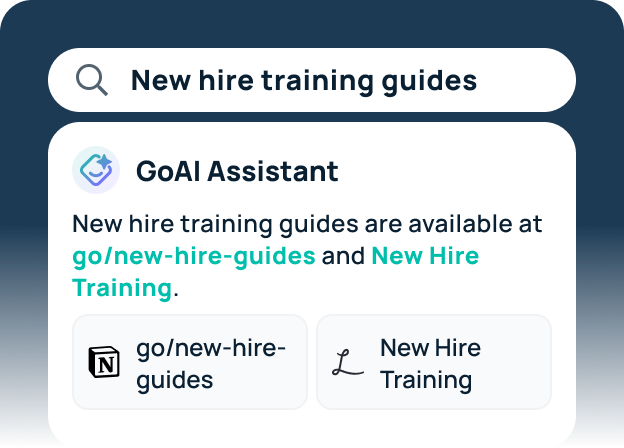
Frequently Asked Questions About Coveo Alternatives
What’s the Best-Value Alternative to Coveo?
Algolia offers a free tier, then pay-as-you-go pricing. For organizations evaluating AI-powered enterprise search, GoSearch provides a more accessible entry point than platforms with six-figure annual commitments. GoSearch offers three plans: Free, Pro ($20 per user/month), and Enterprise, with packages starting at 35 users, and includes AI search, agents, and workflows in a single platform.
How Long Does It Take to Migrate From Coveo?
Timelines depend on how many connectors and how much custom logic you need to rebuild. You’ll need to re-index content, reconfigure connectors, and rebuild any custom logic. Most alternatives offer migration guides or professional services to help.
Does Coveo Do Workflow Automation?
Partly. Coveo offers agentic retrieval, Coveo for Agentforce, and service add-ons like Case Assist, but its packaging centers on search and answers. Teams that want search results to trigger multi-step actions across apps may need a separate automation tool, or a platform with built-in workflows such as GoSearch.
What’s the Best Coveo Alternative for Workplace Search?
It depends on what you need beyond search. Glean offers AI workplace search for large organizations, but prospects report $50,000+ annual base packages and implementation fees on top of per-user pricing. Microsoft 365 Copilot fits teams standardized on Microsoft 365. GoSearch fits teams that want search, no-code agents, and workflows in one platform.
Is Coveo a Good Fit for Support Teams?
Often, yes. Coveo for Service indexes knowledge across systems like Salesforce and ServiceNow for case deflection and agent assist, and G2 reviewers often cite those uses. Teams that also want answers to trigger actions, such as creating tickets or updating records, should check which agent features cost extra.
Is Coveo Good for Ecommerce Product Search?
Yes, it’s one of its core uses. Coveo Commerce includes product catalog indexing and merchandising tools, with add-ons for deep learning ranking and conversational product discovery. It also runs website and support search on the same platform and index, which is its main advantage over single-purpose search tools. Algolia and Bloomreach are the most common alternatives for ecommerce search.
How Do Coveo Alternatives Compare on Security and Permissions?
Compare four things: whether search respects each source app’s permissions, which compliance certifications the vendor holds, how long query data is retained, and where data is hosted. Coveo enforces document-level permissions and sells HIPAA Cloud, bring-your-own-key encryption, and multi-region hosting as add-ons. Workplace search tools such as GoSearch mirror each connected app’s permissions, so check each vendor’s certifications, retention policy, and deployment options against your requirements.
Should You Buy Coveo or Build Your Own Search?
Building on Elasticsearch or Solr gives full control, but your engineers own the connectors, permissions, relevance tuning, and upkeep. Coveo and GoSearch sell those as a managed service. Compare the cost of a dedicated search team against a subscription before deciding, using this build vs. buy enterprise search breakdown as a starting point.