
Quick answer: It depends on the use case and your environment.
- ChatGPT stands out as the most versatile,
- Claude shines for writing and coding
- Gemini is ideal for teams using Google Workspace
- Microsoft 365 Copilot fits best in Microsoft environments
- Perplexity excels at research with sources
- GoSearch and Glean specialize in workplace knowledge and enterprise search
The top models are now so very similar that your best choice is really going to come down to what you’re trying to do and what tools you’re already using.
The Best AI Chatbots at a Glance
| Best overall | ChatGPT | Free; Plus $20/mo | Gemini | Free; AI Pro $19.99/mo |
| Best for writing | Claude | Free; Pro $20/mo | ChatGPT | Free; Plus $20/mo |
| Best for reasoning and analysis | ChatGPT (Pro tiers) | Plus $20/mo; Pro from $100/mo | Claude | Pro $20/mo; Max $100-$200/mo |
| Best for coding | Claude (Claude Code) | Pro $20/mo; Max $100-$200/mo | Cursor; GitHub Copilot | Cursor Pro $20/mo; GitHub Copilot Pro $10/mo |
| Best for cited research | Perplexity | Free; Pro $20/mo | Gemini | Free; AI Pro $19.99/mo |
| Best for workplace knowledge | GoSearch | Free personal plan; paid from about $25/user/mo | Glean | Not published; reported $50+/user/mo |
| Best for Google-only shops | Gemini | Included in many Workspace plans; AI Pro $19.99/mo | Gemini Enterprise | Reported about $20-30/user/mo |
| Best for Microsoft-only shops | Microsoft 365 Copilot | $30/user/mo, on top of a base license | Copilot Chat | Included with eligible Microsoft 365 plans |
| Best for mixed-stack companies | ChatGPT Business or Claude Team, plus an AI search layer | ChatGPT Business about $20-25/user/mo; Claude Team about $25-30/seat/mo | Gemini Enterprise | Reported about $20-30/user/mo |
| Best free option | Gemini or ChatGPT Free | $0 each | Claude Free | $0, with daily limits |
How We Evaluated These AI Chatbots
We compared tools on seven criteria that matter in day-to-day work:
- Output quality for the task (writing, reasoning, code, retrieval)
- Integrations and ecosystem fit with the apps a team already uses
- Security, admin controls, and data handling (including whether business data is used for training)
- Application access and use. What data do you need to access and what are you going to use that data for?
- Usage limits on paid plans, which now matter as much as the sticker price
- Total cost, including required base licenses and add-ons
- Reliability and transparency, including citations and source grounding
A quick note on benchmarks really: the top models from OpenAI, Anthropic and Google are all pretty much tied on the public tests, the rankings shift all the time as new versions come out. Rather than just looking at the leaderboard we look at how they actually work in real life. The best way to pick one is to just try them out on your own work for a week.
Current flagship model families (as of late October 2026): OpenAI’s GPT-6 family, Anthropic’s Claude 5.5 family (Opus, Sonnet, Haiku), Google’s Gemini 4 and xAI’s Grok 4.7. The free tiers generally run smaller models than the paid tiers.
Best Overall AI Chatbot: ChatGPT
Why it wins: ChatGPT covers the most ground of any other AI chatbot, has the most extensive ecosystem and the widest range of features. It can help you write, analyse data, generate images, do voice stuff, do research, schedule things, build your own GPTs and code too. If you’re looking for one assistant to do pretty much anything then ChatGPT is still the one you’d go with.
Pros
- Widest range of features in one product, including voice, images, deep research, and agents
- Large third-party integration library; business plans connect to tools such as Slack, Google Drive, SharePoint, GitHub, and Atlassian
- Flexible plan ladder from free to $200/month for individuals
- Strong general reasoning, with higher tiers unlocking the most capable models
Cons
- Plan and model naming is confusing and changes often
- The most capable models are gated behind paid tiers; the free and Go tiers run lighter models
- Heavier users can hit limits on Plus and need to jump to the $100 or $200 Pro tiers
- Individual plans may include ads on lower tiers, so check the current plan details
Pricing (US, monthly): Free $0; Go about $8; Plus $20; Pro from $100 (with a $200 tier above it); Business at about $20 per user billed annually or $25 monthly (minimum of 2 seats); Enterprise is custom. Only Business and Enterprise offer annual billing.
Considerations: Plus is the sensible starting point for the majority of professionals. Business is something you’d want to price out if you’re going to have two or more people using it (mainly as business data isn’t used for training by default). Individual plans you’ll need to check your own data sharing settings.
Also consider: Gemini if your life is Google apps.
Best AI Chatbot for Writing: Claude
Why it wins: Claude is for anyone who cares about well-written text. The output feels far more natural and less robotic and it actually adheres to the style instructions. It’s excellent for editing, re-writing in your own voice and working with longer documents.
Pros
- Natural, style-sensitive writing that usually needs less cleanup
- Strong long-document handling for editing and summarizing
- Projects let you keep reference material and instructions together
- Includes Claude Code on paid plans, which is a bonus for technical writers
Cons
- Usage limits on lower tiers can interrupt long sessions
- Fewer built-in media features than ChatGPT (no native image or video generation focus)
- Smaller third-party integration ecosystem than ChatGPT or Gemini
Pricing (US, monthly): Free $0 with daily limits; Pro $20 (approx $17/month billed annually); Max $100 or $200 for heavy use; Team plans from around $25-30 per seat (5 seat minimum, more expensive premium seat); Enterprise is custom.
Considerations: if you’re in the editing/drafting camp then start on Pro and only upgrade to Max if you’re hitting your limits several times a week. For teams, use it in conjunction with a style guide in a shared Project so you all get consistent output.
Also worth considering: ChatGPT for technical explainers and variations of marketing copy; Gemini if your drafts are going to live in Google Docs.
Best AI Chatbot for Reasoning and Analysis: ChatGPT (Pro Tiers), With Claude Close Behind
Why it wins: For the complex, multi-stage problems and deep analysis, both the top models from OpenAI and Anthropic are so close that the “best” really comes down to your individual requirements. The higher tiers of ChatGPT are very capable in terms of reasoning, code execution and data analysis and so are a very flexible choice for tasks that require analysis. The top models from Claude are just as good, particularly when it comes to reading long documents and providing well-reasoned, clear explanations.
Pros
- Top-tier reasoning models available on paid plans
- Built-in data analysis, file handling, and deep research
- Strong tool use and multi-step planning
- Claude and Gemini offer very large context windows for working across long documents
Cons
- The best reasoning models cost the most ($100-$200/month for individuals)
- Reasoning modes are slower and use more of your allowance
- Models still make confident mistakes, so verify numbers and citations
Pricing (US, monthly): ChatGPT Plus $20, Pro from $100; Claude Pro $20, Max $100-$200; Google AI Pro $19.99, Ultra $99.99-$199.99.
Considerations: Test two models on the same five ‘hard’ questions from your own work. For any finance, legal or scientific analysis, treat the outputs as a first draft and check against the source material.
Best AI Chatbot for Coding: Claude (Claude Code)
Why it wins: Claude (with Claude Code) is the one that developers are reaching for when they’ve got a big code change to make, when they’re debugging across a whole project or when they’re doing a code review. Claude Code works straight in your terminal or editor, can look at your entire repo, run commands and run tests (all of which is included in the Pro, Max and Team plans).
Pros
- Strong on large, multi-file changes and long agentic sessions
- Claude Code included in paid subscriptions, so there is no separate tool bill
- Good explanations that help with code review and learning a codebase
Cons
- Heavy agentic use can burn through usage limits quickly on Pro
- Terminal-first workflow has a learning curve for developers used to autocomplete in an IDE
- Max tiers are expensive for individuals
Pricing (US, monthly): Pro $20; Max 5x $100; Max 20x $200; Team seats from about $25-30. Developers can also pay per token via the API.
Runners-up for coding
- Cursor: AI-native editor. Free Hobby tier; Pro at $20/month; Pro+ at $60; Ultra at $200; Teams is around $40/user. Ideal for developers who want AI in the editor. Note the credit based billing and the cost of add-ons (e.g. code review).
- GitHub Copilot: Pro at $10/month, Pro+ at $39, Business at about $19/user. Best value and easiest route for GitHub-centric teams. Premium requests are metered.
- ChatGPT with Codex: Comes as part of the ChatGPT plans (token based pricing for Business and Enterprise). Best if your team are already on ChatGPT.
Considerations: many devs will run two tools and switch depending on the task (e.g. an editor assistant for the small stuff, an agent for the big changes). Check your company’s code privacy policy before connecting any tool to your proprietary repos.
Best AI Chatbot for Cited Research: Perplexity
Why it wins: It’s all about getting you the real, current information. Every answer comes with its sources so you can check the facts immediately. If you’re after current information with links rather than just a chat box style summary then Perplexity is your go to.
Pros
- Citations on answers make fact-checking quick
- Strong for current events, market research, and literature scans
- Deep Research mode for longer reports
- Published enterprise pricing and SOC 2 and HIPAA compliance for business plans
Cons
- Less suited to long creative writing or in-depth document editing
- Citation does not equal correctness, so open the sources
- Top-tier plans are expensive ($200 individual, $325 per seat enterprise)
Pricing (US, monthly): Free; Pro at $20 (approx $17 per year); Max at $200; Enterprise Pro at around $40 per seat; Enterprise Max at around $325 per seat. API usage is billed separately.
Considerations: Use Perplexity for the research stage and then Claude or ChatGPT for the writing stage. Always click through to the original source if you’re going to publish anything.
Best AI Chatbot for Workplace Knowledge: GoSearch (With Glean as the Main Alternative)
Disclosure: GoSearch is our product. We’re listing it here on its merits and giving Glean and the platform-native options a fair comparison so you can judge them for yourself.
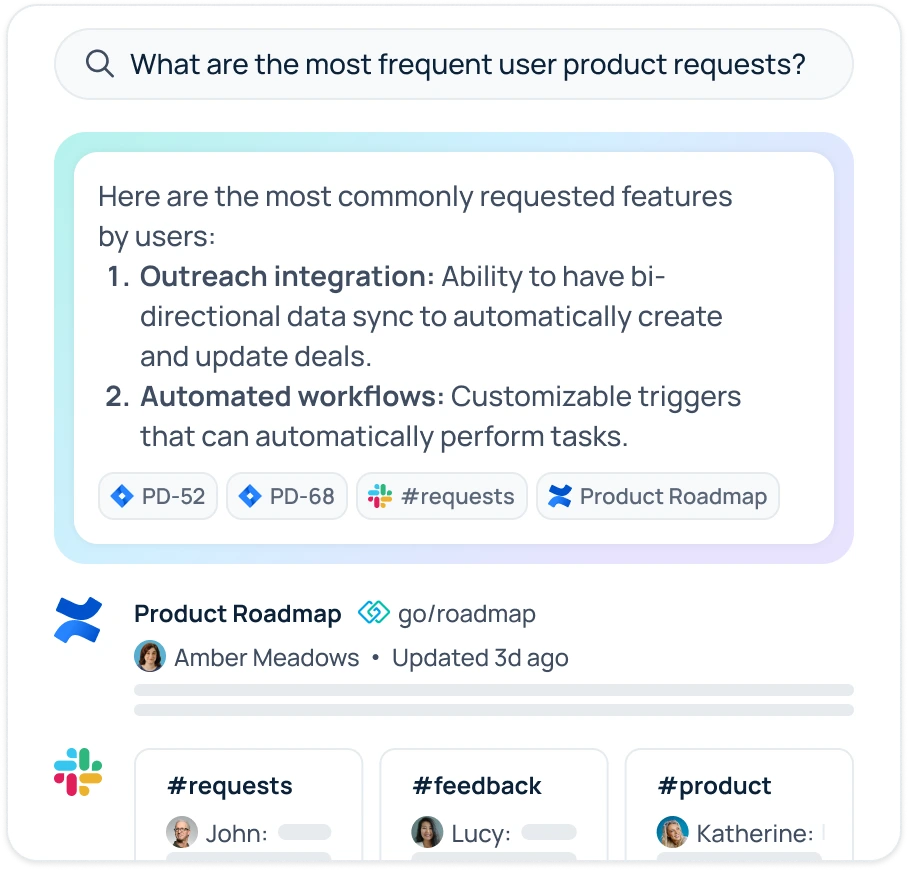
What ‘workplace knowledge’ (aka enterprise serach) is: Workplace knowledge tools will answer your questions using your own company’s content (Slack threads, Google Drive/SharePoint files, Confluence pages, tickets, CRM records etc) and will do so within the bounds of each individual’s existing permissions. If your question is “where’s the latest pricing deck?” or “what did we decide on the Q3 launch?” then you’re looking for workplace knowledge rather than a general chatbot.
Why GoSearch is our pick: GoSearch combines enterprise search, AI chat and automation. It checks your apps both in real time and via indexing, is transparent about its pricing and actually offers a free personal plan so you can try it out before you commit.
Pros
- Searches across many connected business apps with permission-aware results
- AI chat and agent building included, with a free personal plan to try it
- Transparent entry pricing compared with quote-only competitors
- Faster setup than most traditional enterprise search deployments, according to the vendor
Cons
- Value depends on how many of your tools are connected, so audit connectors first
- Like any search layer, results are only as good as the underlying content and permissions
Pricing: Free personal plan; paid plans on a per user basis with GoSearch listing entry pricing at circa $25 per user per month; Enterprise is custom. Confirm on the vendor’s site.
Main alternative is Glean: mature enterprise search and agents platform with very deep connector coverage. Pricing is not published, though customers typically report somewhere in the region of $50+ per user per month with minimum seat commitments of around 100 users and annual renewal increases. That said it’s a very good fit for a large enterprise with a budget and a long deployment runway.
Other options are: Microsoft 365 Copilot (best if your content lives in Microsoft 365), Gemini Enterprise (best if your content lives in Google Workspace), Slack AI (best if Slack is the centre of your work) and Notion AI (best for Notion first teams, as an add-on at around $10 per user).
Considerations:
- Permissions first: make sure the tool is enforcing the source app permissions rather than just its own.
- Connector coverage: list your top 10 systems and check for native connectors on each.
- Freshness: How quickly does new and changed content appear in the answers?
- Total cost: includes the AI add-ons, implementation, and support (not just the per-seat price).
Best AI Chatbot for Google-Only Shops: Gemini
Why it wins: If your team are Gmail/Docs/Sheets/Slides/Meet/Drive users, then Gemini is the obvious choice. It’s built into all those apps. It can summarise meetings and emails, draft in Docs, build formulas in Sheets and cope with long, complex inputs.
Pros
- Native across Gmail, Docs, Sheets, Slides, Meet, and Drive
- Very large context windows for long documents and many files
- Strong multimodal abilities (text, images, audio, video)
- Generous free tier and an inexpensive path to paid plans
- Gemini 4 became broadly available in October 2026
Cons
- Less useful if important content lives outside Google apps
- Plan structure is complicated: consumer AI plans, Workspace plans, and Gemini Enterprise are separate products
- Ultra-tier pricing and credit allowances can be hard to forecast
Pricing (US, monthly): Free; a low-cost AI Plus tier; Google AI Pro at $19.99; Google AI Ultra at $99.99 or $199.99. For business, Gemini features are included in several Google Workspace plans, and Gemini Enterprise is a separate per-seat product reported to be in the range of $20-30 per user. Check with Google or your reseller for current Workspace and Gemini Enterprise terms.
Considerations: Do you need AI within the Workspace apps (Workspace plans) or a company-wide assistant and agents platform (Gemini Enterprise)? Developers can also use Gemini via AI Studio and Vertex AI (both billed on a per-token basis).
Also worth considering: NotebookLM for source-grounded study and research notebooks, and a workplace search layer if you’re also using non-Google tools.
Best AI Chatbot for Microsoft-Only Shops: Microsoft 365 Copilot
Why it wins: If your business is reliant on Outlook, Teams, Word, Excel, PowerPoint, SharePoint and OneDrive then Microsoft 365 Copilot is the obvious choice. It’s built into those products and leverages your existing Microsoft permissions to pull in data from your emails, meetings, files and chats all in one secure location.
Pros
- Native in Word, Excel, PowerPoint, Outlook, Teams, and OneNote
- Grounded in your Microsoft 365 data with enterprise security and compliance
- Agent building through Copilot Studio
- Copilot Chat is included at no extra cost with eligible Microsoft 365 subscriptions
Cons
- It’s an add-on not a standalone product. You pay for a qualifying Microsoft 365 base license plus the Copilot license.
- Full Copilot is $30 per user per month so the total cost per user is vastly higher than the headline implies.
- Microsoft reportedly took Copilot Chat out of the Office apps in April 2026. So users without a licence may well see no AI at all.
- Less helpful for content stored in non-Microsoft tools
Pricing (US, per user per month): Microsoft 365 Copilot at $30 (billed annually) on top of a qualifying plan (Business Standard, Business Premium, E3 or E5). Copilot Business for up to 300 users is priced at around $21 (promotional pricing of $18 has been offered on occasion) although you should always check with Microsoft or your partner to confirm the current promotion and the end date of that promotion. Copilot Chat is included in eligible Microsoft 365 plans. The base Microsoft 365 plan prices were increased in July 2026 so you should check your renewal terms.
Considerations:
- Base license plus Copilot budget, and Copilot Studio credits if you’re building agents.
- Clean up the SharePoint and OneDrive permissions prior to the rollout as Copilot will surface whatever a user is already able to access.
- Pilot with a department prior to buying for the whole organisation and measure usage prior to renewal.
Also: GitHub Copilot for developers in Microsoft-centric engineering teams.
Best AI Chatbot for Mixed-Stack Companies
Most real companies are not purely Google or Microsoft. If your team uses Slack, Atlassian, Salesforce, Notion, and a mix of Google and Microsoft apps, a platform-native assistant will only see part of the picture.
Why GoSearch is our pick: GoSearch connects to the apps your teams already use and answers questions across all of them in one place, with AI chat and agents built in. Pair it with a general assistant such as ChatGPT Business or Claude Team for drafting, analysis, and coding, and you cover both public-knowledge and company-knowledge work without forcing everyone into one vendor’s ecosystem.
Disclosure: GoSearch is our product. Weigh it against the alternatives above on your own connectors and requirements.
Pros
- Searches across many connected business apps, not just one vendor’s ecosystem
- Permission-aware results, so people see only what they already have access to
- AI chat and agent building included alongside search
- Free personal plan and published entry pricing let teams test before a sales conversation
- Vendor-neutral, so you can change your general assistant as models change
Cons
- Smaller brand and customer base than Glean or the big platform vendors
- Value depends on connector coverage, so check your top systems first
- Pairing with a general assistant means more than one tool to buy and govern
Pricing: GoSearch has a free personal plan, with paid plans per user and entry pricing listed around $25 per user per month; Enterprise is custom. A general assistant adds ChatGPT Business at about $20-25 per user per month, or Claude Team at about $25-30 per seat per month with a five-seat minimum. Confirm current terms with each vendor.
Considerations: List your top 10 systems and confirm native connectors for each. Ask each vendor whether business data is excluded from model training by default, and get SSO and audit logging in writing. Set a clear policy on which tool is used for what.
Try it: Start with the free GoSearch plan and test it on your own apps.
Search across all your apps for instant AI answers with GoSearch
Schedule a demo
AI Chatbot Pricing Comparison (October 2026)
| Tool | Free | Individual (Paid) | Team and Business | Enterprise |
| ChatGPT | Yes | Go ~$8; Plus $20; Pro $100-$200 | Business ~$20-25/user | Custom |
| Claude | Yes | Pro $20; Max $100-$200 | Team ~$25-30/seat (5+ seats) | Custom |
| Gemini | Yes | AI Pro $19.99; Ultra $99.99-$199.99 | Workspace plans; Gemini Enterprise per seat | Custom |
| Microsoft Copilot | Copilot Chat included with eligible plans | Consumer plans vary | Copilot Business ~$21/user; M365 Copilot $30/user (plus base license) | Custom |
| Perplexity | Yes | Pro $20; Max $200 | Enterprise Pro ~$40/seat | Enterprise Max ~$325/seat |
| Cursor | Yes | Pro $20; Pro+ $60; Ultra $200 | Teams ~$40/user | Custom |
| GitHub Copilot | Yes | Pro $10; Pro+ $39 | Business ~$19/user | Custom |
| GoSearch | Free personal plan | $20 a month per user | Paid per user (entry ~$20/user) | Custom |
| Glean | No | n/a | Not published; reported $75+/user | Custom |
Prices are US list prices as taken from vendor pages and third party trackers in October 2026. A number of vendors changed packaging more than once during the year and there are some minor discrepancies between the various third party sources so check before you buy.
Frequently Asked Questions
Frequently. Not just the base price but the token cost, the model cost, etc. A number of the big players changed their tiers, their usage caps, their packaging on a number of occasions in 2026. Always check the vendor’s current pricing page before you go and buy.
For the kind of quick drafting and Q&A stuff, yes. For actual day to day professional use, the paid plans give you access to better models, higher token limits and better privacy controls. The business plans by default don’t include your data in the model training.
ChatGPT is the best all-around AI chatbot for most people, simply because of the breadth of features and the ecosystem that it offers. Claude and Gemini are very much in the same ballpark and either one could be the better choice depending on whether you’re more focused on writing and coding (Claude) or Google integration (Gemini).
Claude is generally the best AI chatbot for writing (natural-sounding, excellent at following style, good at long documents). ChatGPT is a very good second, particularly for generating marketing copy variations and technical explainers.
Claude with Claude Code is our top pick for multi-file changes and code review. Cursor is a very good editor-based option, and GitHub Copilot is the best value at $10 a month for individuals.
Gemini is the obvious choice as it’s the only one that works natively in Gmail, Docs, Sheets, Slides, Meet and Drive. For company-wide agents and search across Google content, then you’d look at Gemini Enterprise.
Microsoft 365 Copilot is the one that makes sense for organizations on Microsoft 365. It’s $30 per user per month on top of a qualifying M365 license, so you need to budget for that as well.
Dedicated enterprise AI search tools (GoSearch, Glean) are designed for searching across multiple business apps with permission aware results. Microsoft 365 Copilot and Gemini Enterprise work really well when most of your content is in their own respective ecosystems.