


Most teams know which work should be automated. The hard part has been building it: picking a trigger, mapping fields between apps, and wiring up each step in a visual editor or in code. A natural language workflow builder removes that step. You describe the outcome you want, and AI builds the workflow for you.
In this guide, we cover what a natural language workflow builder is, how it works, how it compares to visual and code-based builders, and what to look for if you are evaluating one. We also walk through a real example from GoSearch, where an engineering lead builds a sprint summary workflow just by chatting with GoAI.
What is a natural language workflow builder?
A natural language workflow builder is a tool that turns a plain-language request into a working, multi-step workflow. You describe what should happen, and AI chooses the trigger, the apps and the actions, then lets you refine the result by continuing the conversation.
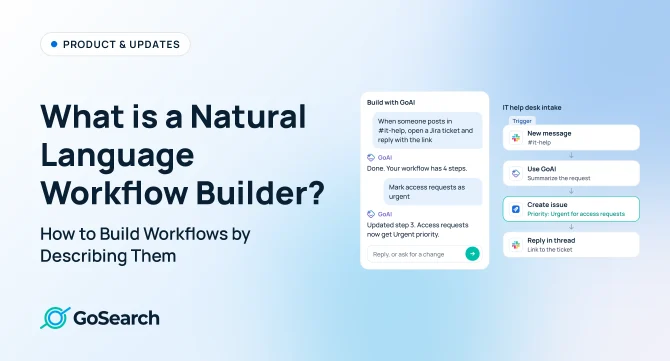
For example, you might type: “When someone posts in #it-help, open a Jira ticket and reply in the thread with the link.” The builder works out that the trigger is a new Slack message, the action is creating a Jira issue, and the last step is a Slack reply. You review the steps, ask for changes, and turn it on.
It is a type of AI workflow builder. Many AI workflow builders let you add AI steps to a workflow, such as summarizing text. A natural language workflow builder also uses AI to build the workflow itself, so you never have to drag in a node or map a field.
How a natural language workflow builder works
The best builders work like a conversation, not a form. Here is what happens behind the scenes:
- You describe the outcome. Write what you want in your own words, the way you would ask a teammate. You don’t need to know which trigger or action types exist.
- AI fills in what it can from context. It identifies the trigger, apps and actions. A builder connected to your company knowledge can also infer details, like where your team tracks tickets or how long your sprints run.
- It asks for missing details. Rather than guess, the builder asks questions about anything it can’t determine, such as which channel to post in or when the workflow should run.
- You make changes through conversation. Describe what you want changed in plain language, such as moving the workflow to Friday afternoons or sending updates to a different Slack channel. The builder adjusts the workflow as you go.
- You review the workflow before turning it on. A visual builder lays out each step so you can check the logic, make manual edits and test the workflow before it goes live.
Example: building a sprint summary workflow by chatting
In the video, an engineering lead types one request into GoSearch Workflows: “I want to build a workflow that sends me a summary of completed tickets every sprint.”
GoAI turns that into a workflow, step by step:
- Schedule: it knows the team runs two-week sprints, so it names the workflow “Biweekly completed tickets” and schedules it every other Monday.
- Jira: it finds that the team tracks work in Jira and searches for tickets completed in the last 14 days.
- GitHub: without being asked, it adds the merged pull requests, so each ticket links to the code that shipped it.
- Summary: a GoAI step groups what shipped by theme, shows who completed each ticket and flags anything still blocked.
The engineer can ask for changes as they come up: move the schedule to Friday afternoons, add a section on fixed bugs, or send the report as a Slack DM instead of email. There’s no need to go back through the builder and map fields to make those changes.
Natural language vs. visual vs. code-based workflow builders
| Natural language | Visual (drag and drop) | Code | |
| How you build | Describe it in a chat | Drag steps and map fields | Write and deploy scripts |
| Who can build | Anyone | Ops and power users | Engineers |
| Time to a first version | Minutes | Hours | Days |
| Changing it later | Ask in plain language | Edit each step | Change the code |
| Best for | Most team workflows, fast iteration | Precise branching you want to set by hand | Custom logic or high-volume systems |
These approaches work best together. A good natural language builder produces a workflow you can still open and edit step by step, so you get the speed of a conversation without losing control of the details.
How natural language workflow builders compare
More automation platforms are using AI to build workflows from plain-language instructions. But the first draft only tells part of the story. It’s worth looking at how each tool handles follow-up changes and whether it can draw on your company’s data and connected apps when building the workflow.
| How you build | Refine by chatting | Context the AI uses while building | |
| Zapier Copilot | Describe a Zap, and Copilot drafts the trigger and actions. Auto-build fills in apps, accounts and fields, or it can ask before each step. | Yes. Keep prompting to add, replace or edit steps, with checkpoints to roll back. | Context from across your Zapier account plus your chat history. Company docs from Google Drive, Notion or Confluence ground the AI steps inside a Zap, not the building itself. |
| n8n AI Workflow Builder and n8n Assistant | Describe your goal, and it selects, places and configures the nodes. | Yes. Refine with follow-up prompts. Each Workflow Builder message uses one AI credit. | Your workflow definition and nodes. n8n Assistant also gets a summary of the project’s workflows, recent changes and run history, read with your n8n permissions (in preview). Context comes from n8n itself, not knowledge in your other apps. |
| Slack Workflow Builder | One prompt generates a Slack workflow to customize and publish. | No. After the draft, you add, remove or edit steps by hand. | The workflow is generated from your prompt. AI steps inside it can draw on channels, canvases and files you add as sources. |
| GoSearch Workflows | Describe what you want, and GoAI builds each step across your connected apps. | Yes. Keep chatting to change any step, or edit it in the visual builder. | GoSearch’s permission-aware knowledge layer across your connected apps, so it can infer details like your sprint length or where your team tracks tickets. |
Based on each vendor’s documentation as of November 2026. Features change often.
Workflows you can build by describing them
If you can explain a process in a sentence, you can build it. A few examples:
Engineering
- “Every Friday, summarize Jira tickets closed during the sprint and link each one to its merged PR.”
- “Write release notes from merged PRs and post in #releases.”
- “Send reviewers a reminder when a pull request is waiting for more than two days.”
IT
- “If someone posts in #it-help, create a Jira ticket and reply with the link. Mark access requests as urgent.”
- “Notify me when tickets mention an outage.”
- “Find IT runbooks that haven’t been updated in 90 days. Flag for review.”
Every team
- “Before tomorrow’s meetings, summarize my to-dos.”
- “Send new hires a first-week checklist on their start date.”
- “Every Friday, summarize customer calls. Post recurring themes in Slack.”
What to look for in a natural language workflow builder
- It refines, not just drafts. You should be able to keep chatting to change the workflow, not just generate a first draft and then fix it by hand.
- It knows your company. The more context the AI has about your apps, projects and teams, the fewer questions it asks and the more accurate the first version is.
- It respects permissions. Workflows should only read and act on data the person running them is allowed to access.
- It shows its work. Every step should stay visible and editable in a visual builder, with run logs you can check after each run.
- It reaches the tools you use. Look for coverage across messaging, code, project management, docs and CRM, plus MCP support for everything else.
- It can be shared. Good workflows should be easy to share with your team so others can reuse and adapt them.
How GoSearch builds workflows from natural language
In GoSearch Workflows, describe the task and GoAI creates the workflow. It can draw on the company knowledge and connected apps already available through GoSearch, so it has context about how your team works. It can use that context to identify where tickets live, understand your sprint schedule and suggest relevant steps as it builds.
You can keep refining the workflow in the chat, or open any step in the visual builder to fine-tune it. When it is ready, run it on a schedule or on an event in your apps, keep it for yourself, or share it with your team.
Book a demo to learn more about GoSearch for your workflows.
Search across all your apps for instant AI answers with GoSearch
Schedule a demo
FAQ
A natural language workflow builder is a tool that creates automated, multi-step workflows from a plain-language description. You describe the outcome you want, such as “post a summary of closed Jira tickets in Slack every Friday,” and AI chooses the trigger, connects the apps and configures each action. You then refine the workflow by chatting or by editing steps in a visual builder.
No. You describe what you want in everyday language, and the builder handles triggers, field mapping and app connections for you. Technical users can still open each step to adjust settings, add logic or check the configuration, so the same workflow works for technical and non-technical teams.
A visual workflow builder makes you drag in each step and map fields by hand. A natural language workflow builder creates those steps for you from a description, so a first version takes minutes instead of hours. Most natural language builders, including GoSearch, still show the result in a visual builder so you can review and fine-tune it.
It combines your description with context about your company. The more the AI knows about your apps, projects and teams, the fewer questions it needs to ask and the fewer wrong assumptions it makes. For example, a builder connected to your company knowledge can tell which tool your team uses for tickets and how long your sprints run, instead of asking you.
Yes. In a conversational builder, you ask for the change in plain language, like “move it to Friday afternoons” or “send it in Slack instead,” and the workflow updates. You can also open any step in the visual builder and edit it directly, then check the run logs to confirm it works as expected.
They are when the builder respects your existing permissions. Look for a tool where workflows only read and act on data the person running them is allowed to see, and where every step and run is logged. In GoSearch, workflows respect app- and user-level permissions across your connected tools.