


Shadow IT used to be a marketing team putting a SaaS tool on a company card without telling IT. Now it’s often an agent: someone builds it in an afternoon, connects it to Slack and the CRM, and leaves the company. The agent keeps running every morning, and nobody in IT knows it exists.
Agent launches are outpacing agent controls. Last week alone, one major platform let every user create agents by default, a security company began selling a way to shut down problematic agents, and an enterprise AI provider hurried to patch its triggered agents so they confirm each recipient can see the source content before delivering it.
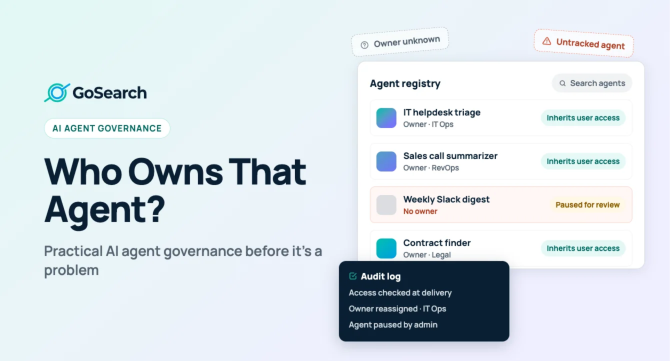
Large enterprises are answering with dedicated AI ops teams. If you run IT or security at a company with 200 to 5,000 employees, you probably can’t hire one. The good news: AI agent governance for a lean team comes down to three basics you can implement this month.
- Inherited permissions, so an agent never gets access to what its user doesn’t have.
- Clear ownership for every agent.
- Audit logs that show what each agent did and for whom.
AI agent governance is the set of rules governing ownership, access, and logging that control what AI agents can do and for whom.
This Week’s Agent Sprawl News
A quick look at recent updates says it all: building agents is getting simpler, but the rules to control them are coming later, often as extra features or fixes.
- Nov 6, Glean: Moderation and notifications now follow an agent’s current owner, not its creator, and a new AI transparency notice supports EU AI Act requirements. Ownership has to survive org changes, and AI disclosure is becoming a product default.
- Nov 4, Microsoft Entra: Default users can now create agent blueprints unless an admin turns the setting off, making agent creation opt-out on one of the most common identity platforms.
- Nov 4, Smartsheet: New agentic workflows and agents shipped alongside security event streaming and data classification. Governance controls now arrive in the same press release as the agents.
- Nov 3, CrowdStrike: An “AI Kill Switch” in Falcon Guardian lets an admin stop a rogue agent at the AI gateway (endpoint termination is planned), block it from relaunching, and cut its network access. Security vendors now treat misbehaving agents as an incident class.
- Nov 3, Glean: Slack- and Zendesk-triggered deliveries now check that each subscriber can see the source, closing a gap where triggered agents could deliver past a person’s permissions.
These vendors aren’t to blame. They’re moving fast, rolling out new features first and fixing issues as they come up. For IT teams, the takeaway is clear: default settings now favor more agents, and it’s your job to turn the right controls on.
The Microsoft change is the one to act on today. If you haven’t decided, ChangePilot’s walkthrough lists the path: Entra admin center > Users > User settings > “Users can create agent blueprints.”
Why AI Agents Need Different Governance Than Shadow SaaS
Shadow SaaS stores your data in the wrong place. Shadow agents act on that data: they send messages, update records, and share files, often on a schedule, with no one reviewing each step. Three differences matter.
They act. A rogue SaaS app could leak a spreadsheet. An agent can send the email, update the CRM record, close the ticket, or post the summary to a public channel. CrowdStrike’s announcement makes the point that agents chain steps and can take actions no one is authorized to take, even when no attacker is involved.
They chain together. One agent’s output becomes another agent’s input. A summarizer feeds a router, which feeds a ticketing agent. Each link may look harmless, but the chain can move data from a restricted HR folder into a team-wide Slack channel in three hops. Nobody reviewed the chain because nobody built it as a chain. The lifecycle below adds a check for chained agents.
They run on triggers. Shadow SaaS needed a person to log in. Agents run on schedules, webhooks, new messages, or new file versions. Glean’s November 3 fix exists for exactly this reason: a trigger fires for a subscriber, and the system must check at delivery time whether that subscriber can still see the source.
Put those together, and the old shadow IT playbook (discover the app, block or approve it) falls short. You need to know who an agent acts for, what it can reach, and what it did.
The Permission Inheritance Principle
An agent should never see more than the person it serves. If that one rule holds, most agent risk shrinks to the risk you already accept from your employees.
In practice, inheritance means three things:
- Access is checked against the requesting user, at the moment of use. Not when the agent was built, and not against the builder’s access. If someone loses access to a Confluence space on Monday, an agent answering them on Tuesday shouldn’t quote it.
- Source permissions stay the source of truth. Read access from Google Drive, SharePoint, Slack, and Jira directly. Copying those rules into the AI system creates drift, and drift causes leaks.
- Triggered and scheduled runs get checked too. When an agent delivers to a channel or a subscriber list, every recipient’s access matters, not just the person who set up the trigger.
Watch for the Shared-Identity Exception
Many platforms now offer service credentials, so an agent can call a tool through a single shared account rather than requiring each user to obtain their own authorization. Glean made this generally available on November 6. It’s useful for tools where per-user OAuth is impractical. It’s also the opposite of inheritance: the agent now carries the service account’s access, whoever asks.
Treat every shared-identity agent as an exception that requires a named owner, a narrow scope, and a written reason. If you can’t state why it needs more access than its users, it shouldn’t have it.
Four Questions for Any Vendor Demo
Use these to check how a platform enforces permission inheritance.
- When an agent answers a user, whose permissions decide what it can retrieve?
- How quickly does a permission change in the source system reach the agent?
- What happens when a triggered agent delivers to someone who lacks access to the source?
- Can I see every action an agent took on a user’s behalf, including triggered runs?
Ownership, Lifecycle, and Retirement of AI Agents
Every agent needs a named human owner, and ownership must move when people do. The builder is a fine default owner on day one. By month six, the builder may have changed teams, and the agent is still running.
Look for platforms where moderation and notifications follow the agent’s current owner rather than its creator.
What the Owner Is Accountable For
A named owner is only useful if the role carries real duties. Each owner is responsible for four things:
- Knowing what the agent does, which sources it reads, and which systems it writes to.
- Approving any change to its triggers, tools, or credentials.
- Answering for it when an audit log or a user complaint raises a question.
- Retiring it when it’s no longer needed.
A Lightweight Lifecycle
- Register. Name, owner, purpose, data sources, write actions, triggers, downstream agents or outputs, and identity model (inherited or shared).
- Review. A quick check before it runs on triggers or reaches beyond the owner’s team. Shared-identity agents are always reviewed, and so is any agent whose output feeds another agent or a wider audience than its sources.
- Run. Logged, with a known way to pause it.
- Recertify. Every quarter, the owner confirms it’s still needed and correctly scoped.
- Retire. Disable triggers, revoke credentials, archive the configuration, keep the logs.
When an Agent Should Be Retired Automatically
| Trigger | Action |
| Owner leaves the company | Pause within 24 hours; reassign or retire within 14 days |
| Owner changes teams | Owner confirms or hands off at the next recertification |
| No runs in 90 days | Flag to owner; retire if unconfirmed after 14 days |
| Missed quarterly recertification | Pause until the owner responds |
| Source system or credential revoked | Pause and notify the owner |
Think of these limits as a starting point, not hard rules. Adjust them to fit how often things change at your company, and write them down so they hold up when things get busy.
Audit Logs for Every Agent
Ownership and inherited permissions set what an agent should do. Logs show what it did. When a user complaint or an incident lands, the log is the only record of whose access an agent used and where its output went.
Capture these for every run:
- The agent and its current version
- The acting user, or the service identity for shared-identity agents
- The trigger: manual, schedule, webhook, or new message
- The sources it read and the actions it took in other systems
- Everyone who received its output
Keep logs in the platform’s admin console at minimum. If you run a SIEM, stream agent logs there alongside your other identity and access events, and keep them as long as your access logs.
Owners review their agents’ logs at recertification. Security reviews them during incidents and conducts spot checks on shared-identity agents on a set schedule.
A 30-Day AI Agent Governance Checklist for Lean IT Teams
This plan assumes one or two people spending a few hours a week. It favors settings you can change and lists you can keep over new tools.
Week 1: Stop the Default Sprawl
- Review agent-creation defaults in every major platform, starting with the Entra “Users can create agent blueprints” setting.
- Decide who may build agents, and grant that through a role, not a default.
- Check which AI features turn on automatically for new users or new releases.
- Name one accountable lead for AI agent governance, even if it’s a part-time hat.
Week 2: Build the Inventory
- Export the agent lists from each platform admin console.
- Record each agent’s owner, purpose, sources, write actions, triggers, downstream agents or outputs, and identity model in one shared sheet.
- Flag agents with no owner, a departed owner, or a shared service identity.
- Pause anything flagged that nobody claims within five business days.
Week 3: Lock Down Permissions and Logging
Confirm that each platform checks the requesting user’s access at query time.
- Confirm triggered and scheduled deliveries check recipient access.
- Write down the reason and scope for every shared-identity agent.
- Turn on audit logging wherever it exists, and send the logs to your SIEM if you have one.
- Confirm SSO and SCIM deprovisioning reach your AI tools, so a departed user loses agent access too.
Week 4: Make It Stick
- Publish a one-page agent policy: who can build, what needs review, and how retirement works.
- Set the retirement triggers from the table above.
- Write a pause runbook: who can stop an agent, how, and who gets told.
- Schedule the first quarterly recertification.
- Spot-check one week of logs for each shared-identity agent.
- Check that every user-facing AI interface discloses that users are talking to AI.
After 30 days, you still won’t have an AI ops team. You’ll have something more useful for a team your size: an inventory of your agents, an owner for each one, and logs you can trust.
The EU AI Act’s Transparency Rules Already Apply
If you have EU users or employees, this isn’t a future deadline. Article 50 of the EU AI Act has been in effect since August 2, 2026. The AI Omnibus pushed most high-risk obligations to December 2, 2027, but it left the transparency duties on schedule, as Goodwin’s alert explains.
These duties fall mainly on providers, the companies that build AI systems and place them on the market. Most lean IT teams deploy vendor tools, but building and deploying your own agents can make you a provider too.
For internal agents and assistants, two duties matter most:
- Tell people they’re talking to AI. Providers of AI systems that interact directly with people must make that clear, unless it’s obvious from context.
- Mark synthetic content. Generated text, audio, images, and video need machine-readable marking. Generative systems already on the market before August 2 have until December 2, 2026, to comply.
Fines for breaching these duties can reach €15 million or 3% of worldwide annual turnover, whichever is higher. The European Commission adopted guidelines on the transparency obligations on July 20, 2026.
What a Lean IT Team Can Do Now
- Loop in legal or compliance to confirm whether you act as a provider, a deployer, or both.
- Add an “AI interaction” column to your agent inventory, and mark which agents talk directly to people.
- Check that each of those shows a clear AI disclosure in every channel, including Slack and email deliveries, not just the main chat window.
- Ask each AI vendor how it handles disclosure and output marking, and get the answer in writing.
Vendors are already building this in. Glean’s transparency notice, for example, is on by default from November 10 unless an admin opts out. Your job is to confirm the default is on and covers every surface your agents use.
Governance That’s Built In, Not Bolted On
The cheapest form of AI agent governance is the kind your platform provides by default. When you evaluate enterprise search and agent tools, look for the three basics from this playbook in the product itself, not in a roadmap.
That’s how we built GoSearch:
- Permission-aware results that mirror each source system’s access, so an answer never reaches past what the person asking can already see.
- Admin-defined, no-code agents, so IT decides who builds and what each agent can touch.
- Audit logs, SSO/SAML/SCIM, PII detection, and SOC 2 Type II compliance, so you can trace what happened and deprovisioning reaches AI access too.
Whatever tools you choose, the takeaway is the same. Agents will keep multiplying, and defaults will keep tilting toward more of them. A lean team can’t outrun that. It can ensure every agent has an owner, inherits its user’s permissions, and leaves a trail.
Ready to give every agent an owner, inherited permissions, and an audit trail?
See how GoSearch builds them in. Book a demo.
Search across all your apps for instant AI answers with GoSearch
Schedule a demo