
Different tasks call for different AI models. A multi-step coding agent needs deep reasoning. A pipeline that summarizes thousands of support tickets needs speed and low cost. GoSearch gives teams a choice of leading LLMs inside one search and agent layer, so each task runs on the model that fits it.
GoSearch now supports GPT-6.1 Sol and GPT-6 Luna, OpenAI’s newest mid-tier and fast-tier models. They follow GPT-5.6 Sol and GPT-5.6 Luna, and they join models from Anthropic, Google, and xAI. This post covers what changed, how each model compares with its GPT-5.6 predecessor, and when to use it.
Quick answer: GPT-6.1 Sol is OpenAI’s upgraded mid-tier reasoning model, released September 29, 2026. GPT-6 Luna is its fast, low-cost model, released September 22, 2026. Both cost about half as much per token as their GPT-5.6 counterparts. Artificial Analysis scores GPT-6.1 Sol at 52 on its Intelligence Index, about five points above GPT-5.6 Sol. GPT-6 Luna scores level with GPT-5.6 Luna, so its gains come from lower cost and fewer hallucinations rather than higher intelligence. In GoSearch, use GPT-6.1 Sol for complex agent, coding, and document work. Use GPT-6 Luna for high-volume tasks such as summaries and extraction.
What are GPT-6.1 Sol and GPT-6 Luna?
Both models belong to OpenAI’s GPT-6 family. OpenAI trained them with methods similar to those behind GPT-6 Astra, its flagship model. The goal was to bring Astra’s strengths in professional work, factuality, coding, computer use, and alignment to faster and cheaper tiers.
OpenAI released GPT-6 Luna on September 22, 2026, as the fast tier for high-volume work. OpenAI positions it for everyday tasks at scale, where speed and cost matter most. GPT-6.1 Sol followed one week later on September 29, 2026. It upgrades GPT-6 Sol and, according to OpenAI, nearly matches Astra on agentic coding, computer use, and professional work at one-fifth of Astra’s token price.
Both models accept text and image input and return text. GPT-6.1 Sol has a 1M-token context window, and GPT-6 Luna has a 1.05M-token window.
How does GPT-6.1 Sol compare to GPT-5.6 Sol?
GPT-6.1 Sol gives you a stronger model for half the price. OpenAI cut its API rates from $4 and $20 per million input and output tokens to $2 and $10, and OpenAI says the GPT-5.6 rates were promotional. Independent benchmarking firm Artificial Analysis also rates GPT-6.1 Sol higher overall, with a score of 52 against 47 for GPT-5.6 Sol.
Here is what that means for your team.
- Agents complete jobs end-to-end. OpenAI reports that GPT-6.1 Sol handles complex, multi-step work better than the models before it, such as fixing a bug across several files or working a request through sales, support, and finance tools. On a test built from real software engineering tasks, OpenAI’s chart data shows GPT-6.1 Sol scoring 75.2%, against 72.7% for GPT-5.6 Sol.
- Answers need less checking. On OpenAI’s factuality tests, GPT-6 Sol made about half as many mistakes as GPT-5.6 Sol. GPT-6.1 Sol then trims errors by about another third at low reasoning effort. That means fewer wrong statements for employees to catch when they ask about policies, products, or customer history.
- Long agent runs cost less. Agents use a lot of tokens across many steps, so the price cut matters most there. Artificial Analysis measured $0.72 per task for GPT-6.1 Sol against $1.99 for GPT-5.6 Sol, partly because GPT-6.1 Sol needed fewer tokens to finish.
| GPT-5.6 Sol | GPT-6.1 Sol | |
| Release date | July 9, 2026 | September 29, 2026 |
| API price per 1M input and output tokens | $4 and $20 | $2 and $10 |
| Context window | About 1M tokens | About 1M tokens |
| Artificial Analysis Intelligence Index at max effort | 47 | 52 |
| Output tokens used across the Intelligence Index | 90M | 67M |
| Cost per Intelligence Index task | $1.99 | $0.72 |
When might GPT-5.6 Sol still be the better pick?
Two trade-offs are worth knowing before you switch.
Long, detailed deliverables. Artificial Analysis found that the GPT-6 models tend to write shorter deliverables that sometimes skip required elements, and its data shows GPT-5.6 Sol ahead on a knowledge-work benchmark. If your team relies on AI for long reports or detailed spreadsheets, compare both models on a real example first.
Speed. Artificial Analysis measures GPT-6.1 Sol as slower than most comparable models at its highest reasoning setting, so answers to demanding questions may take longer to appear.
How does GPT-6 Luna compare to GPT-5.6 Luna?
GPT-6 Luna delivers the same level of intelligence as GPT-5.6 Luna for about half the price, with fewer confident wrong answers. Think of it as a cost and reliability upgrade rather than a smarter model. OpenAI cut Luna’s input price in half, from $0.20 to $0.10 per million tokens, and its output price by 58%, from $1.20 to $0.50.
Here is what that means for your team.
- High-volume work gets much cheaper. Summarizing tickets, tagging documents, and pulling facts from large sets of records is where Luna does most of its work. Artificial Analysis measured $0.07 per task for GPT-6 Luna against $0.18 for GPT-5.6 Luna, about 60% less.
- Luna is more willing to say it does not know. On a test of hard knowledge questions, the share of times Luna guessed wrong instead of admitting uncertainty fell from 93% to 77%, while its accuracy held steady. That makes it easier to trust for summaries and lookups.
- A small model can take on bigger jobs. OpenAI reports that, at higher effort levels, GPT-6 Luna matches GPT-5.6 Sol on factual accuracy at about a hundredth of the cost. That opens Luna up for work you may have reserved for a larger model.
| GPT-5.6 Luna | GPT-6 Luna | |
| API price per 1M input and output tokens | $0.20 and $1.20 | $0.10 and $0.50 |
| Cost per Intelligence Index task at max effort | $0.18 | $0.07 |
| AA-Omniscience hallucination rate, lower is better | 93% | 77% |
| AA-Omniscience Index | -10 | 1 |
| AutomationBench-AA | 50% | 53% |
| Coding Agent Index in Codex | 43 | 41 |
| DeepSWE v1.1 | 66% | 64% |
| SWE-Atlas-QnA | 49% | 44% |
Where should you be careful with GPT-6 Luna?
Coding is the one area where Luna slipped. Artificial Analysis scores it two points below GPT-5.6 Luna on its coding agent test, and it also found shorter, less complete deliverables on knowledge-work tasks. Independent testing found that Luna can write infrastructure configuration that passes automated checks but fails when deployed. Add a review or test step when Luna writes code or configuration that ships, and keep long, detailed write-ups on a larger model.
How do GPT-6.1 Sol and GPT-6 Luna compare with each other?
GPT-6.1 Sol is the stronger model, and GPT-6 Luna is the far cheaper one. On the Artificial Analysis Intelligence Index, GPT-6.1 Sol scores 52 and GPT-6 Luna scores 38. Luna’s token price is one-twentieth of Sol’s. Per Intelligence Index task, Luna costs about $0.07 against $0.72 for Sol. That gap makes Luna the efficient choice whenever the task does not need Sol’s reasoning depth.
Both models take text and image input only. Gemini 3.1 Pro remains the better fit for audio and video. Our Grok 4.7 post covers how the wider GoSearch lineup compares.
When should you use GPT-6.1 Sol or GPT-6 Luna in GoSearch?
Reach for GPT-6.1 Sol when the task is complex and the cost of a wrong answer is high. Good fits include:
- Multi-step coding and agent work, such as planning a change across several files and checking it
- Multi-step business workflows that move across sales, support, finance, and HR tools
- Questions over dense PDFs with tables, charts, and fine print, an area where OpenAI reports that GPT-6.1 Sol scores near Astra on the GDP.pdf benchmark
- Data analysis and scientific workflows, where OpenAI reports that GPT-6.1 Sol more than doubles GPT-6 Sol’s score on Terminal-Bench Science
Reach for GPT-6 Luna when the task is high-volume and the goal is clear. Good fits include:
- Summarizing documents, meeting notes, and long threads at scale
- Extracting fields and facts from large sets of records
- Answering quick questions where speed and cost matter most
- First-pass triage in a workflow, with hard cases routed on to GPT-6.1 Sol
Stay with GPT-5.6 Sol for a workflow that already produces long, complete deliverables until you have compared outputs side by side. Use Gemini 3.1 Pro for tasks with audio or video input.
How do you use GPT-6.1 Sol and GPT-6 Luna in GoSearch?
GoSearch’s hybrid connector architecture pairs any supported model with real-time federated retrieval across your connected systems. GPT-6.1 Sol and GPT-6 Luna answer questions and complete agent tasks with current data from your connectors instead of a stale snapshot from an earlier sync.
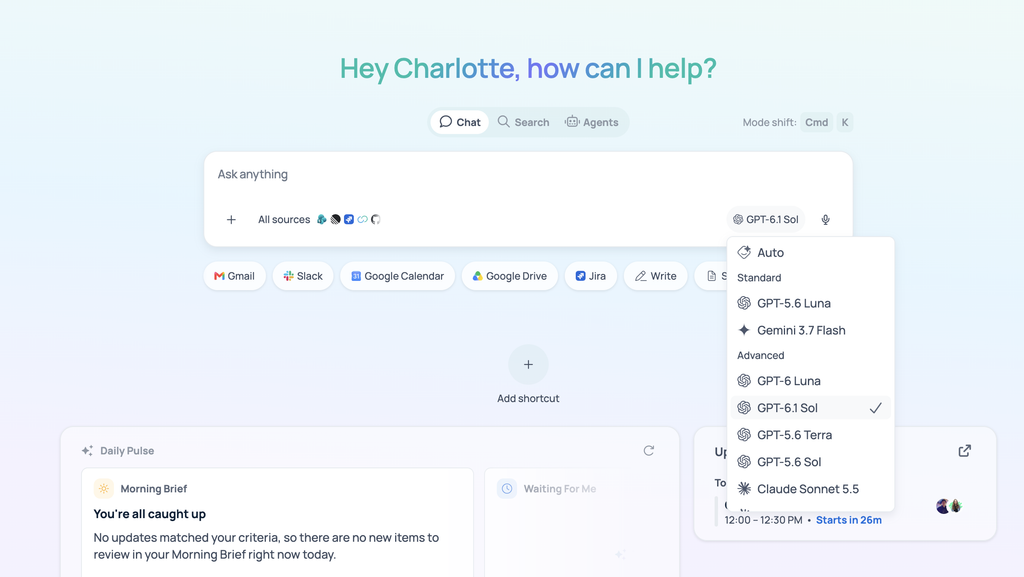
You can use both models three ways:
- In search and chat. Select a model from the picker in GoSearch’s AI chat assistant for a single question or conversation.
- In agents. Set GPT-6.1 Sol or GPT-6 Luna as the default model for a specific agent in the no-code agent builder. A support agent that summarizes tickets suits Luna. An engineering agent that works across repositories and tickets suits Sol.
GoSearch runs on Zero Data Retention agreements with its model providers, so switching to either model does not change how your company’s data is handled.
Getting started
GPT-6.1 Sol and GPT-6 Luna are available now through the GoSearch model selector in search, chat, and the no-code agent builder. Existing agents and workflows keep their current model until you change it, so adopting either model is opt-in. To test them, run the same query or agent task through the new model and your current default, then compare the output inside GoSearch before you switch anything over.
GPT-6.1 Sol gives GoSearch customers a stronger option for complex agent and coding work. GPT-6 Luna gives them a low-cost option for high-volume tasks. Book a demo to see both models alongside GoSearch’s other options on your own workflows.
Search across all your apps for instant AI answers with GoSearch
Schedule a demo
Frequently Asked Questions
How is GPT-6.1 Sol different from GPT-5.6 Sol?
GPT-6.1 Sol costs half as much per token and scores higher on independent tests. Artificial Analysis rates it 52 on its Intelligence Index against 47 for GPT-5.6 Sol, and it uses fewer output tokens per task. OpenAI reports gains in coding, computer use, and factual accuracy. GPT-5.6 Sol still scores higher on a few benchmarks, including GDPval-AA, and GPT-6.1 Sol generates tokens more slowly than average.
Is GPT-6 Luna better than GPT-5.6 Luna?
GPT-6 Luna is cheaper and hallucinates less, but it is not smarter. OpenAI cut its token prices by 50% to 58%, and Artificial Analysis measures its hallucination rate falling from 93% to 77%. Overall intelligence stays level with GPT-5.6 Luna, and coding scores dip slightly. Luna suits high-volume work such as summaries and extraction. For code that ships, pair it with a review step.
Which should I use in GoSearch, GPT-6.1 Sol or GPT-6 Luna?
The right choice depends on the task. GPT-6.1 Sol suits complex work, such as multi-step agents, coding, and questions over detailed documents. GPT-6 Luna suits high-volume tasks with a clear goal, such as summaries, extraction, and quick answers. Luna’s token price is one-twentieth of Sol’s, but Sol scores 52 on the Artificial Analysis Intelligence Index against 38 for Luna. Many workflows use both.
Does GoSearch send my data to OpenAI when I use these models?
Using GPT-6.1 Sol or GPT-6 Luna does not change how GoSearch handles your data. GoSearch runs Zero Data Retention agreements with its model providers, including OpenAI. Your connected data still flows through GoSearch’s real-time federated retrieval, and the provider does not store it for training or other purposes. Switching models changes which model writes the answer, not your connectors, permissions, or data setup.
Can GoSearch switch between GPT-6.1 Sol, GPT-6 Luna, and other models without losing context?
Yes. GoSearch retrieves your company’s data in real time instead of relying on each model’s memory, so switching models does not require rebuilding context. Every model draws on the same connected data through GoSearch. You can run the same query through two models and compare the answers before you change the default for an agent.