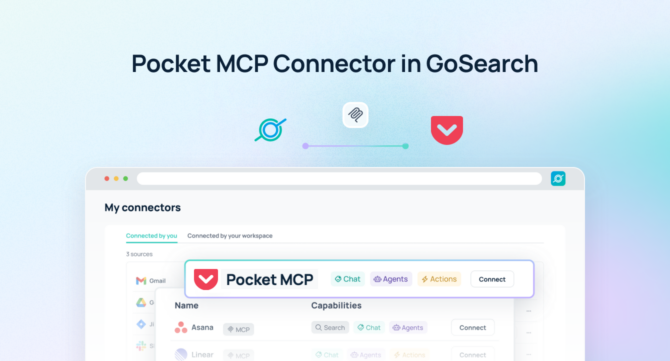

Quick Answer: The Pocket MCP server uses the Model Context Protocol (MCP) to give compatible AI tools access to Pocket recordings. It exposes conversation search, transcripts, AI summaries, action items, and folders from a connected Pocket account. GoSearch’s new Pocket connector brings that data into GoSearch, so AI agents can combine what was said in your meetings with the rest of your company knowledge to answer questions, track follow-ups, and move work forward.
TL;DR
- GoSearch now connects to Pocket through the Model Context Protocol.
- The connection surfaces conversation search, transcripts, summaries, action items, and folders.
- Pocket authenticates through OAuth, and GoSearch adds it as a connector alongside its other 100+ integrations.
- Teams can ask GoSearch what was decided, who owns the follow-up, and what changed since the last call.
- Sales, product, and operations teams can combine meeting context with CRM records, tickets, and project docs.
- Agents can update Pocket action items, so completed follow-ups flow back into Pocket.
- The result is a workflow that moves from meeting conversation to team action in one place.
What Is a Pocket MCP Server?
A Pocket MCP server is a Model Context Protocol connection that lets AI applications work directly with Pocket recordings. Pocket is an AI voice recorder that captures conversations, transcribes them, and turns them into summaries and action items. Instead of opening the Pocket app and scrolling through transcripts, an MCP-enabled AI agent can search and read recordings on demand.
Pocket’s MCP connection covers several areas of an account:
- Conversation search: Semantic and keyword search across recordings, with date, tag, and folder filters
- Transcripts: Full transcripts with timestamps and speaker labels
- Summaries: The AI-generated notes for each recording
- Action items: Tasks filtered by status, priority, category, and due date
- Folders and spaces: How recordings are organized, with recording counts
- Account info: The connected user’s name, email, and plan
Search, action items, and folders work on all Pocket plans. Full transcripts and synthesized answers about your meetings require Pocket Pro.
That turns Pocket from an app people check into a data source AI agents can query as part of a larger workflow.
Why Connect Pocket to an AI Agent?
Meetings produce decisions, commitments, and context. Most of it stays locked inside the recording. A 2026 Cronofy survey found that 52% of employees name unclear follow-up actions as the top reason meetings become ineffective. The same survey found employees spend one to three hours each week on meeting admin.
A transcript rarely answers a question by itself. Knowing what a customer said on Tuesday’s call does not tell you whether it matches the contract, the open ticket, or the last promise your team made.
Answering those questions usually takes more than Pocket:
- CRM and account records
- Tickets and sprint boards
- Contracts and statements of work
- Project plans and roadmaps
- Internal messages about status
- Customer emails and support history
The Pocket MCP connector becomes far more useful once it sits alongside that context in GoSearch, instead of standing alone.
Rather than asking:
What did we talk about on the Acme call?
You can ask:
What did Acme ask for on our last call, and does it match what we agreed to in the contract?
The second question needs Pocket’s transcript and the contract that defines what was agreed. GoSearch has both, so it can answer the question a manager actually cares about, not just the one Pocket can answer on its own.
Pocket MCP Server vs. Manual Meeting Follow-Up
Without MCP, turning a meeting into action means moving between tools by hand.
A typical workflow looks like this:
Open Pocket → find the recording → read the transcript → check the CRM or ticket → write the recap → update the task list
With the Pocket MCP connector and GoSearch, the workflow becomes:
Ask AI → search Pocket → search company knowledge → analyze → let AI draft the follow-up
The time saved is not just in reading the transcript. It is in skipping the cross-checking that used to come after.
Native Pocket MCP Server vs. Pocket in GoSearch
Pocket publishes its own MCP server, so you can connect it to an AI client directly. Here is how that compares with connecting Pocket through GoSearch.
| Capability | Native Pocket MCP server | Pocket in GoSearch |
|---|---|---|
| Pocket data | Conversation search, transcripts, summaries, action items, folders | Recordings, action items, and folders available in GoAI, agents, and workflows |
| Other company context | Pocket only | 100+ connectors for CRM, tickets, docs, and messages |
| Setup | Add the server URL to each AI client, then use OAuth or an API key | Select Pocket in the connector library and sign in |
| Where it runs | Each MCP client you configure | One connection shared across GoSearch |
| Write actions | Update action item status, priority, due date, label, and assignee | Agents can update Pocket action items and act in other connected apps |
| Best for | Querying Pocket from a single AI client | Questions that span meetings and other systems |
When the native server is enough
If you only need to query Pocket recordings from one AI client, such as Claude or Cursor, the native server does that well. GoSearch becomes the better fit when a question needs context from outside Pocket, or when a whole team needs the same access without configuring each client individually.
How the Pocket MCP Server Works
The Pocket MCP connector exposes Pocket data as tools that an AI agent can call directly.
A simple question might be:
“What did I discuss in my meetings last week?”
The agent searches the relevant recordings and summarizes them.
A more advanced question might be:
“Find every customer call this month where pricing came up, and compare what we said against the Acme proposal.”
Now the agent needs Pocket’s recordings and the proposal that defines what was offered. GoSearch supplies both, drawing the conversations from the Pocket connector and the proposal from wherever it lives, such as Drive, Notion, or email.
Pocket MCP Server Use Cases for Sales and Customer Success
Customer calls hold buying signals, objections, and promises. Those details often reach the CRM late, or reach it incomplete.
1. Turn Calls Into Account Summaries
Ask:
“Summarize my last three conversations with Acme and list their open concerns.”
The agent reads the recordings and organizes the themes, so a rep walks into the next call with the full picture instead of a skim of old notes.
2. Check Commitments Against Contracts
Ask:
“Which commitments did we make on the Acme call, and do they match the signed order form?”
Because GoSearch can read the order form alongside the transcript, the check does not depend on someone remembering what was said.
3. Prepare for Renewals
Ask:
“Pull everything this customer has said about our product this quarter, and draft talking points for the renewal call.”
That gives account teams the customer’s own words, grounded in real conversations, before the renewal conversation starts.
Pocket MCP Server Use Cases for Product and Project Management
Decisions made in meetings often never reach the ticket or the doc. The gap shows up weeks later, when someone asks why the work changed.
1. Capture Decisions in One Place
Ask:
“What did we decide in yesterday’s planning meeting, and which tickets does that affect?”
The agent pairs the decision from Pocket with the tickets in your issue tracker, so the right work gets updated.
2. Keep Action Items Moving
Ask:
“Show my open Pocket action items due this week, and mark the ones tied to the launch as high priority.”
The agent finds the items and updates them in Pocket, so the change appears in the app like any other edit.
3. Spot Drift Between Meetings and the Roadmap
Ask:
“Compare what we said about the launch date in meetings this month against the current roadmap.”
That surfaces a mismatch while there is still time to correct it.
Pocket MCP Server Use Cases for Leadership and Operations
Leaders sit in back-to-back conversations. The decisions and open questions from those conversations rarely land in one place.
1. Build a Weekly Digest
Ask:
“Summarize the key decisions and open questions from my meetings this week.”
The agent gives you a single view of the week without anyone writing a recap.
2. Find Past Conversations Fast
Ask:
“Find every conversation where we discussed the vendor switch, and summarize the concerns raised.”
Semantic search finds the conversation even when no one used the exact phrase you remember.
Pocket MCP Server Prompts for Teams
Here are practical prompts once Pocket is connected to GoSearch.
Sales and Customer Success
“Summarize my last three calls with this customer.”
“What objections came up most often in my calls this month?”
“Which commitments did we make on the last call?”
Product and Project Management
“What did we decide in yesterday’s planning meeting?”
“Which open action items are due this week?”
“Mark the follow-up email action from yesterday’s sync as done.”
Leadership and Operations
“Summarize the key decisions from my meetings this week.”
“Find every conversation about the vendor switch.”
Cross-Functional
“Compare what customers asked for on calls this month against our open tickets.”
“Summarize this client’s conversation history for the renewal discussion.”
Combining Pocket With Company Knowledge in GoSearch
The real value is not asking AI about Pocket recordings alone. It is combining those recordings with everything else your team already knows.
Imagine asking:
“Review my customer calls this week, compare what customers asked for against our open tickets, and draft a summary for the product team.”
That question needs several sources of context.
Pocket provides:
- Recordings and transcripts
- AI-generated summaries
- Action items
- Folders and tags
GoSearch provides access to:
- CRM and account records
- Tickets and issue trackers
- Contracts and statements of work
- Project documentation and roadmaps
- Internal communication
- Other connected business systems
GoSearch connects those sources so the agent can answer the full question, not just the part Pocket covers on its own.
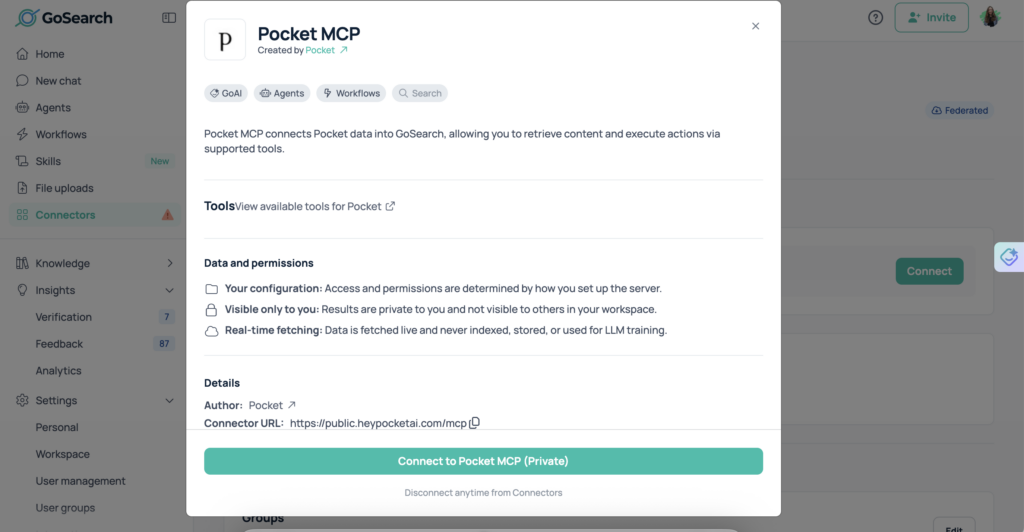
How to Connect the Pocket MCP Server to GoSearch
Connecting Pocket takes a few steps and about five minutes.
1. Find Pocket in GoSearch’s connector library
Open GoSearch’s connectors page and select Pocket from the list of 100+ available integrations.
2. Click to connect
Select Connect and you’ll be redirected to Pocket to sign in.
3. Authenticate with Pocket
Approve the connection from your Pocket account. This authorizes GoSearch to access your recordings without any API keys to generate or copy.
4. Start querying Pocket through GoSearch
Once connected, your Pocket recordings and action items become available to GoSearch agents and workflows alongside your other connected systems.
Why Use GoSearch With the Pocket MCP Server?
Pocket captures what was said. It does not know what your contract says, what your tickets show, or what your roadmap promises. GoSearch fills that gap.
GoSearch connects Pocket to the rest of your company’s knowledge through the same platform: over 100 connectors covering CRM records, contracts, tickets, project docs, and internal communication. A question like “did we deliver what we promised Acme?” pulls the conversation from Pocket and the commitment from wherever that document lives, in one answer instead of two lookups.
Because GoSearch queries connected tools directly rather than relying on indexed snapshots, answers reflect what is in Pocket right now. And because GoSearch agents and workflows can act on what they find, a rep can go from a meeting question to a drafted follow-up without leaving the conversation.
Meeting recordings carry sensitive context, so security matters. GoSearch is SOC 2 Type II and GDPR compliant, and access to Pocket data follows the permissions granted when you authorize the connection.
Pocket captures the conversation. GoSearch turns it into an answer, and often a next step.
Who Should Use the Pocket MCP Server?
Sales and Customer Success Teams
Turn calls into account summaries, check commitments against contracts, and prepare for renewals.
Product and Project Managers
Connect meeting decisions to tickets, keep action items moving, and catch drift from the roadmap.
Operations Teams
Find past conversations quickly and keep follow-ups from slipping between meetings and systems.
Leadership
Get a single view of decisions and open questions across a full week of meetings.
Pocket MCP Server: From Meeting Conversations to Team Action
The Pocket MCP server gives AI agents access to the recordings, transcripts, summaries, and action items teams already capture.
On its own, that data answers narrow questions. Connected to GoSearch, it answers bigger ones, because the agent can combine meeting context with CRM records, tickets, contracts, and the rest of your company knowledge.
That means your AI agent does not just know what was said. It can explain whether that matches the plan, what it means for the customer, and what to do next.
Pocket captures what your team says. GoSearch helps turn it into action. Schedule a demo to learn how GoSearch integrates with Pocket and other enterprise tools.
Search across all your apps for instant AI answers with GoSearch
Schedule a demo
Pocket MCP Server FAQs
What is a Pocket MCP server?
A Pocket MCP server connects compatible AI applications to Pocket through the Model Context Protocol. It gives AI agents access to conversation search, transcripts, summaries, action items, and folders from a Pocket account, so agents can query recordings directly instead of someone opening the app and copying notes by hand. Pocket publishes its own server, and GoSearch adds Pocket as a connector.
What data does the Pocket MCP connector provide?
The connector surfaces conversation search results, full transcripts with timestamps, AI-generated summaries, action items, and folder structure. Search, action items, and folders work on all Pocket plans. Full transcripts and synthesized answers about your meetings require Pocket Pro. This covers most of what a team would otherwise copy out of the Pocket app by hand.
How do you connect Pocket to GoSearch?
Select Pocket from GoSearch’s connector library, then click Connect. You’ll sign in to Pocket and approve access, with no API keys to generate or manage. Once approved, Pocket recordings and action items become available to GoSearch agents and workflows, and GoSearch queries Pocket directly when someone asks a question. The process takes about five minutes from start to first question.
Can GoSearch update Pocket action items?
Yes. The Pocket MCP server lets AI tools change an action item’s status, priority, due date, label, context, and assignee. A GoSearch agent can mark a follow-up complete or move a due date, and the change appears in the Pocket app like any other edit. Teams can pair this with workflows to review open action items on a schedule.
Why connect Pocket to GoSearch instead of using the native server alone?
The native server gives one AI client access to Pocket recordings. GoSearch adds everything else: CRM records, tickets, contracts, project docs, and internal messages. That lets an agent compare what was said in a meeting against what your systems show, then draft the next step. It also gives a whole team the same access without configuring each client individually.