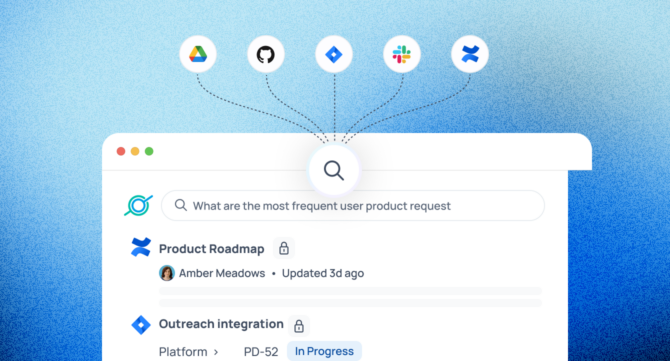

Enterprise search is software that enables employees to find information across all of an organization’s internal systems (documents, messages, tickets, and databases) through a single search interface. It enforces each user’s existing access permissions, so people only see content they’re authorized to view.
Key Takeaways
- Enterprise search connects all your internal tools (Slack, Drive, Jira, Confluence, Salesforce) and lets employees search them from one place.
- It enforces each user’s existing permissions, so restricted content stays restricted.
- AI-powered platforms go further — answering questions in natural language, not just returning a list of links.
- Your AI is only as good as what it can retrieve. Enterprise search is that retrieval layer.
The Problem Enterprise Search Was Built to Solve
Modern organizations don’t have a knowledge problem — they have a fragmented knowledge problem. A McKinsey Global Institute study found that employees spend an average of 1.8 hours every day just looking for things they need to do their jobs — nearly a full workday lost every week. IDC’s landmark study, The High Cost of Not Finding Information, calculated that an organization with 1,000 knowledge workers loses $5.7 million annually just from employees failing to find information they need — and that figure doesn’t include the downstream costs of decisions made on incomplete information.
The average knowledge worker switches between 13 apps 30 times per day, according to Asana’s Anatomy of Work Index. Documentation lives in Google Drive. Decisions live in Slack threads. Tickets live in Jira. Policies live in Confluence. Customer context lives in Salesforce. No single one of those systems knows what’s in the others — and that fragmentation is expensive.
Enterprise search collapses that fragmentation — connecting your tools, indexing their content, and surfacing the right answer wherever it lives.
GoSearch is one example of a modern AI enterprise search platform built for this exact problem — unifying search across your entire knowledge environment with permission-aware retrieval and natural language answers.
How Enterprise Search Compares to Other Search Types
Broadly speaking, there are four types of search engines: web search, site search, enterprise search, and application-specific search. Enterprise search is the only type built for private, multi-source internal environments — and the differences run deeper than scope alone. The table below captures the key distinctions between the three most commonly compared types:
| Feature | Enterprise Search | Site Search | Web Search (Google/Bing) |
| Scope | All internal systems simultaneously | Single website or app | Public internet |
| Permission enforcement | Per-user, inherited from source systems | None | None |
| Content types | Docs, messages, tickets, emails, code, databases | Public web pages on one site | Public web pages and documents |
| Personalization | Role, team, history, access level | Limited | Limited |
| Answer generation | Natural language answers grounded in company content | None | AI overviews from public sources |
| Structured data support | Yes — tickets, CRM records, databases, metadata | Rarely | Limited (public structured data only) |
| Freshness controls | Configurable sync schedules per source | Crawler-dependent | Crawler-dependent |
| Use case | Internal knowledge discovery | Website navigation | Public information retrieval |
Site search is scoped to a single website and its publicly visible content. It can’t reach into your internal tools, respect permissions, or understand who’s asking the question.
Application-specific search — tools like Microsoft Copilot or Salesforce Einstein — operates within a single software platform. It’s more focused than enterprise search and useful within a workflow, but it can’t search across your other tools and creates its own silo rather than eliminating them.
Consumer web search (Google, Bing) indexes the public internet. It has no concept of your internal knowledge, your company’s proprietary documentation, or your employees’ access levels.
Enterprise search does all of this differently. It reaches across private, multi-source internal environments, enforces the permissions that already exist in your source systems, and returns results that are relevant to the specific user asking — not just the query.
From Ingestion to Answer: How Enterprise Search Works
At a high level, every enterprise search platform follows the same four-step workflow — regardless of vendor, architecture, or scale.
Step 1: Content Ingestion and Connectors
Enterprise search platforms use crawlers, APIs, and pre-built connectors to pull content from your existing workplace tools — Google Drive, Confluence, Slack, SharePoint, Salesforce, Jira, Zendesk, GitHub, and dozens more. Indexed connectors sync on a schedule or continuously to keep content fresh; federated connectors query sources live at search time rather than storing a copy. This is where source coverage matters most: any tool without a connector is knowledge your search will never find.
Step 2: Indexing and Metadata Enrichment
Once content is ingested, it’s processed and indexed for retrieval through four operations:
- Metadata extraction — author, creation date, document type, team, and topic are tagged for filtering and ranking
- Chunking — long documents are broken into smaller, independently retrievable segments so the system surfaces the exact relevant passage, not the whole file
- Format normalization — PDFs, HTML, and proprietary file types are converted into plain text for indexing
- Vector embedding (AI-powered systems only) — content is represented as vectors that capture semantic meaning, enabling meaning-based retrieval
Good indexing is what turns a pile of raw documents into a structured, queryable knowledge base.
Step 3: Querying, Ranking, and Relevance
When a user submits a query, the system interprets the intent behind it and retrieves candidate results — from the index, or directly from source systems, depending on the architecture. Results are then ranked by relevance: query-to-content similarity, content freshness, the user’s role and history, and source authority (an official HR policy outranks a personal note on the same topic). Semantic and AI-powered systems go further, matching on meaning rather than keywords alone.
Step 4: Permission Enforcement — The Feature That Makes Enterprise Search Enterprise-Grade
If a user doesn’t have permission to view a document, it won’t appear in their search results — regardless of how relevant it is. That’s what separates enterprise search from every other kind of search: permissions inherited from the original source, enforced at query time, for every result. No special configuration. No exceptions made for relevance.
How Enterprise Search Retrieves and Matches Content
Enterprise search involves two distinct decisions: how content is retrieved (the architecture) and how queries are matched to it (the retrieval method). Most platforms make both choices for you — the best ones let you configure them.
Indexed vs. Federated: The Core Architecture Choice
Indexed Search
Indexed search pulls content from source systems into a centralized index that the search engine queries directly. Retrieval is fast and consistent — well-suited to broad discovery where speed matters. The trade-off is staleness between sync cycles and, in some cases, security and compliance exposure from duplicating data outside its source. SharePoint search is a common example: fast and consistent within the Microsoft ecosystem, but limited to content already in its index.
Federated Search
Federated search queries source systems live at search time rather than indexing content centrally — making it ideal for sensitive or highly dynamic content that shouldn’t be replicated outside the source. The trade-off is latency and the overhead of assembling results from multiple live systems in real time. One common scenario: a financial services firm that needs to search across FINRA-regulated trade records or GDPR-governed customer data without ever copying that content into an external index.
Most modern enterprise platforms blend both — using indexed search for broad, fast discovery and federated search for sensitive or real-time sources — rather than locking in to one architecture exclusively.
Keyword vs. Semantic: How Enterprise Search Interprets Queries
Architecture determines where content lives and when it’s retrieved. Retrieval method determines how a query is matched to that content — and the two are independent. Semantic search can sit on top of either architecture.
Keyword Search
Keyword search matches query terms against indexed terms literally — fast and predictable, but brittle. A search for “headcount reduction” won’t return documents about “workforce restructuring” unless those exact words appear. It handles precise, known-term lookups well but breaks down quickly for natural language queries and concept-based discovery.
Semantic and AI-Powered Search
Semantic search uses embedding models to represent both content and queries as vectors, enabling retrieval based on meaning rather than exact wording. A search for “headcount reduction” returns documents about “workforce restructuring” even if those words never appear. AI-powered platforms extend this further — generating a direct, grounded answer synthesized from retrieved content rather than returning a list of links. GoSearch is built on this approach, combining semantic retrieval with permission-aware answer generation across your connected tools.
Most enterprise search platforms today use hybrid retrieval — blending keyword and semantic matching — to maximize precision and recall across different query types.
The Business Case for Enterprise Search
Hours Saved Per Employee Per Week
Enterprise search cuts the time employees spend hunting for information — reducing context switching, eliminating dead-end searches across siloed tools, and surfacing answers directly rather than making users figure out where to look first.
Get More Value From the Knowledge You Already Have
Every organization has a substantial body of documentation, decisions, and institutional knowledge that goes unused — not because it doesn’t exist, but because it can’t be found. Enterprise search makes that knowledge discoverable, reducing the rate at which teams duplicate work that’s already been done. It also accelerates onboarding: new hires who can self-serve answers reach full productivity faster, without pulling colleagues away from their own work to answer questions that are already documented.
A Stronger Foundation for AI
Your AI is only as good as what it retrieves. Feed it inaccurate, outdated, or over-permissioned content and it generates confidently wrong answers. Enterprise search fixes the retrieval layer — giving AI copilots, agents, and RAG implementations access to your organization’s actual knowledge, scoped correctly to each user.
Where Enterprise Search Has the Most Impact
IT and Operations
When an on-call engineer needs to resolve a production issue at 2 AM, the last thing they should be doing is hunting across four tools for the right runbook. IT teams use GoSearch to surface answers across ticketing systems, documentation wikis, and identity systems instantly — so incident response stays focused on resolution, not retrieval. The same search can surface the last three times that incident occurred, the engineer who resolved it, and the fix they used.
HR and People Teams
When an employee has a question about parental leave or open enrollment, their first move is to search — not file a ticket. Without enterprise search, that query hits a dead end and becomes an email to HR instead. GoSearch surfaces the right policies, docs, and answers instantly — no matter where it’s stored. The result is a measurable drop in repetitive inbound questions, a better employee experience, and an HR team freed to focus on higher-value work rather than answering the same benefits question for the hundredth time.
Sales, Support, and Customer-Facing Teams
A sales rep in a live demo who can’t immediately find the right competitive positioning doc loses momentum at exactly the wrong moment. GoSearch instantly surfaces CRM data, call insights, and enablement content — so reps spend less time searching and more time closing. The same applies to support agents: instead of putting a prospect on hold to search three different tools for a pricing history or product spec, the answer is already there.
Marketing Teams
Marketing teams produce a high volume of content — campaigns, briefs, performance reports, brand assets, competitive research — spread across more tools than any other function. A copywriter shouldn’t have to excavate last quarter’s messaging doc. A demand gen manager shouldn’t be manually reconciling data from three dashboards. GoSearch unifies content, campaign data, and performance insights in one place — cutting the time from insight to action and ensuring the whole team is working from the same version of the truth.
Engineering Teams
Every engineering team has re-opened a decision that was already made — usually because the original reasoning was buried in a Slack thread nobody can find. The debate happens again, the same tradeoffs get re-litigated, and the team loses a week to a conversation that already happened. With it, institutional memory becomes searchable: engineers find code, docs, and tickets instantly, spend less time reconstructing context, and more time building.
Product Teams
Product managers operate at the intersection of customer feedback, engineering capacity, and business priorities — and the information they need is scattered across a dozen tools. Without enterprise search, a PM scoping a new feature has to manually pull together Jira tickets, customer feedback from Intercom, specs from Confluence, and roadmap data from their planning tool. With GoSearch, product teams surface customer feedback, roadmap data, and specs in seconds — so teams move faster and stakeholders stay aligned without another status meeting.
Legal and Compliance
Legal and compliance teams don’t have the luxury of “I’ll find it later.” In a litigation hold or acquisition due diligence, locating every relevant document in minutes rather than days isn’t a productivity gain — it’s a legal obligation. Enterprise search makes that search instant, complete, and auditable.
What to Look for in an Enterprise Search Platform
Most enterprise search evaluations start with vendor demos. They should start with a question: where does your organization actually lose time to fragmented information? Map that first — the vendor conversation becomes much easier when you know exactly what you need to solve.
Source Coverage and Integrations
The value of enterprise search is directly proportional to how much of your knowledge environment it can reach. Evaluate connector depth, not just connector count — how deeply each integration indexes content (full text vs. metadata only), how frequently it syncs, and whether it handles edge cases like nested folders, versioned documents, and threaded conversations. A platform with 100 integrations that index metadata only is less useful than one with 40 that index full text.
Relevance and Personalization
Relevance quality is the most important factor in whether employees actually use a search tool. Strong platforms offer semantic understanding, query intent modeling, and context-aware personalization — surfacing results based on the user’s role, team, and recent activity, not just the literal query string. The gap between a platform that returns ten links and one that returns the right answer is a relevance problem, not a coverage problem.
Security, Governance, and Compliance
Enterprise-grade search must inherit and enforce the permission model of every connected source. This means access control lists respected at query time, no over-indexing of restricted content, full audit trails for search activity, and controls that satisfy compliance requirements in regulated industries. Before going live, run a real-world permissions test: search as a user who shouldn’t see restricted content and verify it stays hidden. Any platform that can’t pass that test across your most sensitive sources shouldn’t pass your evaluation either.
Analytics and Administration
Search analytics reveal what employees are looking for, where the knowledge gaps are, and which queries consistently return nothing useful. Good platforms surface deep visibility into search trends, user journeys, adoption, and AI performance — not just query volume. A high volume of zero-result searches for “parental leave policy,” for example, signals a documentation gap, not a search failure. That distinction is only visible if your platform makes it visible.
How AI Is Changing Enterprise Search
Keyword Search vs. Semantic Search
Traditional keyword search is fast and predictable, but brittle. A query for “what’s our policy on remote work?” returns every document containing the words “remote” and “work” — not the policy itself. Semantic search closes that gap: by representing queries and documents as vectors, it retrieves based on meaning rather than exact wording, significantly improving recall across natural language queries.
Search, RAG, and Enterprise Copilots
In a Retrieval-Augmented Generation (RAG) architecture, an AI model generates answers by pulling context from a trusted knowledge base rather than relying on training data alone. Enterprise search is that knowledge base — the retrieval layer that determines whether the AI’s answer is grounded in your organization’s actual content or fabricated from gaps in its training.
Risks and Limitations
AI-powered enterprise search introduces three failure modes that buyers consistently underestimate. Hallucination — even a well-grounded model can synthesize a plausible but inaccurate answer from real documents and deliver it without caveat. Stale content — when an index falls behind, the AI answers based on a policy that no longer exists. Misconfigured permissions — a single access control gap can surface restricted content to anyone with a search bar. Each has a specific fix — confidence scoring, freshness controls, and permission inheritance — and any platform that can’t demonstrate all three isn’t ready for deployment.
Why Enterprise Search Is Now Core Infrastructure
The organizations winning with AI aren’t the ones with the best models — they’re the ones with the best retrieval. Enterprise search is what makes internal knowledge findable, reusable, and available to every AI tool in your stack. Get that layer right and every document, decision, and conversation your team creates compounds in value. Get it wrong and your AI is working from incomplete information, confidently.
The question isn’t whether to invest in enterprise search. It’s how much longer you can afford not to.
See GoSearch in action — book a demo →
Search across all your apps for instant AI answers with GoSearch
Schedule a demo
Frequently Asked Questions About Enterprise Search
Enterprise search is software that lets employees find information across all of an organization’s internal systems — documents, messages, tickets, databases, and more — through a single search interface, while respecting each user’s existing access permissions. Unlike web or site search, it works across private, multi-source environments and personalizes results based on the user’s role and context.
Enterprise search works in four steps: connectors pull content from your existing tools (Slack, Drive, Jira, Confluence, and others); that content is indexed and enriched with metadata; when a user submits a query, the system retrieves and ranks results by relevance and context; and finally, permissions are enforced at query time so each user only sees content they’re authorized to access. AI-powered platforms add a fifth layer — generating a direct natural language answer from the retrieved content rather than just returning a list of links.
The best platform depends on your stack, team size, and whether you need AI-generated answers or unified search results alone. Key factors to evaluate: how many of your existing tools have pre-built connectors, how permissions are enforced at query time, and whether the platform supports natural language answer generation or keyword results only. GoSearch is built for organizations that need all three — broad connector coverage, rigorous permission enforcement, and AI-generated answers grounded in company content.
Elasticsearch is an open-source search and analytics engine — infrastructure that developers use to build search capabilities from scratch. Enterprise search is a complete, ready-to-use product that adds pre-built connectors to workplace tools, permission enforcement, relevance tuning, admin dashboards, and often AI-generated answers on top of that infrastructure. Elasticsearch gives you full control but requires a dedicated engineering team to configure, maintain, and scale. Enterprise search platforms are designed to be deployed and used without one. If you’re a developer building a custom search product, Elasticsearch is a reasonable starting point. If you’re an organization trying to make internal knowledge findable, enterprise search is the right category.
Web search engines (Google, Bing) index the public internet and return publicly accessible pages. Enterprise search indexes your organization’s private, internal content — documents, emails, tickets, chat logs — and enforces per-user permissions so people only see what they’re authorized to access. Web search has no knowledge of your internal systems; enterprise search has no access to the public web. They solve fundamentally different problems.
Not exactly. RAG (Retrieval-Augmented Generation) is an AI architecture pattern that grounds language model outputs in retrieved context. Enterprise search is the retrieval system that RAG uses as its knowledge source. Think of enterprise search as the infrastructure layer that makes RAG possible in organizational settings — providing the indexed, permission-aware, multi-source knowledge base that the AI draws from when generating answers.