
If you’ve ever tried to build an AI agent, you’ve hit the same wall. You know what you want the agent to do. How to write the prompts that actually make AI agents do that reliably is a different problem entirely.
GoSearch’s new Enhance Instructions feature closes that gap. Write a basic description of what you want in plain language, click a button, and GoSearch generates a fully structured prompt with the context, constraints, and output specifications your agent or workflow needs to perform consistently. This post explains why agent prompts are hard to write, how Enhance Instructions works, and what it looks like in practice for both agents and workflows.
Why Writing Prompts for AI Agents Is Hard
Writing a prompt for a chatbot and writing a prompt for an AI agent are fundamentally different tasks.
A chatbot prompt is a question. The model replies and the conversation continues. An agent prompt is closer to a set of operating instructions. It needs to define what the agent is trying to accomplish, what information it can access, how it should handle decisions, what format its output should take, and what to do when something goes wrong.
Vague prompts that produce mediocre answers in a chatbot produce expensive, looping failures with an agent — every ambiguity compounds across steps. The more autonomous the agent, the more consequential the prompt.
Most people have at one point mischaracterized what an agent is — and the distinction between agents and workflows matters. Agents dynamically direct their own processes with no fixed path, while workflows follow defined steps with structured handoffs. Writing good instructions for each requires a different approach.
The result is that most people building AI agents spend significant time writing, testing, and revising prompts before their agent behaves reliably. For teams without prompt engineering experience, that iteration cycle can be a real barrier to getting agents into production.
How GoSearch Enhance Instructions Works
Enhance Instructions removes the iteration barrier. The process is three steps:
- Write a plain language description of what you want your agent or workflow to do.
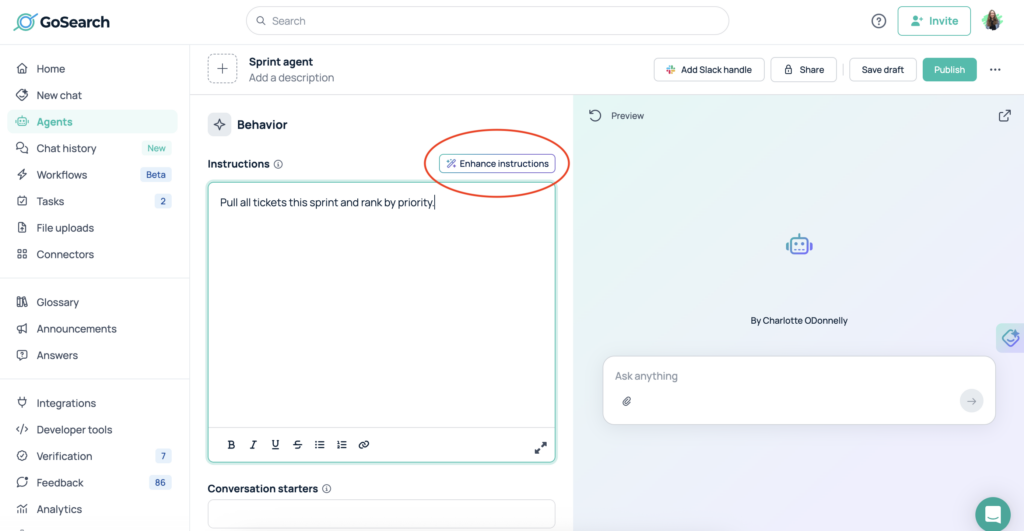
It doesn’t need to be detailed or technically precise. “Pull all tickets this sprint and rank by priority” is enough to start.
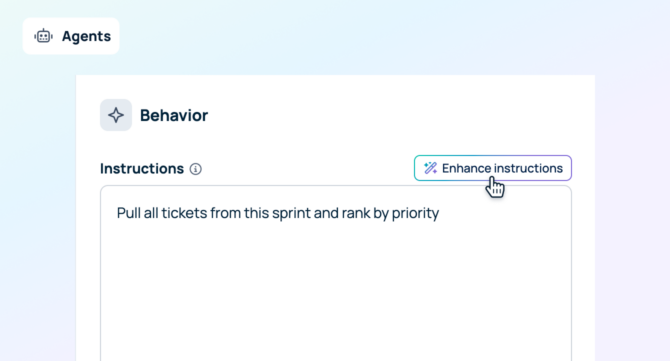
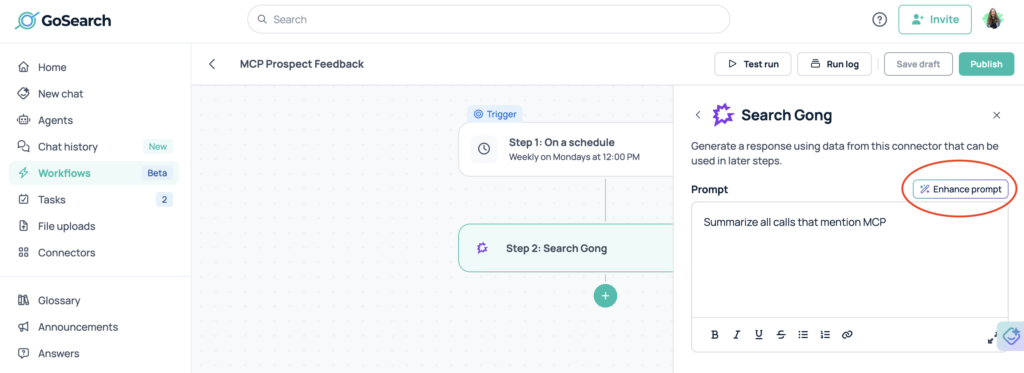
- Click Enhance Instructions (for agents) or Enhance Prompt (for workflows).
GoSearch generates a fully structured prompt with added context, clear objectives, output specifications, and constraints that make the agent or workflow perform more reliably.
- Use the generated prompt as is, or edit it.
If needed, regenerate the prompt to improve any new context or constraints you’ve added.
You can use Enhance Instructions when building something new or when optimizing an existing agent or workflow that isn’t performing the way you’d like. The feature works across both agent instructions and workflow prompts inside GoSearch.
Enhance Instructions for AI Agents
AI agents in GoSearch take action across your connected tools. They can pull data, synthesize information, draft outputs, and surface what matters — but only as reliably as their instructions allow.
Here’s what Enhance Instructions looks like for a sprint prioritization agent.
Basic input:
Pull all tickets this sprint and rank by priority
Enhanced instructions:
Retrieve all tickets assigned to the current sprint from the project tracking system. For each ticket, capture the ticket ID, title or summary, current status, priority level, assignee, story points if available, due date if available, and last updated timestamp. Rank the tickets from highest to lowest priority using the system’s existing priority field, and if multiple tickets share the same priority, order them by nearest due date and then most recently updated. Return the results in a structured table with columns for sprint name, ticket ID, summary, priority, status, assignee, story points, due date, and last updated. If no active sprint is found, return a clear message stating that no current sprint is available.
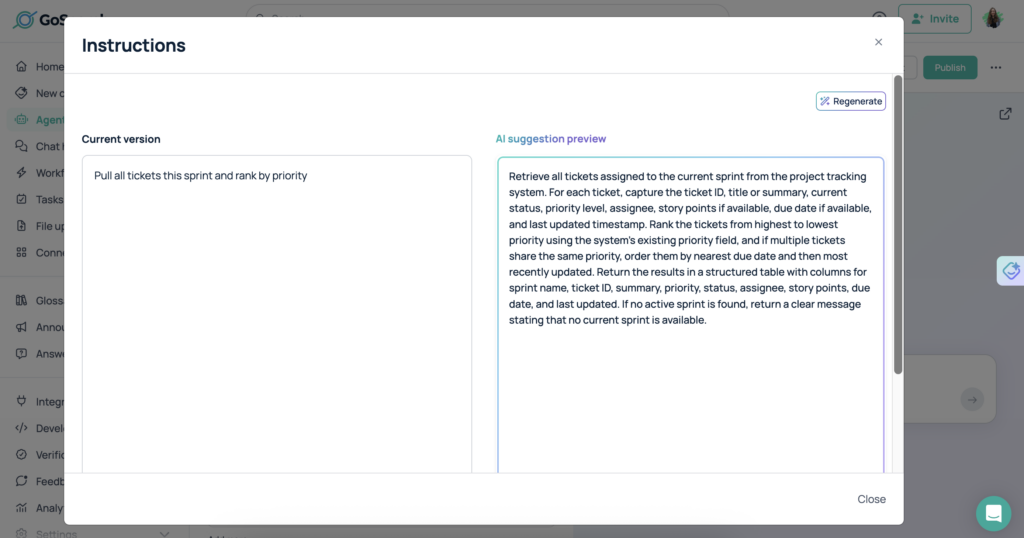
The enhanced version specifies what data to retrieve, how to evaluate and rank it, what format to use, and how to handle edge cases. That level of specificity is what separates an agent that works predictably from one that requires constant supervision.
Enhance Prompt for Workflows
Workflows in GoSearch automate multi-step processes across connected tools. The prompts define how each step runs, what triggers the next step, and what the final output looks like.
Workflow prompts need to be even more explicit than agent prompts because the steps run in sequence. Ambiguity at step two affects everything that follows.
Here’s what Enhance Prompt looks like for a weekly pipeline report workflow.
Basic input:
Summarize all calls that mention MCP
Enhanced prompt:
Review all available call records and identify every call in which “MCP” is explicitly mentioned. For each matching call, extract and summarize the relevant discussion, including the call date or timestamp, participants if available, the specific context in which MCP was mentioned, any decisions made, action items assigned, open questions, and the overall outcome or significance of the mention. If transcripts are available, use them as the primary source; otherwise use call notes, summaries, or metadata. Return the results in a structured list or table with one entry per call, including: call ID or title, date, participants, MCP mention summary, decisions, action items, and unresolved follow-ups. If no calls mention MCP, return a clear statement indicating that no relevant calls were found.
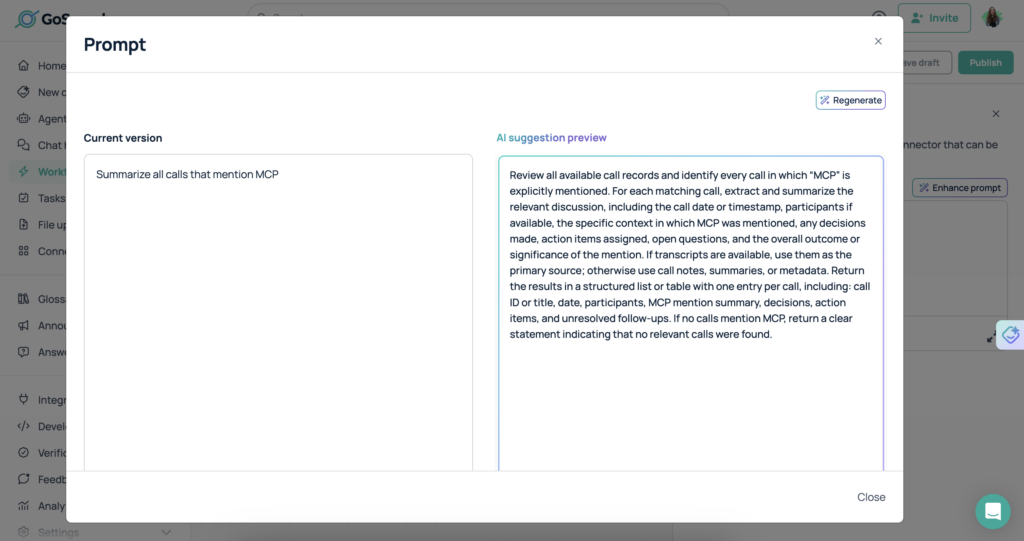
The enhanced version defines the source, the data to retrieve, the grouping logic, the output format, and the error handling. A workflow running those instructions performs consistently without manual oversight.
Who Benefits Most
Enhance Instructions is useful for anyone building agents or workflows in GoSearch, but three groups benefit most.
Teams new to AI agents and workflows. Writing structured prompts is a skill that takes time to develop. Enhance Instructions gives teams a production-ready starting point without requiring prompt engineering experience.
Teams optimizing existing agents and workflows. If an agent or workflow isn’t performing as expected, Enhance Instructions gives you a structured alternative to compare against. Paste your current instructions, enhance them, and see what’s missing.
Teams scaling agent and workflow deployment. Moving from one or two agents or workflows to dozens means writing a lot of prompts quickly. Enhance Instructions makes that process faster without sacrificing quality.
Enhance Instructions Makes AI Agent Prompting Accessible to Everyone
Writing effective prompts for AI agents has always required a combination of technical knowledge, trial and error, and time most teams don’t have. GoSearch Enhance Instructions removes that barrier. Whether you’re building your first agent, automating a recurring workflow, or improving something that isn’t quite working, you get a structured, production-ready starting point from a single plain language description.
Better agent prompts mean more reliable agents. More reliable agents mean less manual oversight and more time back for the work that actually matters.
Get started with GoSearch Free and try Enhance Instructions today.
Personal access to agentic enterprise search, free with GoSearch.
Sign up
Frequently Asked Questions
The most effective agent prompts start with a clear role definition — not just what the agent does, but how it thinks and what values it applies when instructions don’t cover a specific situation. Beyond the role, a complete agent prompt should define the objective, the tools available, decision-making criteria, output format, and how to handle errors or edge cases. Missing any one of these consistently produces unpredictable behavior.
An agent prompt defines how an autonomous system makes decisions across an open-ended task. A workflow prompt defines how a structured, multi-step process runs from start to finish. Agent prompts need to account for dynamic decision-making and unexpected inputs. Workflow prompts need to be precise about sequence, triggers, and handoffs between steps. Both benefit from specificity, but in different ways.
No. GoSearch Enhance Instructions is designed for users who know what they want their agent or workflow to do but don’t know how to write instructions that make it happen reliably. A plain language description is all you need to start. GoSearch handles the structure.
Yes. The enhanced output is a starting point, not a final version. You can edit, adjust, or expand on the generated instructions before saving or regenerating. Most users run the enhancement, review the output, and make small adjustments to reflect specific preferences or edge cases they know from experience.
Yes. You can use it to optimize instructions for agents and workflows that are already running. If something isn’t performing the way you want, edit the current instructions, click Enhance Instructions, and compare the output to what you have.