
AI assistants are evolving fast — from tools you query to systems that work for you. One of the most talked-about examples of this shift is Clawdbot (now OpenClaw), known for its always-on, task-driven approach to AI.
But for many teams, adopting Clawdbot (OpenClaw)isn’t realistic. It often requires local installation, elevated permissions, and a level of access that most companies won’t allow on work computers — and many security professionals don’t recommend installing it on personal machines either.
The good news: you don’t need a complex system to get the benefits of scheduling AI.
With GoSearch Tasks, teams get many of the core features of Clawdbot (OpenClaw) — scheduling, automation, and continuous AI execution — in a simpler-to-set-up, easier-to-use format, designed with enterprise security in mind.
GoSearch Tasks runs where work already happens — across email, calendar, Slack, and the web — without requiring downloads, local agents, or risky device-level access. You can turn on always-on AI in minutes, with clear controls, predictable behavior, and workflows your security team can actually approve.
This post breaks down:
- What Clawdbot (OpenClaw) is known for
- What “scheduling AI” actually means in practice
- How GoSearch Tasks compares
- Why Tasks is often the more accessible path to always-on AI
What Is Clawdbot (OpenClaw)?
Clawdbot (OpenClaw) is often described as an always-running AI agent — an AI system designed to operate continuously in the background, monitoring signals and executing tasks without waiting for user prompts.
At a high level, Clawdbot (OpenClaw)focuses on:
- Persistent AI execution
- Task-based automation
- Long-running workflows
- AI that acts proactively, not reactively
For many teams, Clawdbot (OpenClaw) represents the promise of “AI that never sleeps.”
The Rise of Scheduling AI (and Why It Matters)
For the average user, the real breakthrough isn’t autonomous reasoning — it’s scheduling AI.
Scheduling AI means:
- AI that runs on a schedule
- AI that knows when to act
- AI that delivers results where you already work
Instead of asking AI for updates, users receive:
- Daily email summaries
- Calendar-driven reminders
- Slack alerts before deadlines
- Web-based monitoring and notifications
This is where GoSearch Tasks comes in.
What Are GoSearch Tasks?
GoSearch Tasks let you schedule AI agents to automatically deliver information or take action, continuously and reliably. From daily summaries to weekly reports, GoSearch ensures you always get the right update, in the right place, at the right time.
Once a task is set up, it runs 24/7, without prompts.
You can:
- Monitor email, calendar events, and web data
- Generate daily or weekly summaries
- Trigger reminders based on time or events
- Deliver results via email or Slack
In other words: GoSearch Tasks gives you the practical benefits of Clawdbot (OpenClaw)— without the overhead.
GoSearch Tasks vs. Clawdbot (OpenClaw): Feature Comparison
| Feature | GoSearch Tasks | Clawdbot (OpenClaw) |
| Always-on AI execution | ✅ Yes | ✅ Yes |
| Scheduled AI workflows | ✅ Built-in scheduling (daily, weekly, one-time, event-based) | ✅ |
| Email automation | ✅ Native email delivery | ⚠️ Varies by setup |
| Calendar-driven actions | ✅ Yes | ⚠️ |
| Web monitoring & alerts | ✅ Yes | ✅ |
| Slack delivery | ✅ Native | ⚠️ |
| Enterprise integrations (Jira, Salesforce, HubSpot, etc.) | ✅ First-class support | ⚠️ |
| Setup complexity | ✅ Low | ❌ Higher |
| Designed for everyday business users | ✅ Yes | ❌ More technical |
| Transparent workflows | ✅ User-defined, visible tasks | ⚠️ |
| “Agentic AI” without custom engineering | ✅ Yes | ❌ |
Bottom line:
GoSearch Tasks provides key aspects of Clawdbot (OpenClaw) — always-on AI, scheduling, and automation — in a form that teams can actually deploy and trust today. GoSearch workflows (launched 2/12/26) is a drag-and-drop AI workflow orchestration tool that is much more secure and easier to set up for the non-technical user.
Clawdbot (OpenClaw) is much more difficult to set up and requires more technical expertise. Also, there have been a lot of conversations around the highest risk of leveraging OpenClaw. Many organizations’ IT staff are telling their companies and teams not to install on company devices and recommending not doing so on personal devices either.
Real-World Examples of GoSearch Tasks in Action
Automate your day with scheduled, AI-powered workflows that keep your day running smoothly.
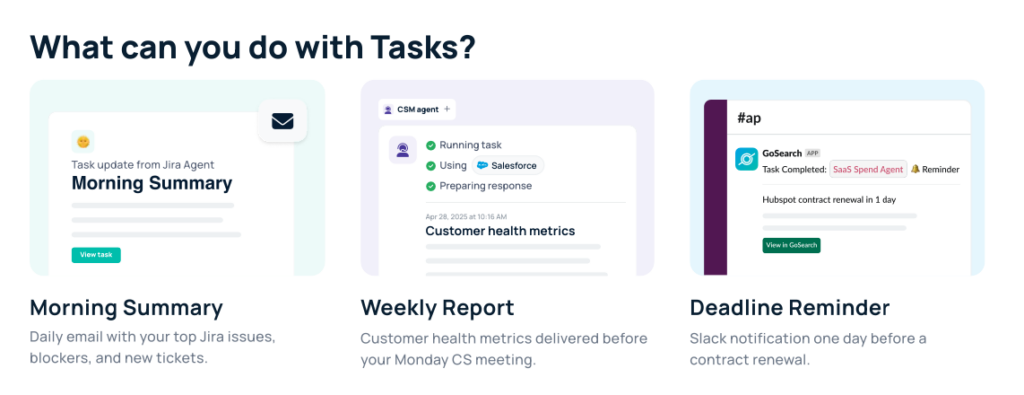
GoSearch Tasks Use Cases
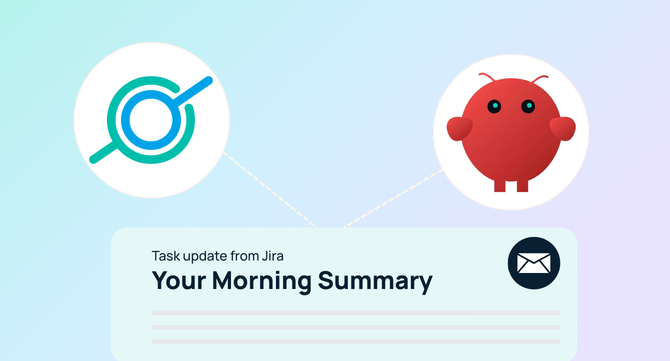
Daily Morning Summary (Email): AI automatically scans Jira and support tools and sends a concise daily summary of blockers, new tickets, and priorities.
Weekly Customer Health Report: A scheduled AI agent pulls CRM data and delivers customer health metrics before your Monday meeting.
Calendar-Driven Reminders: Get Slack or email alerts one day before contract renewals or key milestones.
Always-On Web Monitoring: Track changes, updates, or mentions across the web and receive structured summaries automatically.
Each of these workflows runs continuously, without user intervention; the hallmark of Clawdbot(OpenClaw)-style AI.
How to Create a Task in GoSearch
Creating a task in GoSearch is as easy as 1 – 2 – 3 – 4:
- Choose an Agent: Pick or build an AI agent.
- Give instructions: Define what the task should do (e.g., “Send a weekly report of top opportunities”).
- Set the schedule: Select delivery frequency (daily, weekly, monthly, annual, or one-time).
- Pick delivery: Get results as an email summary or a full response in Slack.
Why Teams Choose GoSearch Tasks Over Clawdbot (OpenClaw)
While Clawdbot (OpenClaw) showcases what’s possible with autonomous AI, many teams need something:
- Easier to set up
- Simplier to set
- Easier to govern
- Less risky for personal and company use
- Easier to integrate with existing tools
GoSearch Tasks delivers:
- Always-on AI without complexity
- Clear, scheduled execution
- Enterprise-grade integrations
- Predictable, auditable outcomes
You turn it on once, and it works for you continuously.
GoSearch Tasks: Always-On AI, Made Practical
If Clawdbot (OpenClaw)represents the future of autonomous agents, GoSearch Tasks brings that future into everyday work.
It gives teams:
- Scheduling AI
- Persistent execution
- Background automation
- Real results delivered where work already happens
No prompts. No chasing updates. Just AI that’s always on.
👉 Learn more at gosearch.ai/.
Search across all your apps for instant AI answers with GoSearch
Schedule a demo