
Quick Answer: GoSearch is an agentic enterprise search and workflow platform with a native Slack app. It searches 100+ connected apps, summarizes results with citations, and runs custom AI agents and follow-up actions from Slack. Slack’s native enterprise search requires the Enterprise+ plan and uses Salesforce’s Agentforce for no-code agent building. GoSearch works on Slack Pro, Business+, and Enterprise+, with a no-code agent and workflow builder for every employee.
Many enterprise teams live in Slack, but the knowledge they need lives in Confluence, Google Drive, Jira, Salesforce, GitHub, and dozens of other tools. To find an answer, employees leave Slack, search another app, and come back, or they ask a colleague instead. On distributed teams, waiting on a colleague’s reply can slow work down. The GoSearch Slack integration brings enterprise search for Slack to every plan, so teams get those answers without leaving Slack.
What You Can Do With GoSearch in Slack
GoSearch adds three capabilities to Slack: enterprise search, custom AI agents, and multi-app workflows.
Install GoSearch from the Slack Marketplace →
| Capability | How you use it | Example | What it returns |
|---|---|---|---|
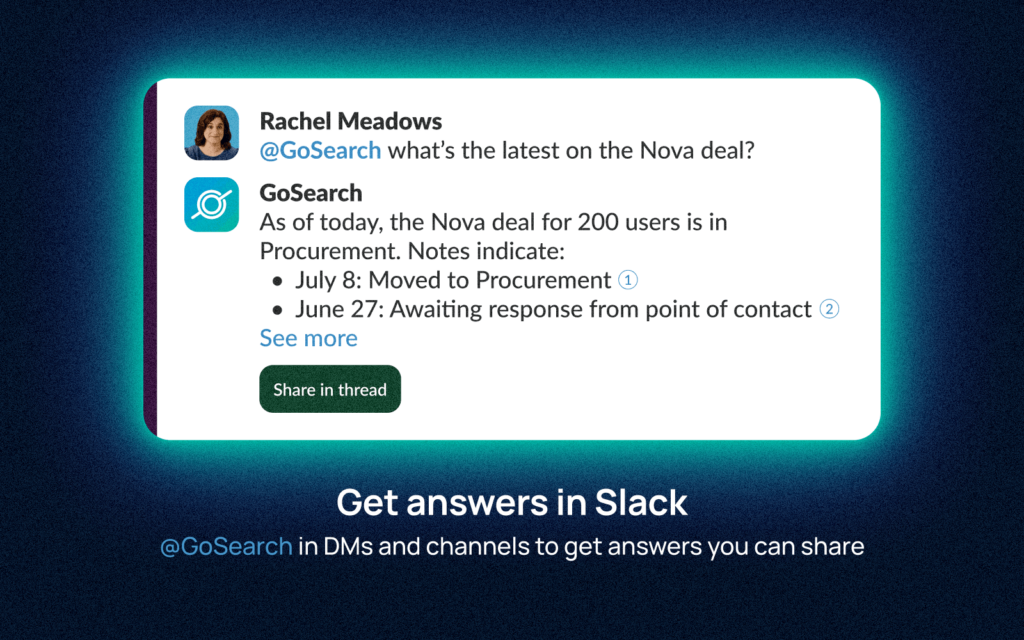
| Enterprise search | Mention @GoSearch with a question, or use /gosearch to find and share a file | “@GoSearch what’s the latest on the Nova deal?” | A summary with citations from Salesforce, Gong, and Gmail |
| Custom AI agents | Mention @GoSearch with the agent’s command | “@GoSearch /itsupport my VPN isn’t connecting” | An answer from IT runbooks, plus a Jira ticket if needed |
| Workflows | Set a Slack channel or DM as the workflow’s destination in GoSearch | A PagerDuty incident triggers a runbook lookup and a Jira ticket | A summary posted to #incidents |
All three work on Slack Pro, Business+, and Enterprise+.
Enterprise Search Across 100+ Apps
GoSearch connects to 100+ apps, including Google Drive, Confluence, SharePoint, Jira, Salesforce, and GitHub. It uses hybrid retrieval that combines indexing, real-time federated queries, and MCP connectors. Keyword and semantic search are both supported, so queries return exact matches or contextual answers depending on the question.
Mention @GoSearch in any Slack channel or DM, ask a question in plain language, and GoSearch returns a summarized answer with citations from your connected apps.
Example: An account executive types “@GoSearch what’s the latest on the Nova deal?” GoSearch searches Salesforce, Gong, and Gmail and returns a cited summary without anyone opening another tab.
Custom AI Agents and Agent Orchestration in Slack
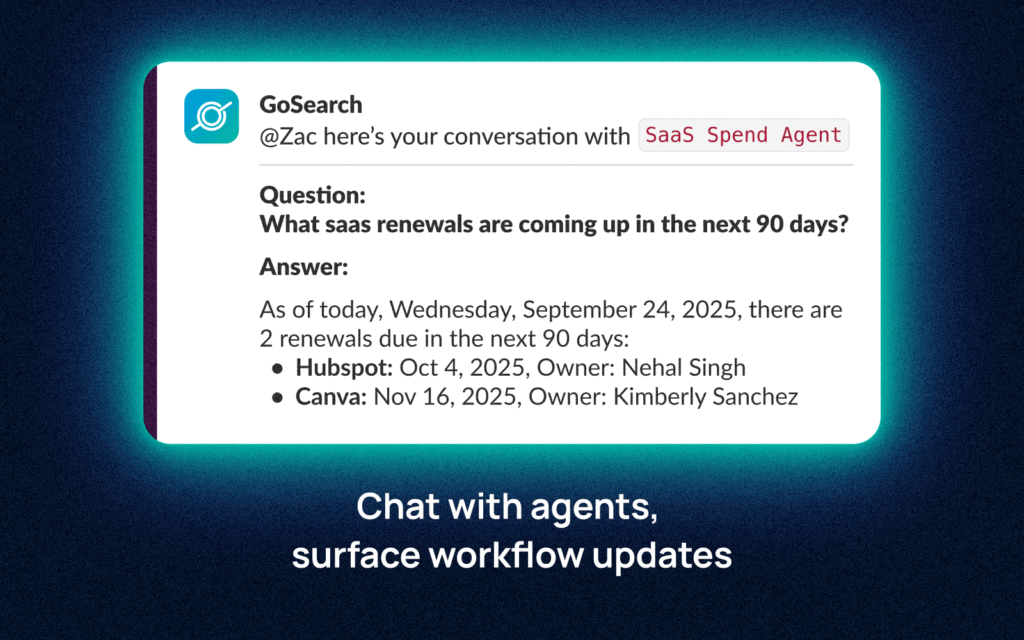
Teams build AI agents for specific departments, roles, or workflows in GoSearch’s no-code agent builder and deploy them to Slack, with no Salesforce license or Agentforce setup. Employees invoke them by command. Each agent retrieves from its assigned data sources, summarizes what it finds, and can hand off tasks, such as opening a Jira ticket.
Each agent answers only from the sources you assign it. A few examples:
| Agent | Example command | What it does |
|---|---|---|
| IT helpdesk | @GoSearch /itsupport my VPN isn't connecting | Answers from runbooks and internal documentation, and opens a Jira ticket when it can’t resolve the issue |
| Sales enablement | @GoSearch /enablement what's our positioning against Competitor X? | Pulls from battle cards, product documentation, and recent call summaries |
| HR | @GoSearch /hrhelper how many PTO days do I have left? | Answers from your HRIS and policy documentation |
Multi-App Workflow Automation in Slack
GoSearch workflows automate multi-step processes across tools and post the results to Slack channels or DMs. Slack’s Workflow Builder runs rule-based steps, including some third-party connector steps. GoSearch workflows add agents that search, summarize, and route the next task to the right person or system.
Each workflow starts with a trigger in another app and ends with an update in Slack. For example:
| Trigger | What GoSearch does | Posted to Slack |
|---|---|---|
| Incident flagged in PagerDuty | Pulls the runbook from Confluence and creates a Jira ticket | Summary in #incidents |
| Deal closed in Salesforce | Builds a summary from CRM and Gong data | Summary in #revenue |
| New employee added in the HRIS | Triggers the onboarding checklist | Progress updates in the manager’s Slack DM |
Enterprise Search for Slack: Native and Third-Party Options
There are a few ways to add enterprise search and AI agents to Slack. The right fit depends on your Slack plan, whether you use Salesforce, and who builds your agents.
Slack’s enterprise search is a native capability. It searches Slack conversations, files, and connected apps such as Google Drive, GitHub, Box, OneDrive, SharePoint, and Salesforce from one AI-powered search bar, and it returns permission-aware answers. For teams on Enterprise+ that run Salesforce, it’s a strong built-in option.
It has two limits. First, enterprise search requires the Enterprise+ plan (or Enterprise Grid with the legacy Slack AI add-on), and org admins must turn it on. Second, no-code custom agents in Slack’s native stack come from Agentforce, which is configured in Salesforce’s Agent Builder. Developers can also build agents on Slack’s developer platform. For organizations that don’t run Salesforce or don’t have developers available, either path adds cost and setup time.
Slack also offers Slackbot, an AI agent available on Business+ and Enterprise+ plans. It works from Slack conversations, files, and Salesforce data.
GoSearch is built for this gap. It works on every Slack plan and adds named AI agents and cross-system workflows.
GoSearch vs. Slack Enterprise Search
Both search connected apps from Slack. They differ in which plans include them, how you build agents, and what happens after a search.
| Slack Enterprise Search | GoSearch for Slack | |
|---|---|---|
| Plan availability | Enterprise+, or Enterprise Grid with the legacy Slack AI add-on | Pro, Business+, and Enterprise+ |
| Connector breadth | Native connectors (Google Drive, GitHub, Box, OneDrive/SharePoint, Salesforce) plus an API for custom sources | 100+ connectors, including MCP integrations |
| Custom agent builder | No-code through Agentforce in Salesforce’s Agent Builder; code-built agents through Slack’s developer platform | Native no-code builder, no Salesforce dependency |
| Multi-app workflow automation | Workflow Builder with third-party connector steps | Agent-powered workflows that search, summarize, and route tasks |
Slack details verified against Slack documentation as of October 2026.
Comparing GoSearch with other enterprise AI tools? See GoSearch vs. Claude Enterprise and GoSearch vs. Glean.
Is the GoSearch Slack Integration Secure?
Yes. GoSearch is built for teams with strict data governance requirements. Results respect each connected app’s existing permissions, so people only see content they’re authorized to access. Full details are on the GoSearch security page.
- Zero LLM data retention: data is used only to generate the answer, never stored by model providers or used to train AI models
- SOC 2 Type II certified; GDPR, CCPA, and HIPAA compliant
- SSO: SAML-based SSO with your existing identity provider
- BYOC: deploy GoSearch in your own cloud environment
- Prompt injection protection for agents working with indexed content
How to Set Up the GoSearch Slack Integration
Setup happens in two places: Slack, where an admin approves the app, and the GoSearch dashboard, where you connect data sources and Slack.
- Approve the app in Slack.
If your workspace requires app approval, a Slack admin approves GoSearch from the Slack Marketplace listing. If not, any member can add it.
- Connect your data sources.
In the GoSearch dashboard, a GoSearch admin connects the apps your team uses. Most authenticate through OAuth.
- Connect Slack.
In the GoSearch dashboard, go to Integrations > Slack and click Connect. Enter your Slack workspace URL and sign in to Slack. Each user completes this step.
- Add GoSearch to your channels.
In Slack, type
/invite @GoSearchin each public or private channel where you want to use it. - Ask your first question.
Type
@GoSearch [your question]for a cited answer, or/gosearch [query]to find and share a file. - Add agents and workflows (optional).
GoSearch, build an agent, deploy it to Slack, and call it with
@GoSearch /[agent-name]. For workflows, set a Slack channel as the destination.
Watch GoSearch answer questions from your company’s apps without anyone leaving Slack.
GoSearch in Slack: Use Cases by Team
GoSearch fits any team that works in Slack but keeps its knowledge in other apps. A few examples by team:
- IT: Answer common questions in Slack before they become tickets, and resolve the rest faster with runbooks at hand.
- Engineering: Pull context from GitHub, Jira, Confluence, and PagerDuty into incident and standup channels.
- HR and People: Give employees policy answers, PTO lookups, and onboarding guidance without routing every question through HR.
- Sales: Get deal context, competitive intel, and enablement content in deal channels on demand.
- Remote and distributed teams: Find answers in Slack, Confluence, and Google Drive without waiting on a colleague’s reply.
See GoSearch in Your Slack Workspace
Bring the questions your team keeps asking in Slack. In a GoSearch demo, see how search, custom agents, and workflows would answer them across your team’s apps.
Already a GoSearch customer? Connect Slack from your Integrations dashboard and start asking questions in your channels today.
Search across all your apps for instant AI answers with GoSearch
Schedule a demo
Frequently Asked Questions About the GoSearch Slack Integration
How does the GoSearch Slack integration work?
The GoSearch Slack integration connects Slack to 100+ company apps. Mention @GoSearch in any channel or DM to get a cited answer, call a custom AI agent, or receive workflow results. It works on Slack Pro, Business+, and Enterprise+.
What is enterprise search for Slack?
Enterprise search for Slack lets employees search company apps such as Google Drive, Confluence, and Jira without leaving Slack. Slack’s native version requires the Enterprise+ plan and uses Salesforce’s Agentforce for no-code agents. GoSearch works on any Slack plan and includes its own no-code agent builder and workflows.
Can GoSearch and Slack’s native enterprise search be used together?
Yes. Slack’s enterprise search covers Slack and its connected apps. GoSearch adds a broader connector set, custom agents, and cross-system workflows.
Does GoSearch respect existing app permissions in Slack?
Yes. GoSearch follows each connected app’s existing permissions. If someone can’t open a file in the source app, they won’t see it in GoSearch results in Slack.
Does GoSearch work in Microsoft Teams?
Yes. GoSearch also integrates with Microsoft Teams. See how to set up GoSearch in Microsoft Teams.