
Organizations are rapidly adopting AI agents and Model Context Protocol (MCP) servers to connect tools, data, and workflows. But many teams still struggle with a fragmented stack, where valuable knowledge lives across internal apps, proprietary systems, and custom APIs.
Today, GoSearch makes that problem easier to solve.
You can now add Custom MCP Connectors in GoSearch. Simply connect GoSearch to your own MCP servers to instantly access proprietary tools, workflows, and knowledge alongside your company’s existing apps.
This capability extends GoSearch’s growing ecosystem of plug-and-play MCP connectors while giving teams full flexibility to integrate any MCP-compatible service.
Key Takeaways
- Connect any MCP server to GoSearch using the new Custom MCP Connector capability
- Access internal tools, APIs, and proprietary systems directly from GoSearch
- Combine MCP-powered actions with federated search results from across your workspace
- Use OAuth or simple server URLs to securely connect your MCP infrastructure
- Extend GoSearch’s AI agents with custom workflows and domain-specific capabilities
What Are Custom MCP Connectors in GoSearch?
Custom MCP Connectors allow organizations to connect any MCP server directly to GoSearch.
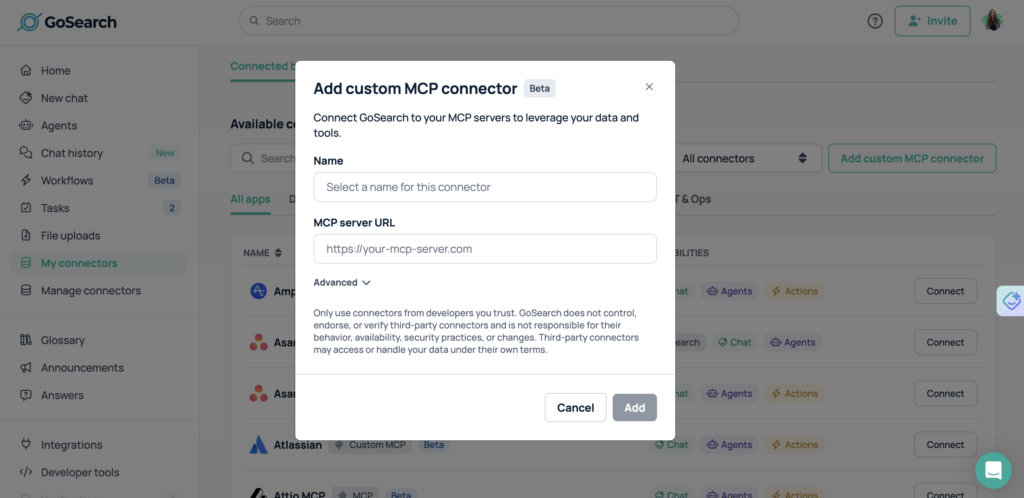
Instead of waiting for a native integration, teams can simply:
- Paste the MCP server URL
- Optionally provide OAuth credentials (client ID and client secret)
- Instantly make those MCP tools available inside GoSearch
Once connected, GoSearch can interact with those servers to retrieve data, trigger actions, and execute workflows alongside search results from your other business apps.
This gives teams a simple way to bring internal tools and custom systems into the GoSearch experience.
Why Custom MCP Connectors Matter for AI-Powered Work
AI agents are only as useful as the systems they can access.
Many organizations rely on proprietary platforms, internal APIs, or specialized tools that are not part of standard SaaS integrations. Without a flexible integration layer, those systems remain disconnected from AI workflows.
Custom MCP connectors solve this by enabling teams to:
- Connect internal developer platforms
- Access proprietary knowledge bases
- Trigger custom automation workflows
- Integrate private APIs and internal tools
- Extend GoSearch with organization-specific capabilities
Instead of building custom AI infrastructure from scratch, teams can plug their existing systems directly into GoSearch.
How Custom MCP Connectors Work
Connecting an MCP server to GoSearch takes just a few steps.
Step 1: Add Your MCP Server
Paste the server URL for your MCP service.
Step 2: Configure Authentication (Optional)
If your MCP server requires authentication, provide:
- OAuth client ID
- OAuth client secret
Step 3: Start Using MCP Tools in GoSearch
Once connected, GoSearch can securely interact with your MCP server to retrieve data or execute tools.
This means your MCP-powered workflows can run directly within GoSearch alongside enterprise search results.
Combining MCP with Federated Search
Custom MCP connectors are not just another integration feature—they are a key part of GoSearch’s federated AI strategy.
GoSearch already connects to hundreds of workplace tools through its federated search architecture. This allows teams to find information across apps like documentation platforms, messaging tools, CRMs, and ticketing systems.
MCP connectors add another powerful layer.
Instead of only retrieving information, GoSearch can interact with systems and execute tasks.
Together, these capabilities enable a unified workflow:
- Search across your organization’s knowledge
- Use AI to analyze and summarize results
- Trigger tools or workflows via MCP servers
- Complete tasks without switching apps
GoSearch operates as an AI workspace for both knowledge and action.
Expanding the GoSearch MCP Ecosystem
GoSearch already offers a growing library of plug-and-play MCP connectors for popular platforms. Custom MCP connectors expand this ecosystem by allowing teams to integrate anything that supports the MCP standard.
This flexibility is especially valuable for organizations that:
- Build internal developer tools
- Maintain private APIs
- Use specialized industry software
- Run custom automation infrastructure
With Custom MCP connectors, those systems can now participate in GoSearch’s AI-powered workflows.
Security and Authentication Options
GoSearch supports flexible authentication methods for MCP servers.
Teams can connect servers using:
- Simple server URLs for open or internal MCP services
- OAuth authentication for secure access to protected tools
This allows organizations to maintain their existing security controls while still enabling powerful integrations with GoSearch.
Why MCP Matters for Enterprise AI
Model Context Protocol is quickly becoming the standard for connecting AI systems to tools and data.
Instead of building custom integrations for every application, MCP provides a universal interface that allows AI platforms to interact with services in a consistent way.
By supporting MCP natively, GoSearch enables organizations to:
- Future-proof their AI infrastructure
- Reduce integration complexity
- Build reusable AI-powered workflows
- Extend enterprise search into actionable automation
Custom MCP connectors make it possible to adopt this architecture immediately.
Get Started with Custom MCP Connectors in GoSearch
Custom MCP connectors are now available in GoSearch.
You can start by connecting your MCP server and making your internal tools available directly within GoSearch.
Once connected, your team can search knowledge, analyze information with AI, and execute workflows, all in one place.
Extend GoSearch with Custom MCP Connectors
Custom MCP connectors give organizations a powerful way to extend GoSearch beyond standard integrations. By connecting GoSearch to any MCP server, teams can bring internal tools, proprietary systems, and custom workflows directly into their AI-powered search experience. This flexibility allows companies to unlock the value of systems that are often difficult to integrate with traditional platforms.
Combined with GoSearch’s federated search architecture, MCP connectors enable a unified workflow where employees can both discover knowledge and take action. Teams can search across company apps, analyze results with AI, and interact with connected tools without leaving the GoSearch interface.
As the Model Context Protocol continues to emerge as a standard for connecting AI to software systems, custom MCP connectors help future-proof enterprise AI strategies. Organizations can integrate new tools, expose internal capabilities, and expand AI-powered workflows while keeping their existing infrastructure in place.
Frequently Asked Questions
What is a custom MCP connector?
A custom MCP connector allows you to connect GoSearch to any server that supports the Model Context Protocol (MCP). Instead of relying only on prebuilt integrations, teams can add their own MCP servers to extend GoSearch with internal tools, proprietary systems, and custom workflows. Once connected, GoSearch can interact with those services to retrieve information, run tools, or trigger automated actions directly from the search interface. This makes it easier to bring specialized systems and internal infrastructure into AI-powered workflows.
What is Model Context Protocol (MCP)?
Model Context Protocol (MCP) is an open standard designed to help AI systems connect to external tools, APIs, and data sources. MCP provides a consistent interface that allows AI platforms to retrieve information, execute tasks, and interact with software services in a structured way. By using MCP, organizations can expose their systems to AI applications without building custom integrations for every tool. This approach simplifies integration and makes it easier to connect AI agents to the systems they need to access.
What is an MCP server?
An MCP server is a service that exposes tools, data, or workflows through the Model Context Protocol so AI systems can interact with them. Instead of building custom integrations for every AI application, organizations can create an MCP server that provides a standardized interface to internal systems or APIs. AI platforms such as GoSearch can then connect to that server to retrieve information, run tools, or trigger workflows. This architecture makes it easier to connect AI agents to the systems they need to access.
How do MCP connectors help unify enterprise knowledge and tools?
MCP connectors help unify enterprise knowledge and tools by allowing AI platforms to interact with multiple systems through a consistent protocol. In GoSearch, federated search retrieves information from many workplace applications, while MCP connectors allow the platform to interact with tools and services directly. This means employees can search across company knowledge, analyze information with AI, and execute actions through connected tools without switching between applications. The result is a more unified workflow where information discovery and task execution happen in the same place.
What are the benefits of using MCP with AI-powered search?
Using MCP with AI-powered search allows organizations to move beyond simple information retrieval and enable more advanced workflows. AI systems can use MCP to access structured data, trigger tools, and automate tasks across connected services. When combined with federated search in GoSearch, MCP enables a unified experience where employees can discover information, generate insights, and take action within the same interface. This approach reduces context switching and helps teams complete complex tasks faster using AI assistance.
How do custom MCP connectors work in GoSearch?
Custom MCP connectors allow administrators to add an MCP server to GoSearch by providing the server URL and, if required, authentication credentials such as an OAuth client ID and client secret. Once the connection is established, GoSearch can communicate with the MCP server to access tools, retrieve information, or execute workflows. These capabilities become available alongside GoSearch’s federated search results, enabling teams to both find knowledge and interact with systems directly from a single interface.
What types of systems can be connected using custom MCP connectors?
Any system that exposes an MCP server can be connected to GoSearch using a custom MCP connector. This includes internal APIs, proprietary knowledge platforms, developer tools, automation services, and other custom software systems. Many organizations use MCP servers to expose internal workflows or specialized tools that are not available through standard integrations. By connecting these systems to GoSearch, teams can access internal capabilities and trigger actions directly within their AI-powered search experience.
How do MCP connectors support AI agents and automation?
MCP connectors enable AI systems to move beyond simply retrieving information and begin interacting with software tools. When GoSearch connects to MCP servers, AI agents can access structured data, run tools, and execute workflows provided by those servers. This allows teams to complete tasks, analyze information, or automate processes directly from GoSearch. By combining AI search with MCP-powered actions, organizations can create workflows where employees find knowledge, generate insights, and trigger operational tasks without switching between applications.
Are custom MCP connectors secure?
Yes, custom MCP connectors support secure authentication methods to protect access to connected systems. Organizations can connect MCP servers using OAuth credentials such as a client ID and client secret when authentication is required. This allows companies to maintain their existing security controls while still enabling AI-powered integrations. Because MCP connectors interact with servers through defined protocols and authentication layers, teams can safely expose internal tools and workflows to GoSearch without compromising security.
Search across all your apps for instant AI answers with GoSearch
Schedule a demo

![Selecting the Best Enterprise Search Software [Features + Vendors]](https://images.gosearch.ai/blog/content/uploads/2023/10/17234328/Blog-Header-3-370x184.png)