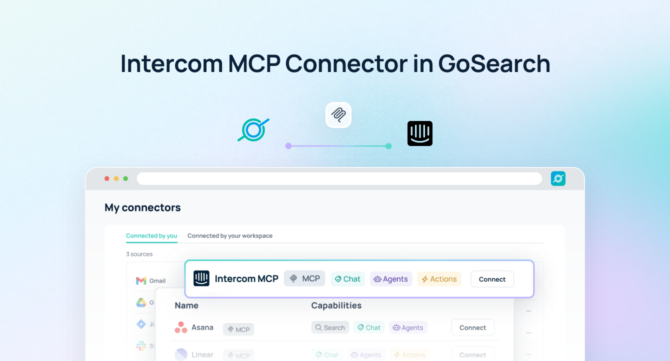

An Intercom MCP server allows AI agents to securely access and act on customer conversations, tickets, and support data in real time, without data exports, syncing pipelines, or custom integrations.
Quick Answer: An Intercom MCP server is a Model Context Protocol endpoint that gives AI agents real-time, permission-aware access to Intercom conversations, tickets, and contacts — no data exports or custom integrations required.
With GoSearch, teams can use an Intercom MCP server to query customer interactions using natural language, take automated actions, and coordinate workflows across systems, all without copying, syncing, or indexing data. AI agents interact directly with Intercom as a structured, permission-aware system, enabling both intelligence and execution at enterprise scale.
As organizations scale AI across support, product, and go-to-market teams, customer conversations become actionable signals that drive real-time decision-making and coordinated workflows across applications.
TL;DR
- An Intercom MCP server is a Model Context Protocol endpoint that gives AI agents structured, permission-aware access to live Intercom conversations, contacts, and tickets.
- GoSearch’s Intercom MCP server goes beyond read access, letting AI agents take actions in Intercom and orchestrate workflows across 100+ connected enterprise tools in a single workflow.
- Setup takes under 5 minutes. GoSearch inherits Intercom’s existing permissions automatically, so teams start querying live data without indexing, syncing, or custom development.
- Key use cases include ticket triage, real-time customer analysis, cross-system escalation, and automated follow-ups across tools like Slack, Jira, and CRM.
- GoSearch’s Intercom MCP server differs from Intercom’s native MCP server, which focuses on read access for individual AI clients. GoSearch adds enterprise orchestration, write actions, and a unified governance layer.
What Is an Intercom MCP Server?
An Intercom MCP server is a Model Context Protocol (MCP) endpoint that gives AI models and agents structured, permission-aware access to Intercom’s conversations, contacts, tickets, and support data in real time, without requiring data exports, syncs, or custom pipelines. Unlike traditional API integrations, an Intercom MCP server exposes Intercom as a callable tool that AI agents can invoke dynamically during query execution.
MCP is an open standard for connecting AI systems to external tools. Instead of building custom connectors for every application, MCP gives AI agents a standardized way to call tools, retrieve data, and take actions across systems. Anthropic, which developed the standard, has seen broad adoption across Claude, Cursor, VS Code, and dozens of enterprise platforms.
Unlike traditional integrations that rely on static exports or data pipelines, an MCP server enables AI to perform actions directly in real time. Teams can use it to:
- Update, assign, or close tickets automatically
- Send follow-up messages or notifications to customers
- Trigger cross-system workflows in CRM, Slack, Jira, or other enterprise tools
- Automate escalation, routing, and internal coordination tasks
Because the Intercom MCP server enforces existing permissions, AI agents act only within authorized boundaries, ensuring governance while accelerating operational efficiency.
GoSearch Intercom MCP Server vs. Intercom’s Native MCP Server
Intercom now offers its own official MCP server, which provides six core tools for reading conversations and contacts via the Intercom API. It is a solid starting point for teams that want to connect Claude or another AI assistant directly to Intercom data.
The GoSearch Intercom MCP server is built for a different scope: enterprise orchestration across multiple systems simultaneously.
| Intercom Native MCP | GoSearch Intercom MCP | |
| Read conversations & contacts | ✅ | ✅ |
| Real-time, permission-aware access | ✅ | ✅ |
| Take actions in Intercom | Limited | ✅ |
| Cross-system orchestration | ❌ | ✅ (100+ connectors) |
| Unified governance layer | ❌ | ✅ |
| Connect to CRM, Slack, Jira, etc. | ❌ | ✅ |
| Multi-agent routing | ❌ | ✅ |
If your team needs to do more than query Intercom data — triggering workflows, coordinating across tools, or enabling agents to reason and act across your entire enterprise stack — GoSearch is the right platform.
How the GoSearch Intercom MCP Server Works
The GoSearch Intercom MCP server connects AI agents directly to live customer communication data and orchestrates actions across the enterprise.
When a user submits a query, GoSearch interprets the request and dynamically calls the Intercom MCP server as a tool. The agent retrieves relevant conversations, tickets, or insights, then synthesizes that information into a clear answer. It can combine Intercom data with information from other systems like CRM, product tools, or internal documentation and perform actions in Intercom or connected apps in the same workflow.
This architecture allows organizations to move beyond basic search into real-time orchestration, where AI reasons and executes in context.
What You Can Do With an Intercom MCP Server
With Intercom connected via MCP, teams can unlock a wide range of high-impact use cases that go beyond simple data access.
Teams can analyze customer conversations in real time to understand what users are experiencing without manually reviewing tickets or chat logs. Patterns and recurring issues can be identified automatically, helping teams prioritize fixes and improvements faster.
Customer context can also be brought into every workflow. Support teams can resolve issues with full visibility into past interactions, while product teams can incorporate feedback directly into planning decisions.
AI agents can also assist with operational workflows triaging tickets, surfacing insights, and coordinating across systems. Because the data is live, every action reflects the most current state of customer interactions. Teams reduce manual work while ensuring consistent, accurate execution across the enterprise.
Example Queries for an Intercom MCP Server
One of the biggest advantages of an Intercom MCP server is the ability to ask complex, multi-source questions and execute actions across applications automatically.
- “Assign all high-priority onboarding tickets to the support lead and notify them via Slack.”
- “Create follow-up messages for customers with unresolved tickets in the past 48 hours.”
- “Escalate negative feedback tickets to the success manager and log details in CRM.”
- “Route feature request tickets mentioning product X to the product team and notify via Teams.”
- “Automatically update ticket status after AI analysis of sentiment and resolution readiness.”
- “Show me all open conversations from enterprise accounts created in the last 7 days, grouped by assigned team.”
- “Find contacts with the email domain acme.com and summarize their recent support history.”
These examples highlight how MCP servers enable multi-step, cross-system workflows, not just information retrieval.
Intercom MCP Server vs. Traditional Integrations
Traditional approaches to connecting Intercom with AI systems often introduce complexity or limitations. Here’s how they compare:
| Intercom MCP Server | Traditional API Integration | Data Sync / Pipeline | |
| Data freshness | Real-time | Near real-time | Stale (batch) |
| Setup complexity | Low | High (custom dev) | High (ongoing maintenance) |
| Permission enforcement | Inherited from Intercom | Must be rebuilt | Often bypassed |
| Cross-system orchestration | Yes (via GoSearch) | No | No |
| Infrastructure overhead | Minimal | High | High |
| Time to first query | Minutes | Weeks | Weeks |
An Intercom MCP server provides real-time, structured, permission-aware access to Intercom without duplicating data. This ensures that AI outputs are always grounded in the latest customer interactions, while also reducing infrastructure overhead. Teams move faster and can trust that the insights they are using reflect reality.
Learn why MCP is replacing custom integrations across enterprise AI →
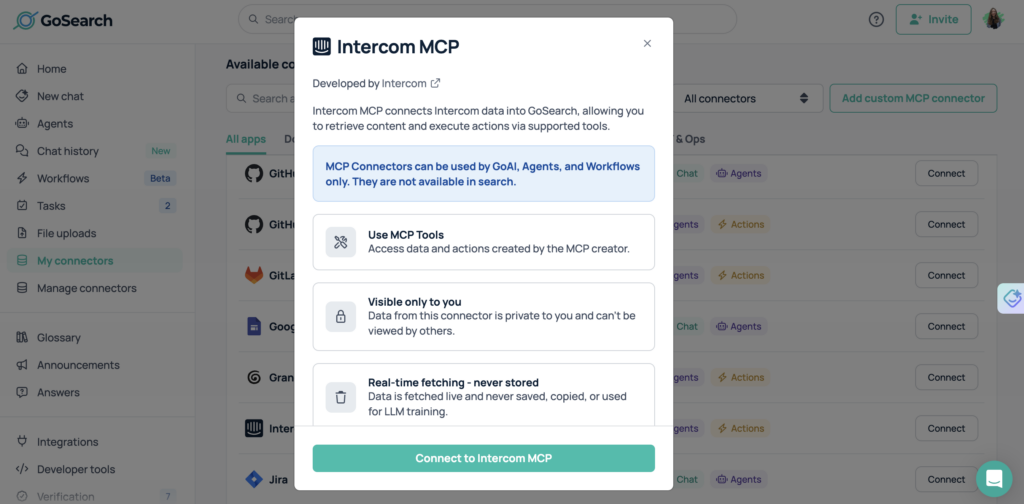
How to Connect Intercom to an MCP Server in GoSearch
Connecting Intercom to GoSearch via MCP is simple and secure. Most teams are querying live data within minutes of setup.
- Enable the Intercom MCP server in GoSearch.
Navigate to GoSearch’s connector library and activate the Intercom MCP server from the integrations panel.
- Authenticate using Intercom’s existing access controls.
Connect via OAuth or an Intercom access token. GoSearch inherits Intercom’s existing permission scopes — no need to rebuild access rules. Required scopes include read access to conversations, contacts, and company data.
- Intercom becomes a live tool for any AI agent or workflow in GoSearch.
No indexing or syncing is required. All access happens in real time through secure APIs. Intercom is now callable by any AI agent or workflow you deploy through GoSearch.
- Start querying immediately.
Use natural language to retrieve conversations, surface customer insights, or trigger cross-system workflows. Test with a simple query like: “Show me open tickets assigned to the enterprise support team.”
Who Should Use an Intercom MCP Server?
An Intercom MCP server is valuable across multiple teams that rely on customer communication data.
Support teams can resolve tickets faster by accessing complete conversation history and context in real time, without switching between tools.
Customer success teams can better understand engagement patterns, identify at-risk accounts, and surface opportunities for growth, all grounded in live Intercom data.
Product teams can analyze feedback trends and prioritize improvements based on real customer needs, directly from conversation data without manual export.
Go-to-market teams gain clearer insight into customer pain points, helping them refine messaging and positioning with evidence from actual interactions.
IT and security teams maintain full control over permissions, governance, and auditability across all AI workflows. GoSearch enforces Intercom’s existing access controls at every step.
Why Use GoSearch for MCP Servers?
GoSearch provides a unified platform for deploying and managing MCP servers across the enterprise. By connecting Intercom with over 100 enterprise systems, GoSearch enables AI agents to reason, act, and coordinate workflows across tools while maintaining a single layer of governance and control.
Teams can route queries, workflows, and agents to the systems that contain the most relevant data, ensuring better outputs and more effective execution. Because GoSearch treats Intercom as a live system of record rather than a static data source, customer intelligence flows directly into decision-making processes instead of being siloed in support tools.
In Summary
An Intercom MCP server gives AI agents real-time, permission-aware access to customer conversations, tickets, and contacts, without the overhead of traditional API integrations or data pipelines. Teams stop copying data and start acting on it directly.
GoSearch’s Intercom MCP server extends that foundation with enterprise-grade orchestration: AI agents can take actions in Intercom, combine data from 100+ connected systems, and operate under a unified governance layer. Support teams resolve tickets faster. Product teams act on feedback sooner. Go-to-market teams ground their messaging in real customer signals.
Setup takes under 5 minutes, GoSearch automatically inherits Intercom’s existing permissions, and teams start running live queries in the same session. For organizations that want AI to do more than surface information, GoSearch is the platform that makes it possible.
Get Started With the Intercom MCP Server
The GoSearch Intercom MCP server enables organizations to operationalize customer conversations across apps and workflows. AI agents can retrieve, analyze, and act on real-time data, triggering tasks, notifications, and updates automatically, with no manual data gathering and full security and compliance across the enterprise.
Get a demo to see how GoSearch connects Intercom and other MCP servers to power enterprise-wide AI workflows that both inform and act.
Search across all your apps for instant AI answers with GoSearch
Schedule a demo
Intercom MCP Server: Frequently Asked Questions
An Intercom MCP server is a Model Context Protocol endpoint that gives AI agents real-time access to Intercom conversations, contacts, and support tickets — without data exports or custom development. It provides a standardized, permission-aware way for AI models to query and act on Intercom data directly, using live APIs instead of synced copies.
Unlike the Intercom API, an MCP server requires no custom code — any MCP-compatible AI agent can connect to it immediately using the standardized protocol. The Intercom API requires bespoke development and ongoing maintenance for each integration, while an MCP server exposes Intercom as a callable tool that AI agents can invoke dynamically. It also enables AI agents to combine Intercom data with other systems in a single workflow, something the API alone cannot do.
No — they serve different purposes. Intercom’s native MCP server provides read access to conversations and contacts for individual AI clients like Claude. GoSearch’s Intercom MCP server is built for enterprise orchestration: AI agents can take actions in Intercom, combine data across 100+ connected systems, and operate under a unified governance layer.
The GoSearch Intercom MCP server requires read access to conversations, contacts, and company data — and GoSearch inherits these scopes automatically from Intercom. When authenticating via OAuth or Bearer token, the relevant Intercom permission scopes must be enabled before connecting. AI agents cannot exceed the permissions granted at the Intercom level, ensuring governance is enforced at every step.
GoSearch’s Intercom MCP server supports both read and write operations — AI agents can retrieve data and take actions in the same workflow. This includes assigning tickets, sending messages, updating statuses, and triggering workflows across connected systems. Intercom’s native MCP server, by contrast, is primarily focused on read access.
Any MCP-compatible AI client can connect to an MCP server, including Claude, Cursor, VS Code with Copilot, and enterprise platforms like GoSearch. MCP is an open standard with broad and growing adoption — no proprietary setup is required on either side. GoSearch extends this further by managing MCP servers at the enterprise level, with centralized governance across all connected tools.
Most teams complete setup in under 5 minutes and are running live queries within the same session. Authentication uses Intercom’s existing OAuth flow, permissions are inherited automatically, and no data indexing is required. There is no custom development needed at any step.

![Selecting the Best Enterprise Search Software [Features + Vendors]](https://images.gosearch.ai/blog/content/uploads/2023/10/17234328/Blog-Header-3-370x184.png)