
Key Takeaways
- GoSearch Workflows introduces a new approach to enterprise AI workflow automation that helps teams schedule tasks, connect enterprise data, and automate business processes.
- Users choose triggers, data sources, and outputs across enterprise apps, web data, and AI agents.
- Workflows run on schedules or recurring intervals and automatically deliver results through email or Slack.
- Teams automate real work across departments, from sales insights to competitive research and knowledge updates.
- GoSearch connects enterprise search, AI agents, and automation in one platform to operationalize enterprise knowledge.
Enterprise AI Needs More Than Answers
Organizations generate vast amounts of knowledge across documents, conversations, and business systems. Enterprise search helps employees find information, yet modern teams also need AI that can act on that knowledge automatically.
Manual reporting, repetitive analysis, and constant context switching slow down decision making. As a result, teams spend valuable time gathering insights instead of using them.
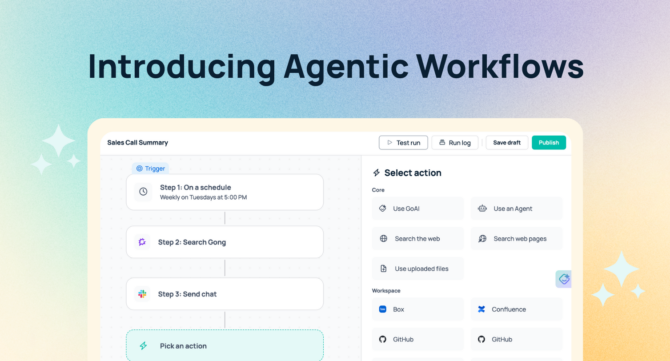
Today, GoSearch introduces Workflows, a drag-and-drop agentic AI workflow builder that transforms enterprise knowledge into automated outcomes. Teams can schedule AI-powered tasks, connect workplace data, and deliver insights without technical setup.
This launch represents a shift from searching for information to operationalizing it.
What Are GoSearch Workflows?
GoSearch Workflows provide a visual, self-serve way to build AI-powered automation across enterprise systems. Previously, GoSearch supported agent-driven tasks that required schema configuration. Workflows now make enterprise automation accessible to business users through a simple interface.
The process follows three steps.
1. Choose a Trigger
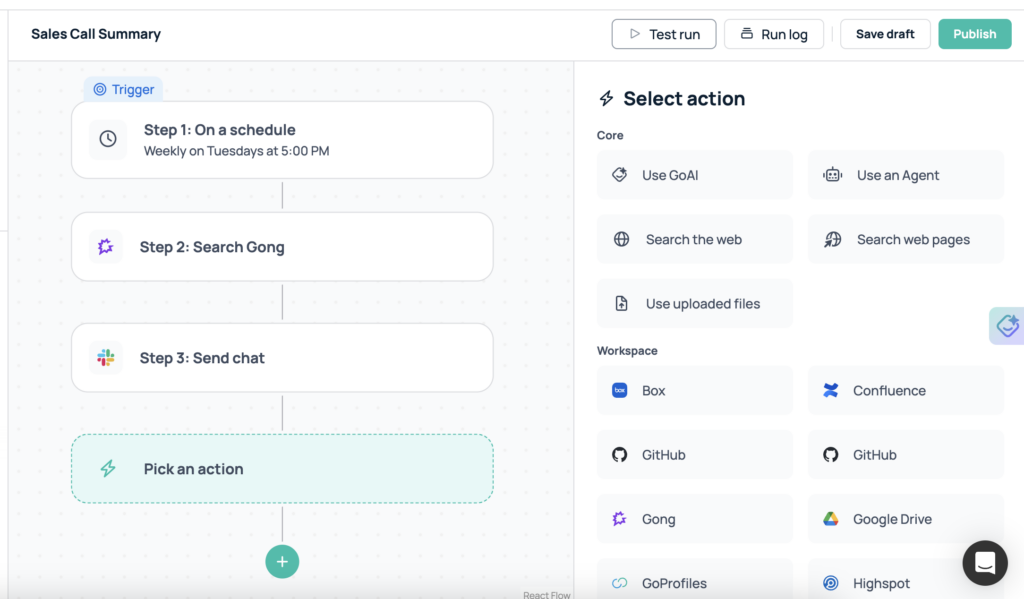
Users define when the workflow runs. It can execute once or follow a recurring schedule such as daily, weekly, or monthly.
2. Select Data Sources and Actions
Next, users choose what information the workflow uses. Available options include:
- GoAI for intelligent generation and reasoning
- Custom AI agents
- Web search
- Web page analysis
- Uploaded files
- Workspace connectors such as Box, Confluence, GitHub, Gong, Google Drive, Highspot, and more
3. Define the Output
Finally, users specify how results are delivered. Workflows can send emails or post messages in Slack automatically.
Because the experience uses a drag-and-drop builder, teams can create enterprise-grade automation in minutes.
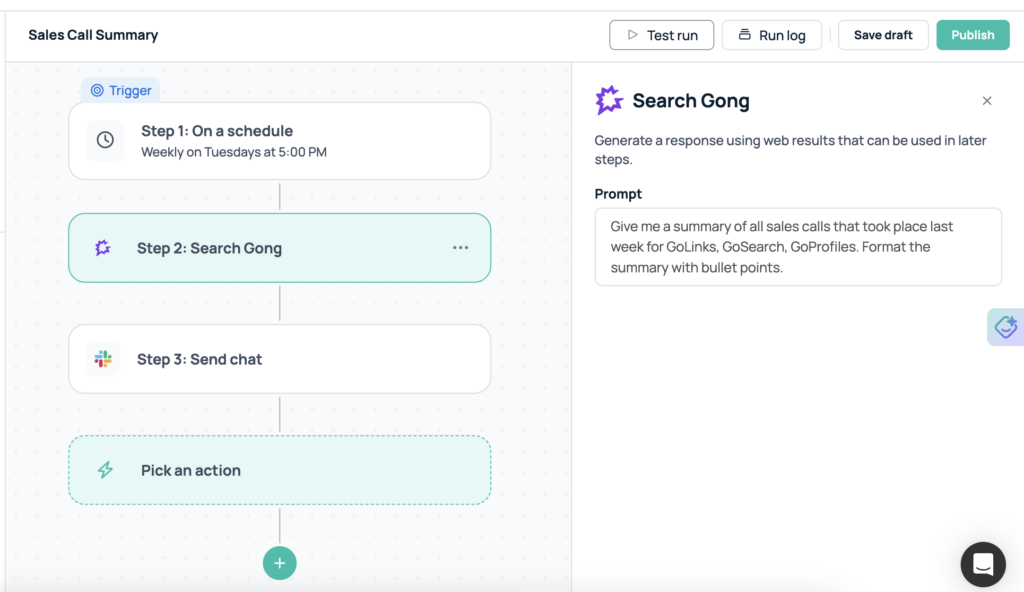
Example Workflow: Weekly Sales Call Summaries from Gong
Revenue teams often need visibility into customer conversations. However, reviewing every call recording requires significant time.
With GoSearch Workflows, a sales leader can schedule a workflow to run every Friday at 5 PM. The workflow connects to the Gong workspace connector and analyzes sales calls from that week.
GoSearch then generates a structured summary of trends, objections, and customer insights. The system sends the summary directly by email.
This process delivers consistent visibility into pipeline health while reducing manual review.
Enterprise Workflow Use Cases Across Teams
Because GoSearch connects to enterprise systems and applies agentic reasoning, workflows support many operational and strategic use cases.
Competitive Intelligence Monitoring
Schedule recurring web searches that track competitors, product launches, or industry developments. The workflow summarizes key changes and shares updates with leadership.
Engineering and Product Updates
Connect GitHub repositories or documentation platforms and generate weekly summaries of code changes, releases, or project activity.
Knowledge Management and Documentation
Scan new documents in Confluence or Google Drive, extract key insights, and distribute updates across teams.
Customer Feedback Analysis
Aggregate support conversations, meeting transcripts, or call recordings and identify recurring themes for product teams.
Executive Reporting
Combine updates from multiple systems and create automated executive briefings that reduce information overload.
Each workflow replaces manual effort with consistent delivery of insights.
Why Enterprise AI Automation Remains Challenging
Many organizations invest in AI tools, yet operationalizing AI across teams often presents two challenges.
First, some AI platforms require technical configuration, prompt engineering, or structured setup to automate workflows. This approach can limit adoption across non-technical teams.
Second, embedded AI features within productivity tools often operate inside a single application. While these features improve individual tasks, they rarely orchestrate work across multiple systems.
As a result, organizations struggle to scale AI automation across their full knowledge ecosystem.
How GoSearch Enables Practical Enterprise AI Automation
GoSearch Workflows address these challenges by combining accessibility with cross-platform orchestration.
Visual Workflow Creation
The drag-and-drop builder allows business users to configure triggers, data sources, and outputs through a guided interface. Teams build automation quickly without relying on engineering resources.
Cross-System Intelligence
Workflows connect enterprise applications, internal knowledge, uploaded files, and web data in one process. This unified approach supports complex business operations.
Agentic Reasoning and Execution
Workflows do more than retrieve information. They analyze data, generate insights, and produce structured outputs automatically.
Automated Delivery
Results reach users directly through email or Slack, which ensures teams receive insights without additional steps.
Together, these capabilities help organizations turn enterprise knowledge into measurable outcomes.
How GoSearch Compares to Embedded AI Tools and Business LLMs
Many organizations use AI capabilities embedded within collaboration platforms or standalone business language models to improve productivity. These tools help users generate content, summarize conversations, or answer questions within specific environments such as messaging or documentation.
However, embedded AI tools typically operate inside a single application. They support individual tasks rather than coordinating work across enterprise systems. As a result, teams still manage workflows manually and switch between tools to complete processes.
Business LLM platforms offer broader flexibility, yet they often require technical setup to operationalize automation at scale. Teams may need structured prompts, workflow configuration, or schema design to connect data sources and execute recurring tasks. This complexity can slow adoption and limit usage to technical teams.
GoSearch Workflows take a different approach. The platform provides a visual, self-serve workflow builder that allows business users to automate processes across enterprise systems through a guided interface. Teams connect workspace data, apply agentic AI reasoning, and schedule recurring actions without complex configuration.
Because GoSearch orchestrates knowledge across tools and delivers outcomes automatically, organizations reduce manual coordination and enable consistent execution across departments.
Benefits of Agentic AI Workflows for Enterprises
Organizations adopting enterprise AI workflow automation gain clear operational advantages.
- Increased productivity: Teams reduce repetitive research, reporting, and analysis work.
- Faster decision making: Leaders receive insights on a consistent schedule.
- Operational consistency: Automated processes run reliably across teams.
- Broader AI adoption: Business users build and manage workflows independently.
- Better knowledge utilization: Enterprise data drives action across the organization.
These benefits help companies scale AI adoption while improving efficiency.
The Future of Enterprise Search Is Proactive
Enterprise search continues to evolve from information retrieval to intelligent execution. Organizations expect AI systems to generate insights, coordinate processes, and deliver outcomes automatically.
GoSearch Workflows support this shift by combining enterprise search, AI agents, and automation in one platform. Teams define outcomes, connect data sources, and allow AI to execute work in the background.
This approach transforms how organizations access and use knowledge at scale. GoSearch Workflows makes enterprise AI workflow automation accessible across the organization.
To see how GoSearch Workflows can automate your enterprise operations, sign up for free to experience the platform in action.
FAQs
What is enterprise AI workflow automation?
Enterprise AI workflow automation uses artificial intelligence to automate business processes across enterprise systems. It schedules tasks, connects data sources, analyzes information, and delivers automated outcomes such as reports or insights. GoSearch Workflows enables enterprise AI workflow automation through a visual builder that connects enterprise apps, AI agents, and workspace tools to operationalize enterprise knowledge.
What are agentic AI workflows?
Agentic AI workflows use AI agents that independently retrieve information, analyze data, and execute tasks based on defined goals. Unlike simple automation, agentic workflows apply reasoning and decision making to complete multi-step processes. In enterprise environments, agentic AI workflows automate knowledge work such as reporting, monitoring, and insight generation.
How do GoSearch Workflows work?
GoSearch Workflows allow users to automate business tasks by selecting a trigger, connecting enterprise data sources, applying AI reasoning, and defining how results are delivered. Users choose scheduled or recurring triggers, select sources such as workspace connectors or web search, and configure outputs like email or Slack notifications. This process enables teams to automate reporting, analysis, and knowledge delivery across enterprise systems.
Do GoSearch Workflows require technical expertise?
GoSearch Workflows does not require technical expertise. The visual drag-and-drop builder allows business users to configure triggers, data sources, and outputs through a guided interface. Teams can automate enterprise processes without coding, schema configuration, or infrastructure setup. This self-serve approach helps organizations scale AI adoption across technical and non-technical teams.
What types of data can AI workflows use?
AI workflows can use data from enterprise applications, internal documents, uploaded files, and external web sources. GoSearch Workflows connects to workspace tools such as document platforms, knowledge bases, and communication systems through secure connectors. By unifying enterprise and external data, AI workflows generate insights, summaries, and automated outputs based on complete organizational knowledge.
How do AI workflows improve enterprise productivity?
AI workflows improve enterprise productivity by automating repetitive research, analysis, and reporting tasks. They deliver insights on a consistent schedule, reduce manual coordination, and ensure teams receive timely information. By automating knowledge processes across enterprise systems, organizations make faster decisions, improve operational efficiency, and allow employees to focus on strategic work.
What are common enterprise AI workflow use cases?
Common enterprise AI workflow use cases include sales call analysis, competitive intelligence monitoring, executive reporting, customer feedback analysis, and knowledge management automation. Organizations use AI workflows to schedule recurring insights, analyze enterprise data, and deliver results automatically across teams.
Search across all your apps for instant AI answers with GoSearch
Schedule a demo