Need a little productivity boost? Join our monthly newsletter and we'll go/link you to the latest tips and trends in tech!
Today, we’re excited to announce two major additions to GoSearch’s AI ecosystem: new MCP personal connectors for Notion and Linear. These connectors unlock deeper automation, richer agentic workflows, and faster productivity, without requiring teams to build or maintain custom actions.
This launch is more than just new integrations. It represents a foundational shift in how GoSearch enables enterprise intelligence: a long-term roadmap built around federated search and MCP connectivity, with minimal data indexing to maximize security.
With these new MCP connectors, teams can now use GoAI to take action across tools. And because these are MCP personal connectors, they work seamlessly with GoAI and agents, making complex workflows feel effortless.
Key Takeaways
GoSearch now supports two new MCP personal connectors: Notion and Linear, enabling AI-powered task creation, documentation, and multi-step workflows.
MCP connectors work with GoAI and agents, unlocking action-based workflows without custom actions or JSON schemas.
Admins control access at the MCP server level, making configuration secure, permissioned, and simple.
MCP dramatically reduces setup complexity: teams can connect and start using AI instantly.
GoSearch’s roadmap prioritizes federated search + MCP over heavy indexing, creating a more secure and real-time approach to enterprise AI.
This strategy differentiates GoSearch from Glean, which remains index-first and offers one MCP server functioning like a traditional API layer.
More MCP connectors are on the way, including Asana, GitHub, and Figma, deepening GoSearch’s advantage in agentic workflow automation.
The combination of federated search and MCP positions GoSearch as the leading platform for low-risk, high-velocity enterprise AI.
What Are MCP Connectors?
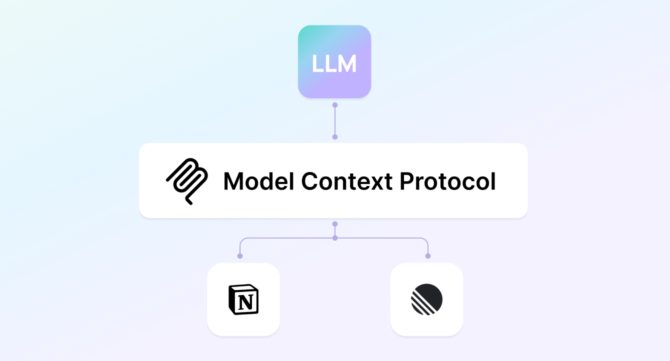
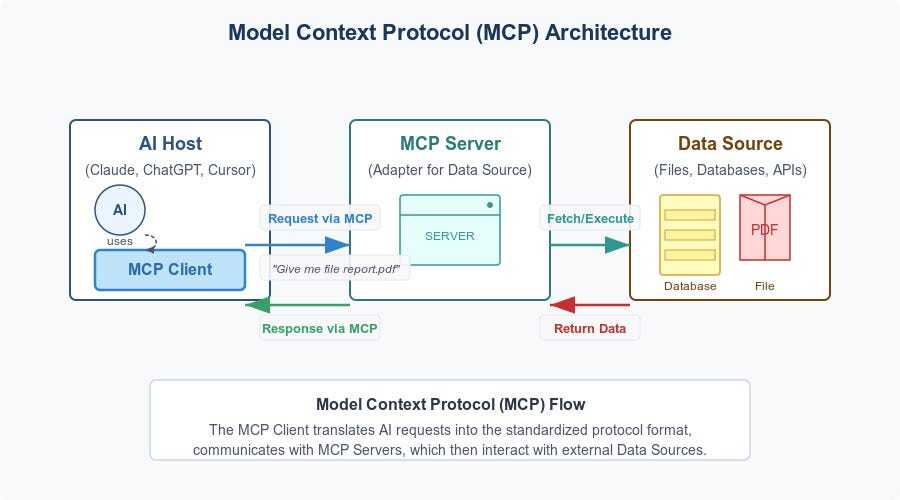
MCP (Model Context Protocol) is an open standard that allows LLMs to safely interact with external tools. An MCP “server” acts as a connector between an AI model and an application (like Notion or Linear) so the model can read, update, or create content in that app based on permissions you configure.
For admins, these connectors are easy to manage, permission, and secure, giving them fine-grained control over what the AI can access.
For end users, MCP connectors unlock workflows like:
“Create a Linear issue and assign it to the Platform team.”
“Draft a Notion page with requirements for that issue.”
“Update the status of my open tasks.”
“Summarize all new Notion docs created this week.”
No learning JSON, schema wrangling, or custom scripting. All you need to do is connect, configure permissions, and start using instantly.
Why MCP Personal Connectors Matter
Unlike traditional integration approaches, MCP personal connectors:
Work instantly (no engineering setup required)
Run through GoAI and agents, enabling automation beyond search
Respect user-level permissions by design
Give admins clear control over every capability
Scale effortlessly across tools
In short: they dramatically reduce the barrier to enabling agentic AI inside the enterprise.
Because AI can chain tasks across multiple systems, the more connectors added, the more powerful the workflow orchestration becomes.
“MCP is redefining how enterprises use AI. With our new Notion and Linear connectors, teams get secure, real-time actions across their tools, without heavy indexing or complex setup. This is the future of enterprise AI, and we’re building it in a way that’s flexible, secure, and built for scale.”
— Jorge Zamora, Founder and CEO, GoSearch
Notion MCP Connector
The Notion MCP connector lets GoAI interact directly with your Notion workspace under secure, permissioned access.
Draft documentation for Linear issues created in the same session
This unlocks knowledge creation powered by AI, right where teams already work.
Linear MCP Connector
With the Linear MCP connector, teams can manage issues through natural language:
Create tasks, bugs, and stories
Assign owners and teams
Add context, descriptions, and labels
Update statuses
Link related issues
AI can now participate in your product development workflow, making issue management dramatically faster.
Why This Matters for Enterprise AI and Search
GoSearch has long differentiated itself with a hybrid approach to enterprise search:
Federated search for real-time data access
Minimal, targeted indexing to improve recall where needed
MCP + AI agents for taking action across tools
This roadmap stands in contrast to competitors like Glean, which remains heavily index-centric and recently introduced MCP servers that function similarly to traditional API endpoints.
Glean’s actions rely heavily on function-call-based interactions, whereas GoSearch gives customers flexible, extensible MCP connectors that plug directly into AI workflows.
Our strategy is clear: Less indexing. More federation, MCP, workflow automation, and security.
“We strongly believe this approach differentiates us from others in the space, especially for security-conscious organizations who need real-time AI workflows without compromising sensitive data. MCP connectors and federated access let teams act across tools instantly, with full control and minimal setup, making AI truly actionable in the enterprise.”
— Jorge Zamora, Founder and CEO, GoSearch
GoSearch vs. Glean: Key MCP Differences
With these new MCP connectors, GoSearch continues to differentiate from Glean across critical features.
GoSearch
Glean
Search Model
Hybrid model prioritizing federated search with selective indexing
Index-first architecture
MCP Support
Native MCP personal connectors; roadmap includes Asana, GitHub, Figma, and more
Single MCP server that mirrors API access
AI Workflows
Agentic workflows using MCP (create, update, automate tasks)
Function-call actions; limited workflow chaining
Security Approach
Minimal data ingestion; real-time access reduces stored data
Heavy indexing increases stored data footprint
Setup Complexity
No setup beyond connecting the MCP server; no JSON or schema knowledge needed
Developer-oriented configuration for MCP
Admin Controls
Granular permissions per MCP server
Permissions tied to indexed or synced data
Scalability
Easily expands as new MCP connectors launch
Dependent on indexing and supported APIs
GoSearch vs. Glean: Approach to MCP
A Roadmap Built for Real-Time, Low-Risk Enterprise AI
The release of the Notion and Linear MCP connectors is just the beginning. Coming soon:
Asana
GitHub
Figma
And many more
As MCP grows across the ecosystem, enterprises gain a unified AI layer across their tools, with GoSearch serving as the secure middle layer between AI models and connectors.
This is a fundamental shift away from the old model of indexing everything and hoping it stays secure.
Instead, GoSearch prioritizes real-time access, minimal storage, and maximum control.
FAQs
What can MCP connectors do in GoSearch?
MCP connectors enable GoAI and agents to read, write, and update content in third-party tools, without building custom actions.
Do MCP connectors power search?
No. MCP connectors are for AI workflows and agents. Secure data indexing and federated connectors power real-time search results.
Are MCP connectors secure?
Yes. Admins control what the model has access to, which tools can be used, and what capabilities are enabled for their workspace.
Do users need any technical knowledge?
No. MCP connectors require zero engineering setup. Just authenticate, enable, and use.
Can AI chain actions across tools?
Yes. That’s one of the biggest advantages of MCP. For example: AI creates a Linear issue. AI generates a Notion doc. AI links the doc to the issue. This is where agentic AI becomes genuinely useful.
How does this fit into GoSearch’s long-term strategy?
This launch accelerates GoSearch’s roadmap toward:
More federated search
More MCP connectors
Less indexing
More secure, real-time AI actions
We’re building the AI interaction layer for the modern enterprise.
The Future of Enterprise AI Is Federated + Actionable
With the launch of our Notion and Linear MCP connectors, GoSearch is redefining what enterprise search and AI can do together. If you’re ready for a new approach to enterprise search and workplace AI, explore GoSearch’s security-first, MCP-enabled platform.
Search across all your apps for instant AI answers with GoSearch
Charlotte O'Donnelly is Senior PMM at GoLinks, GoSearch, and GoProfiles, where she leads positioning and GTM for enterprise AI products redefining how organizations find, access, and act on institutional knowledge. A 3x founding PMM with 9 years spanning PLG and enterprise sales, she specializes in bringing AI-native products to market — aligning teams around messaging that drives activation, expansion, and revenue.
A practical guide for IT and knowledge leaders evaluating AI enterprise search: how the technology works, what to ask vendors, how to calculate ROI, and how seven platforms compare on pricing, connectors, and agents.