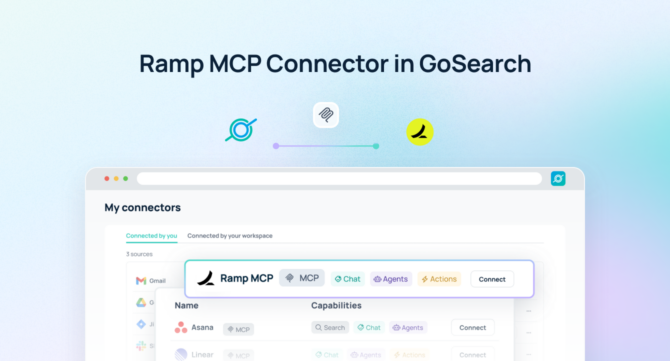

A Ramp MCP server gives AI agents direct, permission-aware access to spend data, expense reports, and financial workflows in real time — no spreadsheet exports, manual reconciliation, or custom API builds required.
Quick Answer: A Ramp MCP server is a Model Context Protocol endpoint that connects AI agents to live Ramp spend data, transactions, cards, and budget information — no data exports or custom integrations required.
With GoSearch, teams can deploy a Ramp MCP server to interrogate financial activity using natural language, automate spend-related workflows, and coordinate actions across their broader enterprise stack — all while keeping Ramp as the authoritative source of record. Instead of exporting CSVs or building bespoke finance dashboards, AI agents work directly inside Ramp’s data model with full permission enforcement.
As organizations expand AI across finance, operations, and procurement, spend intelligence becomes a foundational input for real-time decisions, approval workflows, and cross-functional coordination.
TL;DR
- A Ramp MCP server is a Model Context Protocol endpoint that gives AI agents structured, permission-aware access to live Ramp transactions, cards, budgets, and expense data.
- GoSearch’s Ramp MCP server goes beyond read access — AI agents can take actions in Ramp and coordinate workflows across 100+ connected enterprise tools in a single execution.
- Setup takes under 5 minutes. GoSearch inherits Ramp’s existing permissions automatically, so teams are querying live financial data without any indexing or syncing infrastructure.
- Key use cases include spend analysis, expense exception flagging, budget tracking, cross-system approvals, and automated finance team notifications.
- GoSearch’s Ramp MCP server differs from point integrations that focus on data export. GoSearch adds enterprise orchestration, write actions, and a unified governance layer across your entire tool stack.
What Is a Ramp MCP Server?
A Ramp MCP server is a Model Context Protocol (MCP) endpoint that provides AI models and agents with structured, permission-aware access to Ramp’s financial data — including transactions, corporate cards, expense reports, vendor information, and budget allocations — in real time, without requiring data exports, scheduled syncs, or custom development.
MCP is an open standard for connecting AI systems to external tools and data sources. Rather than maintaining a bespoke connector for every application, MCP gives AI agents a consistent way to call tools, retrieve data, and execute actions across systems. Anthropic, which developed the standard, has seen widespread adoption across Claude, Cursor, VS Code, and dozens of enterprise platforms.
Unlike integrations built on static data pulls or periodic exports, an MCP server lets AI act directly on live financial data. Teams can use it to:
- Retrieve real-time spend summaries by team, vendor, category, or time period
- Flag expense policy violations or unusual transaction patterns automatically
- Initiate approval workflows and route exceptions to the right stakeholders
- Trigger cross-system actions in ERP, Slack, procurement tools, or HRIS
- Automate budget alerts, reimbursement follow-ups, and vendor spend reviews
Because the Ramp MCP server enforces existing permission boundaries, AI agents operate only within what each user is authorized to see — maintaining financial governance while compressing the time between insight and action.
GoSearch Ramp MCP Server vs. Point Integrations
Many finance teams have attempted to connect Ramp data to AI tools through direct API integrations or CSV-based pipelines. These approaches deliver partial results at high maintenance cost.
The GoSearch Ramp MCP server is purpose-built for enterprise orchestration — connecting Ramp data to broader workflows across the full tool stack.
| Point API Integration | GoSearch Ramp MCP | |
|---|---|---|
| Access live transactions & spend | Limited | ✅ |
| Real-time, permission-aware access | ❌ | ✅ |
| Take actions in Ramp | ❌ | ✅ |
| Cross-system orchestration | ❌ | ✅ (100+ connectors) |
| Unified governance layer | ❌ | ✅ |
| Connect to ERP, Slack, procurement | ❌ | ✅ |
| Multi-agent routing | ❌ | ✅ |
If your team needs to do more than pull spend reports — triggering workflows, flagging anomalies across systems, or enabling AI agents to reason and act across your enterprise financial stack — GoSearch is the right platform.
How the GoSearch Ramp MCP Server Works
The GoSearch Ramp MCP server connects AI agents directly to live financial data and coordinates downstream actions across the enterprise.
When a user submits a query or triggers a workflow, GoSearch interprets the request and dynamically invokes the Ramp MCP server as a callable tool. The agent retrieves the relevant transactions, budgets, or card data, synthesizes it into a clear answer or action plan, and — when needed — combines that financial context with data from other connected systems like ERP, procurement platforms, or internal communication tools.
This architecture moves finance teams beyond reactive reporting into proactive, real-time orchestration — where AI reasons over financial data and executes workflows in the same step.
What You Can Do With a Ramp MCP Server
Connecting Ramp via MCP opens up a range of high-value use cases that go well beyond pulling a spend summary.
Finance teams can monitor spend in real time without building manual reports. Recurring patterns, budget overruns, and policy exceptions surface automatically — giving controllers and CFOs a live view of where money is moving and whether it should be.
Procurement and operations teams gain full vendor spend context directly inside their workflows. Renewal conversations, contract negotiations, and vendor consolidation decisions can be grounded in accurate, up-to-date Ramp data rather than stale spreadsheets.
AI agents can also assist with exception handling — routing flagged transactions for approval, notifying budget owners when spend approaches limits, and coordinating follow-up actions across tools without manual intervention. Because data flows directly from Ramp in real time, every action reflects the current state of company finances rather than a cached snapshot from yesterday’s export.
Example Queries for a Ramp MCP Server
One of the most significant advantages of connecting Ramp via MCP is the ability to ask complex, multi-source questions and trigger coordinated actions automatically.
- “Show me all transactions over $5,000 from the past 30 days that weren’t pre-approved, grouped by department.”
- “Identify vendors where we’re spending more than $50K annually and flag any without a signed contract in our procurement system.”
- “Notify each department head via Slack when their team’s monthly spend exceeds 80% of budget.”
- “Pull all expense reports pending approval for more than 5 business days and escalate to the relevant manager.”
- “Summarize Q2 software spend by vendor and compare it to Q1, flagging any category where spend grew by more than 20%.”
- “Flag any new vendor added in the last 7 days with a transaction over $10K and log it in our compliance tracker.”
- “Find all active corporate cards where there has been no transaction in the past 90 days and prepare a deactivation report.”
These examples illustrate how MCP-powered agents handle multi-step financial workflows — not just point-in-time data lookups.
Ramp MCP Server vs. Traditional Approaches
Conventional approaches to connecting Ramp data with AI workflows introduce friction, data latency, and governance gaps. Here’s how they compare:
| Ramp MCP Server | Traditional API Integration | Data Export / Pipeline | |
|---|---|---|---|
| Data freshness | Real-time | Near real-time | Stale (batch) |
| Setup complexity | Low | High (custom dev) | High (ongoing maintenance) |
| Permission enforcement | Inherited from Ramp | Must be rebuilt | Often bypassed |
| Cross-system orchestration | Yes (via GoSearch) | No | No |
| Infrastructure overhead | Minimal | High | High |
| Time to first query | Minutes | Weeks | Weeks |
A Ramp MCP server gives AI agents live, structured, permission-aware access to financial data without duplicating it outside the source system. Outputs are always grounded in what Ramp actually contains — not what was exported last Tuesday — while reducing the engineering overhead typically associated with finance integrations.
Learn why MCP is replacing custom integrations across enterprise AI →
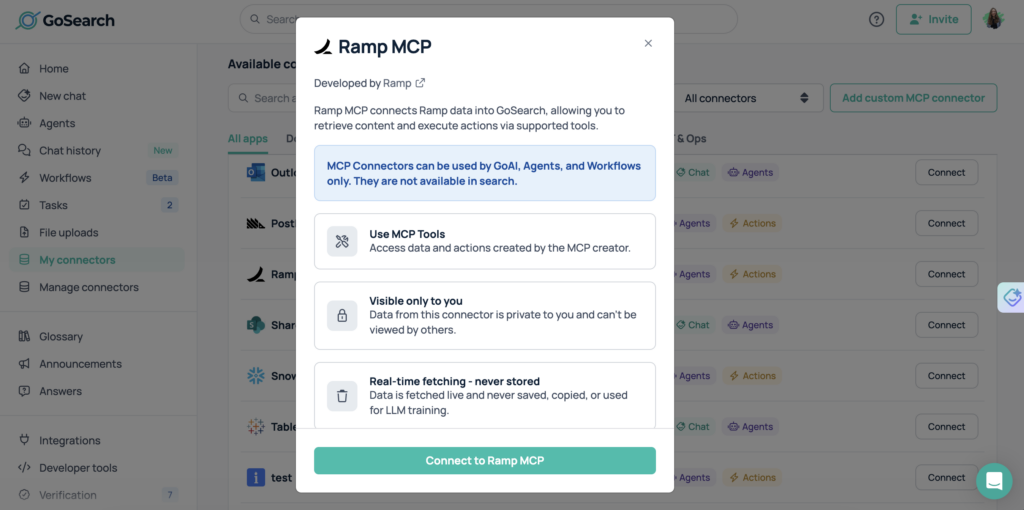
How to Connect Ramp to an MCP Server in GoSearch
Connecting Ramp to GoSearch via MCP is fast and straightforward. Most teams have AI agents querying live financial data within the same session they begin setup.
- Enable the Ramp MCP server in GoSearch.
Navigate to GoSearch’s connector library and activate the Ramp MCP server from the integrations panel.
- Authenticate using Ramp’s existing access controls.
Connect via OAuth or a Ramp API token. GoSearch inherits Ramp’s existing permission scopes automatically — no need to recreate access rules or rebuild role definitions. Required scopes include read access to transactions, cards, budgets, and company spend data.
- Ramp becomes a live tool for any AI agent or workflow in GoSearch.
No indexing, syncing, or data duplication is required. All access happens in real time through secure APIs. Ramp is immediately callable by any AI agent or automated workflow you deploy through GoSearch.
- Start querying immediately.
Use natural language to retrieve spend data, surface financial insights, or trigger cross-system workflows. Test with a simple query like: “Show me the top 10 vendors by spend over the last 90 days.”
Who Should Use a Ramp MCP Server?
A Ramp MCP server creates value across any team that relies on financial visibility or controls spend.
Finance and accounting teams can surface exceptions, monitor budget pacing, and accelerate month-end close by querying Ramp directly — without waiting on manual report generation or data pulls from the finance stack.
Controllers and CFOs gain a live view of company spend without dashboard sprawl. Natural language queries replace scheduled reports, and anomaly detection happens in real time rather than after the fact.
Procurement and vendor management teams can track supplier spend, flag renewal timelines, and identify consolidation opportunities by querying Ramp data in the context of contracts and vendor records from other systems.
Operations and IT teams maintain full control over permissions, governance, and auditability across all AI-powered financial workflows. GoSearch enforces Ramp’s existing access controls at every step, so no AI agent ever exceeds its authorized scope.
HR and department heads can review team spend, approve pending expenses, and respond to budget alerts without needing to log in to Ramp directly — all through natural language queries in GoSearch.
Why Use GoSearch for MCP Servers?
GoSearch provides a unified platform for deploying and managing MCP servers across the enterprise. By connecting Ramp with more than 100 enterprise systems, GoSearch enables AI agents to reason, act, and coordinate workflows across tools — finance, operations, HR, communication, and more — while maintaining a single layer of governance and control.
Teams can route queries and workflows to the systems that hold the most relevant context, producing more accurate outputs and more effective execution. Because GoSearch treats Ramp as a live system of record rather than a static export, financial intelligence flows directly into decisions and workflows instead of being siloed in the finance tool.
In Summary
A Ramp MCP server gives AI agents real-time, permission-aware access to transactions, expenses, cards, and budgets — without the overhead of traditional API integrations or data pipelines. Finance teams stop chasing exports and start acting on live data.
GoSearch’s Ramp MCP server extends that foundation with enterprise-grade orchestration: AI agents can take actions in Ramp, combine financial context with data from 100+ connected systems, and operate under a unified governance layer. Finance teams close faster. Controllers catch exceptions sooner. Operations teams coordinate spend approvals without manual handoffs.
Setup takes under 5 minutes, GoSearch inherits Ramp’s existing permissions automatically, and teams start running live queries in the same session. For organizations that want AI to do more than generate spend reports, GoSearch is the platform that makes it possible.
Get Started With the Ramp MCP Server
The GoSearch Ramp MCP server enables organizations to operationalize financial data across tools and workflows. AI agents can retrieve, analyze, and act on real-time spend information — triggering approvals, alerts, and coordinated actions automatically — with no manual data gathering and full security and compliance across the enterprise.
Get a demo to see how GoSearch connects Ramp and other MCP servers to power enterprise-wide AI workflows that both inform and act.
Search across all your apps for instant AI answers with GoSearch
Schedule a demo
Ramp MCP Server: Frequently Asked Questions
A Ramp MCP server is a Model Context Protocol endpoint that allows AI agents to access live Ramp financial data — including transactions, corporate cards, budgets, and expense reports — in real time. It gives AI models a standardized, permission-aware way to query and act on Ramp data without requiring data exports, sync pipelines, or custom API development.
The Ramp API requires custom development and ongoing maintenance for each integration. An MCP server exposes Ramp as a standardized, callable tool that any MCP-compatible AI agent can use immediately — no custom code required. It also allows AI agents to combine Ramp financial data with other systems in a single coordinated workflow.
The GoSearch Ramp MCP server requires read access to transactions, cards, budgets, and company spend data. When using OAuth or API token authentication, the relevant Ramp permission scopes must be enabled. GoSearch inherits and enforces these scopes automatically — AI agents cannot exceed the permissions granted at the Ramp level.
GoSearch’s Ramp MCP server supports both read and write operations. AI agents can retrieve spend data and also take actions such as flagging transactions, routing approvals, triggering notifications in connected systems, and updating records across the enterprise stack.
MCP is an open standard with broad adoption. Compatible tools include Claude (Anthropic), Cursor, VS Code with Copilot, and enterprise platforms like GoSearch that manage MCP servers at scale. Any MCP-compatible client can connect to an MCP server using the standardized protocol.
Most teams complete setup in under 5 minutes. Authentication uses Ramp’s existing OAuth flow, permissions are inherited automatically, and no data indexing is required. Teams are typically querying live Ramp data within the same session.

![Selecting the Best Enterprise Search Software [Features + Vendors]](https://images.gosearch.ai/blog/content/uploads/2023/10/17234328/Blog-Header-3-370x184.png)